Are you struggling with slow internet while gaming or working from home? You are not alone. Many people want a faster connection, and choosing the right router makes a huge difference. Today, we will look at Wi-Fi 7 vs. Wi-Fi 6E to see which one fits your daily needs. Both options offer incredible internet speeds, but they have distinct differences under the hood. Therefore, understanding these specifications will help you make a smart choice for your home network setup.
Bandwidth and Speed in Wi-Fi 7 vs. Wi-Fi 6E
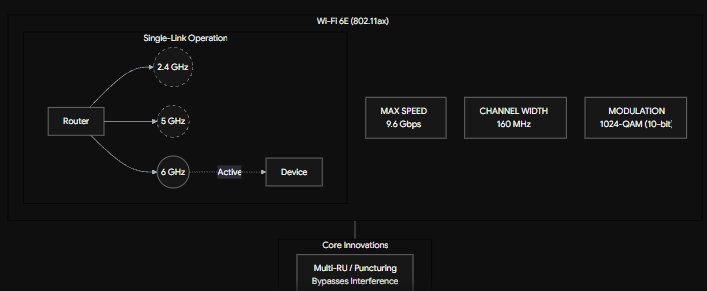
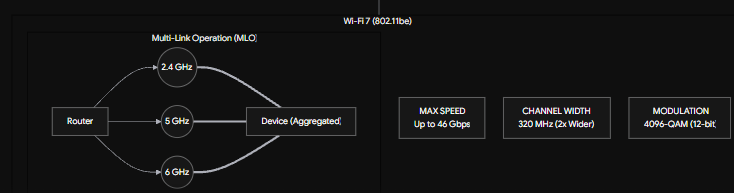
When comparing Wi-Fi 7 vs. Wi-Fi 6E, overall speed stands out as the most obvious upgrade. Wi-Fi 6E already provides excellent performance using a 160 MHz channel bandwidth. However, Wi-Fi 7 doubles this massive capacity. It uses massive 320 MHz channel bandwidths. Think of bandwidth like a highway. If Wi-Fi 6E represents a two-lane road, Wi-Fi 7 acts as a four-lane superhighway.
Consequently, more lanes allow more cars—or data—to travel at once without frustrating traffic jams. Because of this, Wi-Fi 7 can reach theoretical speeds of up to 46 Gbps, while Wi-Fi 6E peaks around 9.6 Gbps. Ultimately, this massive jump ensures your heavy game downloads and 4K movie streams run perfectly smoothly.
Understanding Multi-Link Operation (MLO)
Furthermore, Wi-Fi 7 introduces a game-changing feature called Multi-Link Operation (MLO). Older standards, including Wi-Fi 6E, restrict your device to connect to just one band at a time. The router chooses either the 2.4GHz, 5GHz, or 6GHz band. Conversely, MLO changes everything. It allows your Wi-Fi 7 devices to connect to multiple bands simultaneously.
As a result, your phone or laptop can send and receive data across different frequencies at the exact same time. This significantly reduces latency. For gamers dodging attacks and remote workers leading video calls, this means almost zero network lag. MLO makes the Wi-Fi 7 vs. Wi-Fi 6E debate lean heavily toward the newer technology for real-time online tasks.
QAM Upgrades: Packing More Data
Next, we need to talk about QAM. QAM stands for Quadrature Amplitude Modulation. While the technical name sounds complicated, the core concept remains simple. It determines how much data the router packs into every single radio signal it transmits. Wi-Fi 6E uses a standard called 1024-QAM. On the other hand, Wi-Fi 7 upgrades to a denser 4K QAM.
To illustrate, imagine you are packing moving boxes. Wi-Fi 6E safely packs 10 items into a box. Meanwhile, Wi-Fi 7 packs 12 items into the exact same size box. Because it packs data 20% more efficiently, your devices download files much faster. Therefore, you get crisp streams and quicker transfers without needing extra signal space.
The Verdict: Wi-Fi 7 vs. Wi-Fi 6E Buying Advice
So, should you buy a new router right now? The answer depends heavily on the devices you currently own. If you recently bought a Wi-Fi 6E router, you should definitely wait. Most smartphones, consoles, and laptops in homes today do not even support Wi-Fi 7 yet.
However, if you are a hardcore gamer building a brand-new network setup, or if you still rely on an ancient Wi-Fi 5 router, buying a Wi-Fi 7 router makes perfect sense. It easily future-proofs your home. In conclusion, evaluating Wi-Fi 7 vs. Wi-Fi 6E comes down to your current gadgets and overall budget. For a deeper dive into optimizing your home network gear, you can check out this helpful guide on CNET’s router buying advice.
References
- Wi-Fi Alliance. (2024). Wi-Fi 7 Introduces New Era of Connectivity. Wi-Fi Alliance Publications.
- IEEE Standards Association. (2024). IEEE 802.11be: Extremely High Throughput (EHT). IEEE Networking Standards.
- Intel Network Specifications. (2023). Understanding the difference between Wi-Fi 6E and Wi-Fi 7 Technologies. Intel Tech Resources.