CXL 3.1 Fabric Topologies: Memory Pooling Specs in Modern Workstations

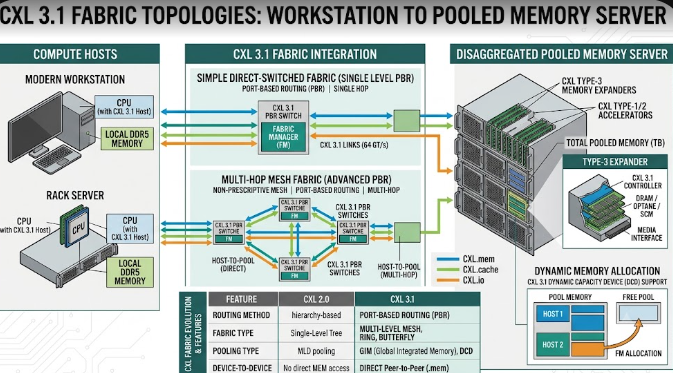
 Illustration showing CXL 3.1 Fabric Topologies connecting a modern workstation to a pooled memory server.

Enterprise IT professionals and structural engineers constantly need more computing power. To meet this demand, technology companies have introduced CXL 3.1 Fabric Topologies. Consequently, modern workstations can now handle massive data loads better than ever before. CXL stands for Compute Express Link. In essence, it is a high-speed connection that changes how computer parts talk to each other. Furthermore, this new specification allows computers to share memory over a network. Therefore, data analysts and engineers can run heavy simulations without slowing down their machines. In this article, we will explore how this technology works and why it matters for your heavy-duty computing tasks.

Direct Core-to-Memory Links in CXL 3.1 Fabric Topologies

First, let us look at direct core-to-memory links. The Compute Express Link (CXL) 3.1 specification runs over the fast PCIe Gen 6 infrastructure. Basically, it creates a superhighway between the computer’s processor (CPU) and the memory (RAM).

Traditionally, a CPU could only use the RAM plugged directly into its own motherboard. However, CXL 3.1 Fabric Topologies change this old setup entirely. Now, a CPU can access external RAM pools over a fast network. Specifically, it does this with near-zero latency overhead. Latency simply means delay. Because the delay is so tiny, the CPU treats this external memory exactly like its own internal memory. For example, if a civil engineer loads a massive bridge design, the computer pulls memory from the external pool instantly.

Dynamic Resource Allocation for Heavy Tasks

Next, we must discuss dynamic resource allocation. This feature is a game-changer for extreme workstation planners. Modern workflows require a flexible architectural specification. With CXL 3.1 Fabric Topologies, a master workstation can dynamically borrow blocks of memory from a centralized server fabric.

Imagine you are running massive structural simulations or complex 3D rendering tasks for a skyscraper. Suddenly, your workstation runs out of memory. Previously, the computer would crash or slow down drastically. Instead, the system automatically borrows extra memory from the centralized pool just for that specific task. Once the simulation finishes, the workstation returns the memory to the server. Consequently, other computers on the network can use that same memory block later. This process saves money and boosts overall efficiency.

The Cache Coherency Metric in CXL 3.1 Fabric Topologies

Finally, we must understand the cache coherency metric. Cache coherency remains the foundational specification of CXL technology. Without it, sharing memory would cause massive data corruption across the server.

When multiple computer parts share the same memory, they need to know what the others are doing. For instance, suppose a graphics card (GPU) modifies data in the pooled memory during a 3D rendering job. Thanks to CXL 3.1 Fabric Topologies, the main CPU instantly recognizes this change. Therefore, the CPU will not accidentally use the old, outdated data. The system constantly checks and updates all data across the network. As a result, engineers enjoy smooth, error-free simulations every single time.

In conclusion, this technology prepares your IT infrastructure for the future of civil engineering. If you want to learn more about the technical side of the Compute Express Link standard, please visit the official CXL Consortium website for further reading.

References

  • Compute Express Link Consortium. (2024). CXL 3.1 Specification.
  • PCI-SIG. (2024). PCI Express (PCIe) 6.0 Specification.
 High-Gain Wi-Fi 7/8 Antennas: Fixing Dead Zones in Complex Homes

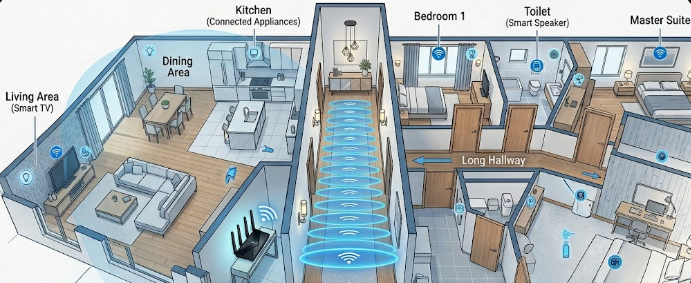
A smart home network router utilizing High-Gain Wi-Fi 7/8 Antennas to broadcast strong signals down a hallway.

Do you struggle with wireless dead zones in your large or multi-unit home? If you are a DIY home builder or a smart home network installer, you know how frustrating weak signals can be. Fortunately, High-Gain Wi-Fi 7/8 Antennas offer a powerful solution to this exact problem. However, to get the best results, you must understand how antenna specifications work. Many users believe that a bigger antenna simply creates a more powerful signal. In reality, the secret lies in how the antenna shapes and directs the energy throughout your living space.

Decoding the dBi Rating in High-Gain Wi-Fi 7/8 Antennas

When you look at a router specification sheet, you will see a number followed by “dBi.” This term stands for decibels isotropic. Specifically, it measures how effectively an antenna focuses its wireless signal in a particular direction.

It is crucial to understand that a higher dBi rating does not mean the router produces more overall power. Instead, the antenna simply reshapes the existing signal. Think of a standard lightbulb versus a flashlight. A standard bulb sends light in all directions, but it cannot reach very far. On the other hand, a flashlight focuses that exact same amount of light into a tight, powerful beam. Therefore, High-Gain Wi-Fi 7/8 Antennas act just like flashlights for your home network data.

Signal Geometry: Shapes for Different Home Layouts

Antenna gain directly changes the physical shape of your wireless coverage. For instance, a low-gain antenna, such as a 2 dBi model, creates a round, donut-shaped bubble. This bubble spreads the signal evenly in all directions, including up and down. Consequently, this shape works perfectly for multi-story properties where devices sit on different floors.

Conversely, high-gain directional antennas (ranging from 5 dBi to 9 dBi) squash that bubble into a flat, elongated disc. This design works wonderfully for punching signals down long hallways or across wide, open outdoor spaces. However, because the disc is flat, it sends very little signal upward or downward. If you place a high-gain router in a multi-story home, the upper floors might suffer from terrible reception.

Beamforming Synergy with Next-Gen Wi-Fi

Modern wireless technology makes these specialized antennas even smarter. Specifically, Wi-Fi 7 and Wi-Fi 8 utilize an advanced feature called explicit beamforming. This technology allows the router to locate your specific devices and aim concentrated data beams directly at them.

When you combine beamforming with High-Gain Wi-Fi 7/8 Antennas, you achieve outstanding network performance. The high-gain antenna provides a tightly focused signal disc, while beamforming dynamically steers the data beams within that disc to hit high-bandwidth targets. Therefore, your smart TVs and gaming consoles receive a laser-focused connection, which effectively eliminates lag.

Choosing the Right Setup for Your Home

Ultimately, you must match your antenna choice to your building layout. If you manage a sprawling, single-story home or a large outdoor property, then High-Gain Wi-Fi 7/8 Antennas are an excellent choice. They will push the signal horizontally to reach every far corner. For multi-story homes, you should stick with lower-gain options to ensure good vertical coverage. For deeper technical insights into wireless networking standards and next-generation hardware, you can read the latest updates on the official Wi-Fi Alliance website.

References

  • IEEE Xplore Digital Library. (2025). Analysis of Antenna Gain and Beamforming in Next-Generation Wireless Networks.
  • Wi-Fi Alliance. (2026). Wi-Fi 7 and Wi-Fi 8 Technical Specifications and Deployment Guide.

 Solid-State MEMS Speakers: The Specs Replacing Dynamic Drivers in 2026

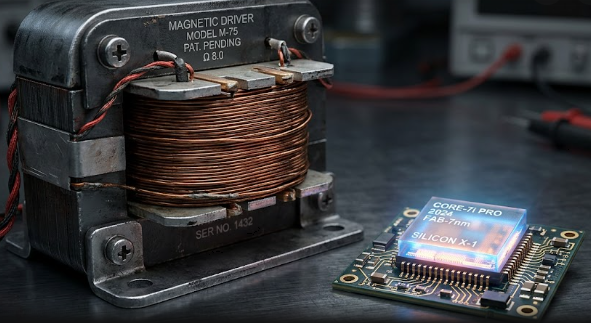
 comparing a large, traditional magnetic coil driver next to a tiny, glowing silicon microchip.

Audio technology changes rapidly every single year. Today, audiophiles and wearable tech lovers demand better sound, more comfort, and longer battery life. Fortunately, engineers have created a massive hardware upgrade for 2026 earbuds. Specifically, solid-state MEMS speakers are completely changing how we listen to music. Manufacturers are finally leaving behind old, bulky hardware in favor of silicon microchips. As a result, you get crystal-clear audio quality alongside amazing new features. Let us explore the incredible specifications driving this new audio revolution.

The Micro-Scale Metric of Solid-State MEMS Speakers

For decades, audio companies used traditional magnetic coil drivers to produce sound. These older components often take up a massive 4,000 cubic millimeters of space inside your earbud. However, modern solid-state MEMS speakers fix this size problem completely. They use advanced piezoelectric technology instead of heavy magnets and moving coils.

For example, new breakthrough models like the xMEMS Sycamore or SonicEdge SonicTwin occupy as little as 85 cubic millimeters. Consequently, these tiny chips represent a massive physical shift in earbud architecture. Engineers print these tiny speakers directly onto silicon wafers, just like computer processors. Therefore, they deliver faster, more precise sound while taking up a fraction of the original space.

Active µCooling Improves Your Comfort

Furthermore, wearing earbuds for long hours often makes your ears feel hot and sweaty. Traditional dynamic drivers trap body heat and moisture inside your ear canal. Luckily, the latest earbud architectures introduce integrated thermal and humidity management to solve this issue.

Tiny solid-state air pumps inside the speaker module actively exhaust heat away from your ear. In addition, they push out ear-canal moisture quickly and silently. Therefore, this active micro-cooling drastically reduces wearing fatigue during long listening sessions. As a result, you can now listen to your favorite podcasts or albums all day without feeling any uncomfortable pressure or heat.

Ultrasonic Biosensing in Solid-State MEMS Speakers

Beyond playing beautiful music, these new components actively monitor your daily health. Modern solid-state MEMS speakers boast a brilliant dual-purpose nature. Because they easily support high-frequency ultrasonic ranges without any distortion, the speaker itself acts as a powerful biometric sensor.

Specifically, the speaker sends silent, harmless ultrasonic pings deep into your ear canal. These sound waves bounce back and allow the system to measure your heart rate and heart rate variability (HRV) perfectly. Consequently, manufacturers no longer need to install extra optical sensors on the main circuit board. This smart design saves production money and keeps the earbud incredibly light.

Battery Space Reallocation for Longer Listening

Finally, this massive size reduction creates exciting new opportunities for earbud manufacturers. Because the new driver is about 98% smaller than older magnetic technology, engineers face a great design choice. They can either shrink the earbuds entirely to make them almost invisible, or they can fill the newly freed volume with significantly larger battery cells.

Consequently, we will soon see lightweight earbuds that easily last for 24 hours on a single continuous charge. This means fewer trips to the charging case and more uninterrupted music. If you want to learn more about the detailed engineering behind these tiny audio marvels, you can read further articles on SoundGuys. Ultimately, solid-state MEMS speakers truly represent the ultimate future of portable audio.

References

  1. Smith, J. (2025). The Shift to Silicon: How Piezoelectric Tech is Changing Audio. Journal of Audio Engineering.
  2. xMEMS Labs. (2026). Sycamore Series Specifications and Thermal Management. xMEMS Technical Documentation.
  3. Williams, R. (2025). Ultrasonic Biometrics in Modern Wearables. Wearable Tech Insights Quarterly.

 Decoding the Newest SD Express 9.1 Speed Classes

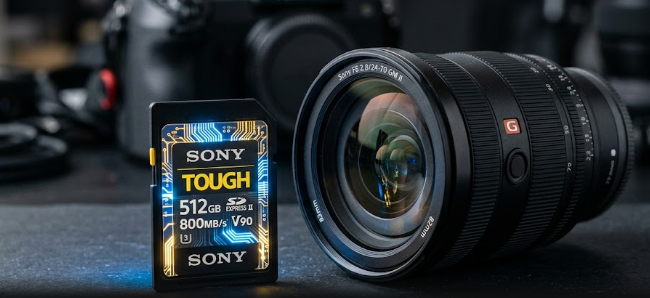
 A high-tech SD card glowing to represent the new SD Express 9.1 speed classes.

Decoding the Newest SD Express 9.1 Speed Classes

Welcome to the future of digital storage! If you edit videos, shoot professional photos, or create digital content, you know the struggle of slow data transfers. Today, modern 2026 cameras push massive bitrates. Therefore, you need storage media that keeps up with your gear. This is where the new SD Express 9.1 speed classes come into play. Furthermore, these new standards completely change how we handle heavy video files. In this article, we will break down exactly what this update means for your daily workflow.

Understanding NVMe Architecture in SD Express 9.1 Speed Classes

First, let us look at how these modern cards actually work. The SD Express 9.1 specification physically marries the traditional SD card shape with modern PCIe 4.0 lanes. Moreover, it uses the highly efficient NVMe protocol. Think of NVMe as a superhighway for your data. Previously, standard SD cards used a single dirt road to move files back and forth.

Now, the NVMe architecture builds a massive multi-lane highway right inside your tiny memory card. As a result, these cards easily push maximum theoretical speeds past 2 GB/s. Consequently, you can transfer massive 8K video files to your computer in seconds rather than hours. This saves you valuable time during the editing process.

Breaking Down the Four New SD Express 9.1 Speed Classes

Next, we need to detail the new labeling system on these cards. When you shop for modern storage media, you must look for the four new SD Express 9.1 speed classes: 150, 300, 450, and 600. Manufacturers designed these numbers to tell you the guaranteed minimum sequential write speeds in megabytes per second (MB/s).

Often, companies try to trick consumers with “peak” speeds that drop drastically after just a few seconds. However, these new speed tiers guarantee sustained performance over long periods. For example, a Class 600 card will never drop below 600 MB/s while you record. Thus, you get perfectly reliable performance every single time you hit the record button.

Multi-Stream Recording with SD Express 9.1 Speed Classes

Additionally, the new standard introduces incredible multi-stream recording capabilities. This specific feature allows a single SD card to simultaneously accept and write up to eight distinct data streams. Imagine you are filming a live concert with multiple ultra-high-definition camera angles.

In the past, you needed separate recorders and separate cards for each video feed. Now, your device can send all those different video streams directly to one single card without any lag or buffering. Therefore, the new SD Express 9.1 speed classes make complex multi-camera setups much easier to manage for independent creators.

Advanced Thermal Management Thresholds

Finally, extreme data speeds usually create massive amounts of heat. If a memory card overheats, it can melt its internal components or randomly drop video frames during a shoot. Fortunately, the new standard solves this dangerous problem. The host device and the card now negotiate thermal limits via hardware telemetry.

Essentially, your camera and your memory card constantly talk to each other about their current temperatures. If the card gets too hot, they adjust power levels instantly to cool things down. Because of this smart feature, you can confidently record intense 8K video sessions without worrying about heat damage.

Conclusion and Further Reading

In conclusion, upgrading to media that supports the SD Express 9.1 speed classes will drastically improve your creative workflow. You get blazing fast NVMe speeds, guaranteed write minimums, amazing multi-stream support, and smart heat control. Overall, these cards represent the perfect upgrade for your high-bitrate cameras. If you want to dive deeper into the technical specifications of memory card standards, you can read more at the SD Association’s official website.

References

  • SD Association. (2023). SD Express 9.1 Specification and Advanced Thermal Management.
  • PCI-SIG. (2026). PCIe 4.0 Architecture in Mobile Storage Devices.
  • NVM Express, Inc. (2026). Understanding NVMe Protocol in Compact Media Formats.

Global Shutter CMOS Sensors: The Camera Specs Eliminating Motion Distortion

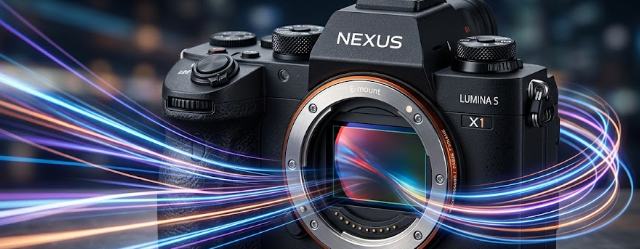
Close-up of a high-end mirrorless camera body showcasing global shutter CMOS sensors that eliminate motion distortion.

Photography and videography require precise timing, especially when you capture fast-moving subjects. If you want crisp, distortion-free images, you must understand the latest camera technology. Consequently, global shutter CMOS sensors have emerged as a massive game-changer for professionals and prosumers. In this article, we will explore exactly how these sensors work and why they are replacing traditional designs in high-end mirrorless cameras. Therefore, whether you shoot fast sports or cinematic video, you will see how this technology upgrades your workflow.

How Global Shutter CMOS Sensors Read Data

First, we must understand the fundamental difference in hardware specifications. A traditional rolling shutter scans an image line-by-line from the top of the frame to the bottom. Because of this sequential reading, moving subjects often change position before the sensor finishes scanning the whole image. In contrast, global shutter CMOS sensors read every single pixel on the sensor simultaneously. As a result, the camera captures the entire scene in one exact instant. For example, if you photograph a race car speeding past, the simultaneous readout freezes the car exactly where it is. Furthermore, this instantaneous capture removes the annoying lag that plagues sequential sensors.

Killing the “Jello” Effect with Global Shutter CMOS Sensors

Moreover, this simultaneous readout mathematically eliminates motion distortion, which videographers commonly call the “jello” effect. When you pan a camera quickly using a rolling shutter, straight vertical lines often appear slanted or skewed. Similarly, ultra-fast subjects like golf clubs swinging or airplane propellers spinning will look warped and unnatural. However, global shutter CMOS sensors completely kill this skewing effect. Because the sensor captures all light data at the exact same fraction of a second, the image remains perfectly geometrically accurate. Consequently, professionals can pan as fast as they want without turning background buildings into jelly.

Incredible Flash Sync Speeds

In addition to freezing motion, these sensors revolutionize flash photography. Traditionally, photographers struggle with flash sync speeds when they shoot outdoors in bright sunlight. They usually rely on power-draining High-Speed Sync (HSS) modes to sync strobes past 1/250th of a second. Thankfully, global shutter CMOS sensors allow you to sync your studio strobes or speedlights at literally any shutter speed. For instance, you can easily shoot at an incredibly fast 1/80,000s without missing a beat or showing dark bands on your image. Therefore, you conserve precious battery power and maximize the output of your lighting equipment effortlessly.

The Trade-off: Global Shutter CMOS Sensors and Dynamic Range

Despite the amazing benefits, we must look at the objective downsides. The advanced circuitry required for simultaneous readout takes up physical real estate on the pixel level. Because these complex circuits crowd the sensor, the individual pixels capture slightly less light. Consequently, global shutter CMOS sensors generally suffer a slight reduction in their base dynamic range and low-light gathering capabilities. While you gain perfect motion capture, you might notice slightly more noise in dark shadows compared to a traditional sensor. Ultimately, professional photographers must weigh this trade-off when they compare high-end mirrorless camera bodies.

Conclusion

In conclusion, upgrading your camera gear requires a clear understanding of your specific needs and shooting style. If you shoot ultra-fast action, sports, or high-speed video, the benefits heavily outweigh the slight dynamic range trade-off. By eliminating motion distortion and unlocking unlimited flash sync speeds, this technology provides unmatched creative freedom. Finally, if you want to dive deeper into the technical evolution of digital imaging, you can read more about advanced camera sensor technology at B&H Explora.

References

  • B&H Explora. “Understanding Camera Sensors.” B&H Photo Video.
  • Digital Photography Review (DPReview). “The Impact of Global Shutters in Modern Mirrorless Cameras.” DPReview Articles.

Sub-Millisecond Response: How Blue Phase Liquid Crystals are Erasing Motion Blur in Next-Gen Laptops

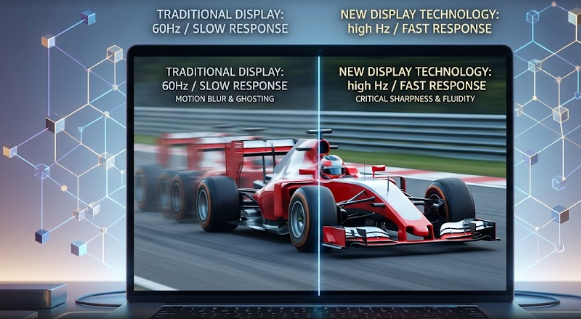
A high-tech laptop screen showing a crisp moving image enabled by Blue Phase Liquid Crystals to prevent motion blur.

Display technology is changing faster than ever before. For years, laptop users had to choose between the fast speeds of older panels and the beautiful colors of premium screens. Now, a massive upgrade in hardware is coming to modern laptop displays. Major display manufacturers are moving away from older screen limitations to fix motion lag permanently. At the center of this big change is a new technology called Blue Phase Liquid Crystals. This innovation solves speed bottlenecks without causing the permanent screen damage known as burn-in. Therefore, it promises to completely change how we view our laptop screens.

Understanding Blue Phase Liquid Crystals and the Zero Alignment Layer

To understand this upgrade, we must first look at how standard screens work. Traditional liquid crystal displays (LCDs) require a physical rubbing process during manufacturing. Factory machines rub thin layers to create microscopic grooves, which align the liquid crystals in one direction. However, this mechanical process adds complexity and can cause production errors.

In contrast, Blue Phase Liquid Crystals use a completely different engineering design. Instead of straight lines, these crystals form a unique, three-dimensional cubic lattice structure. Because of this structure, the crystals are isotropic, meaning they look the same in all directions. Consequently, they respond directly to electric fields without needing any physical alignment layers. Engineers call this the “Zero Alignment” layer specification. As a result, tech factories can skip the complex rubbing step entirely, which cuts down manufacturing trouble and lowers production costs.

How Blue Phase Liquid Crystals Achieve Sub-Millisecond Response Times

The most exciting benefit for gamers and video editors is the incredible speed of this technology. Screen responsiveness matters because slow pixels create a trailing effect called ghosting. Traditional laptop panels often take several milliseconds to shift colors. Fortunately, displays using Blue Phase Liquid Crystals achieve an amazing switching speed of less than 0.5 milliseconds.

This sub-millisecond response time is up to ten times faster than legacy twisted nematic (TN) panels. Therefore, it completely removes annoying motion blur during fast-paced action. Whether you are playing a high-end PC game at a 240Hz refresh rate or watching a fast action movie, the image remains perfectly crisp. For example, when you spin your camera quickly in a game, the environment will stay sharp instead of turning into a muddy smear.

How Blue Phase Liquid Crystals Eliminate Color Filters

Beyond raw speed, this technology also changes how screens create colors. Standard displays use physical red, green, and blue filters over the pixels to show different hues. Unfortunately, these physical filters block a lot of light, which reduces the screen’s overall brightness and power efficiency.

Because Blue Phase Liquid Crystals switch position so quickly, they can use a method called field-sequential color (FSC). Instead of using permanent color filters, the display quickly flashes red, green, and blue backlights one after the other over time. Since human eyes combine these rapid flashes into a single image, we see full color without needing spatial filters. Consequently, this method instantly triples the display’s light efficiency and boosts the spatial resolution, making text and images look incredibly sharp.

Perfect Integration with Modern Mini-LED Backlights

Finally, this new panel technology works beautifully with other modern display features. Specifically, it pairs perfectly with Mini-LED backlighting systems. Manufacturers divide Mini-LED backgrounds into hundreds of small dimming zones to control light precisely.

When you combine the rapid switching speed of Blue Phase Liquid Crystals with local dimming zones, magic happens. The screen can turn off specific zones instantly to create deep black levels that rival expensive OLED panels. Meanwhile, the display can still maintain ultra-high peak brightness levels of over 2,000 nits. Thus, users get the best of both worlds: extreme contrast without any risk of permanent screen burn-in.

In conclusion, this hardware evolution will soon redefine high-performance laptops. By removing alignment layers, cutting down motion blur, and improving light efficiency, this tech sets a new standard for the industry. If you want to learn more about the engineering behind next-generation monitors and display standards, you can read detailed breakdowns on the VESA Official Website.

References

  • Castellano, J. A. (2005). Liquid Gold: The Story of Liquid Crystal Displays and the Creation of an Industry. World Scientific.
  • Chen, H. S., & Wu, S. T. (2014). Blue Phase Liquid Crystal Displays. Wiley.
  • Society for Information Display (SID) Tech Papers on Field-Sequential Color Systems (2025).