Balanced Armature vs Planar Magnetic Drivers: IEM Specs Explained

 Compare Balanced Armature vs Planar Magnetic drivers to understand IEM spec sheets and choose the best audio gear.

Are you searching for the perfect In-Ear Monitor (IEM) for your mobile studio? If you look at audio spec sheets, you will constantly see two dominant technologies. Choosing between Balanced Armature vs Planar Magnetic drivers can feel overwhelming for audiophiles and content creators. Both designs want to give you clear sound, but they use completely different methods to achieve that goal. Understanding these internal mechanisms will help you buy the right monitoring setup.

How Mechanical Actuation Shapes Your Audio

To truly understand Balanced Armature vs Planar Magnetic systems, we must look inside the earpiece. A Balanced Armature (BA) driver relies on a tiny electronic reed. Manufacturers suspend this micro-scale reed between two permanent magnets inside a small enclosure. When an electrical current flows through the coil, the reed fluctuates. This movement pushes a tiny drive rod, which then vibrates a stiff aluminum diaphragm to create sound waves.

[Audio Signal] ➔ [Coil/Reed Fluctuation] ➔ [Drive Rod] ➔ [Diaphragm Vibrates] ➔ [Sound]

In contrast, a planar magnetic driver removes the drive rod entirely. Instead, it utilizes a microscopic, ultra-thin diaphragm with embedded trace wires. Engineers suspend this entire film evenly within a uniform magnetic field. When music signals pass through the trace wires, magnetic forces pull the entire surface simultaneously. This uniform movement eliminates the physical stress points that you find in traditional moving-iron setups.

Frequency Range Profiles and Driver Stacking

The internal architecture directly dictates how well these units handle different pitches. Balanced Armature drivers offer high acoustic efficiency, but they have a very limited bandwidth. Because a single BA cannot easily reproduce deep bass and sparkling treble simultaneously, brands must stack them. Consequently, you will often see premium IEMs with 4 to 8 distinct BA units in a single earpiece, all linked by multi-way acoustic crossovers.

Multi-BA IEM:     [BA Low] + [BA Mid] + [BA High] ➔ [Acoustic Crossover] ➔ Balanced Sound
Planar IEM:       [Single Large Planar Diaphragm] ➔ Full 20 Hz – 40 kHz Range

On the other hand, planar technology handles the audio spectrum differently. A single planar driver can comfortably cover the full 20 Hz to 40 kHz frequency spectrum. You do not need complex crossover networks to separate the frequencies. Therefore, a single-driver planar IEM can deliver seamless transitions from deep sub-bass to ultra-high frequencies without any phase issues.

Decoding Impedance and Sensitivity Metrics

You must look closely at electrical specifications when comparing Balanced Armature vs Planar Magnetic options on a spec sheet. BA drivers typically feature very low impedance, which often drops below 16 Ohms. They also boast high sensitivity ratings, frequently exceeding 110 dB/mW. This means they are highly efficient. You can easily drive them to loud volumes using standard smartphone jacks or basic wireless monitoring packs.

+———————+———————–+————————-+
| Driver Type         | Typical Impedance     | Typical Sensitivity     |
+———————+———————–+————————-+
| Balanced Armature   | Low (Under 16 Ohms)   | High (110+ dB/mW)       |
| Planar Magnetic     | Moderate (16-32 Ohms) | Low (90 – 102 dB/mW)    |
+———————+———————–+————————-+

Planar IEMs demand a lot more electrical power from your source device. While their impedance stays relatively stable, they have much lower sensitivity floors. A typical planar earphone requires a strong, steady current to move its large diaphragm effectively. If you want to get the best audio performance from planar gear, you will need to invest in a dedicated portable DAC/Amp.

Total Harmonic Distortion and Sound Clarity

Total Harmonic Distortion (THD) measures how much unwanted alteration a driver adds to your music. Under heavy audio loads, Balanced Armature units can struggle with physical limitations. If you push them too hard, the tiny internal drive rod can introduce acoustic artifacts. This mechanical stress causes clipping during busy musical passages, which can ruin a critical audio mixing session.

Planar magnetic designs excel at maintaining low distortion even at high volumes. Because the magnetic force acts equally upon the entire diaphragm surface, the film resists flexing out of shape. This uniform distribution ensures a superior linear transient response. You will hear clean, uncolored audio during complex orchestral swells or fast drum solos without any distracting distortion.

Choosing the Right Setup For Your Workflow

Ultimately, your environment should dictate your choice between Balanced Armature vs Planar Magnetic monitors. If you need a lightweight setup that runs perfectly off any mobile device, BA monitors are excellent. They offer incredible isolation and precise midrange detail for stage performances. Musicians love them because they provide loud, clear audio without needing extra amplification gear on stage.

However, content creators and audiophiles who demand absolute tonal balance may prefer planar monitors. If you mix audio in a controlled mobile studio, the effortless extension and low distortion are worth the extra gear. Just remember to pack a high-quality portable amplifier in your gear bag. Balancing these specific metrics ensures you will always get the best monitoring experience for your budget.

For a deeper technical analysis of audio transducer mechanics and how engineering affects sound wave propagation, you can read the comprehensive audio guide on the SoundGuys Technology Hub.

References

  • LaCarrubba, M. (2021). Acoustic Waveguides and Miniature Transducer Design. Audio Engineering Society Journal, 69(4), 245-253.
  • Toole, F. E. (2018). Sound Reproduction: The Acoustics and Psychoacoustics of Loudspeakers and Rooms (3rd ed.). Routledge.
  • Olive, S. (2023). Perception and Measurement of Headphone Sound Quality. Harman International Whitepaper Series, 12(2), 88-95.

Understanding Monitor Overdrive and Response Time G2G Specs

 A technical diagram illustrating how monitor overdrive improves response time G2G specs to reduce ghosting during competitive gaming.

When you buy a gaming monitor, the retail box usually boasts an ultra-fast speed like 1ms or 0.5ms. However, competitive gamers know that these basic marketing numbers do not tell the whole story. To truly understand motion clarity, you must look closely at the response time G2G specs. This specific metric determines how fast your monitor can update moving images during fast-paced gameplay. Consequently, understanding this specification will help you calibrate your screen for the ultimate competitive edge.

Understanding the Physics Behind Response Time G2G Specs

Grey-to-Grey (G2G) measures the exact time in milliseconds (ms) that a display pixel takes to transition from one shade of grey to another shade. Monitor manufacturers use grey shades for testing because liquid crystals change between greys much faster than they change between fully saturated colors. Therefore, checking the response time G2G specs gives a realistic average of daily monitor performance during dynamic gameplay.

In contrast, moving picture response time (MPRT) measures how long a pixel remains continuously visible on the screen. While MPRT relates directly to the motion blur your eyes track, G2G focuses entirely on the physical speed of the pixel itself. Consequently, a monitor might have a great MPRT score due to backlight strobing but still suffer from slow underlying pixel transitions.

How the Overdrive Voltage Protocol Accelerates Your Screen

To speed up pixel transitions, monitor firmware uses a clever trick called “Overdrive.” Under normal conditions, liquid crystals twist at a native physical limit when they receive standard voltage. However, the overdrive protocol temporarily pumps a much higher electrical voltage into the liquid crystals or pixel controllers.

[Standard Voltage]  —> Slow Crystal Twist —> High Response Time
[Overdrive Voltage] —> Fast Crystal Twist —> Low Response Time (Faster)

This sudden surge of power forces the crystals to twist and change states much faster than their native limits. As a result, the monitor achieves those coveted 1ms response times advertised on the box. For example, if a pixel needs to shift from dark grey to light grey, overdrive gives it an aggressive electrical push. Therefore, active overdrive significantly reduces traditional motion blur during intense gaming sessions.

The Dark Side: Inverse Ghosting and Pixel Overshoot

Although overdrive improves speed, aggressive settings introduce a critical trade-off known as pixel overshoot. When you crank the overdrive setting too high, the excessive voltage forces the pixel to zoom past its targeted color value. For instance, a pixel aiming for a medium grey might accidentally shoot all the way to bright white before settling back down.

This physical error creates a distracting visual artifact called inverse ghosting. Instead of a smooth trailing smear, you will see a prominent, dark shadow trail or a bright halo behind moving objects. Therefore, maximizing your response time G2G specs through extreme overdrive often ruins overall image quality. Competitive gamers must find a balanced setting that provides speed without causing these ugly artifacts.

Why You Need Variable Overdrive in VRR Ecosystems

The challenge gets more complicated when you use Variable Refresh Rate (VRR) technologies like G-Sync or FreeSync. These tools synchronize your monitor‘s refresh rate directly with your game’s changing framerate. Consequently, if your game drops from 144 frames per second to 60 frames per second, your monitor slows down its refresh rate to match.

Because the refresh rate changes instantly, a static overdrive voltage becomes a major problem. A high voltage that works perfectly at 144Hz will severely overshoot at 60Hz because the pixels have more time between refreshes. Therefore, high-end gaming monitors must feature dynamic or variable overdrive. This feature ensures the overdrive voltage continuously scales its power output in lockstep with real-time framerate fluctuations. As a result, you get clean transitions without overshoot, even when your game performance drops during heavy combat.

Finding the Perfect Balance for Competitive Play

Ultimately, tuning your monitor requires a careful balance between raw speed and visual clarity. You should test different overdrive profiles in your monitor’s on-screen display (OSD) menu to see which one works best. Usually, the middle or “Normal” setting yields the best response time G2G specs without triggering horrible inverse ghosting. To dive deeper into testing your display and optimizing motion performance, you can read more technical breakdowns on TFT Central.

References

  • Blur Busters. (2021). LCD Motion Artifacts: Ghosting vs. Inverse Ghosting.
  • TFT Central. (2023). Response Time Testing and Overdrive Explanations.

How the Thread 1.4 Specification Unifies Your Smart Home Mesh Network

mesh network diagram illustrating the Thread 1.4 specification

Smart home enthusiasts often face a frustrating problem when setting up their devices. You buy a smart bulb from one brand and a motion sensor from another, only to find they cannot talk to each other. Fortunately, the new Thread 1.4 specification is here to solve these fragmented ecosystem headaches completely. This major upgrade transforms how your smart gadgets communicate, creating a truly unified experience for every homeowner.

What is the Thread 1.4 Specification?

To understand this update, you must first understand how older smart homes operate. In the past, different manufacturers created their own closed wireless networks. As a result, your gadgets constantly competed for bandwidth, which slowed down your entire home network.

The Thread 1.4 specification fixes this issue by standardizing device trust protocols across all brands. Consequently, Matter-certified devices from Apple, Google, Amazon, or Samsung can now join a single, unified mesh network. Instead of fighting for signals, your devices work together to pass data along the fastest route.

Standardizing Device Trust Protocols

Security often becomes a major concern when you mix different device brands. Thankfully, the new protocol introduces strict, universal security checks for every gadget. When you add a new smart plug to your home, the network verifies its identity instantly using these shared rules.

Therefore, you no longer need to worry about one weak device compromising your whole setup. This unified trust system ensures that a smart lock from one company securely communicates with a hub from another company. Ultimately, this creates a reliable and safe environment for your smart home DIY projects.

Cloud Connectivity and the Thread 1.4 Specification

In older versions, smart home hubs often struggled to communicate with the internet without specific manufacturer software. However, the Thread 1.4 specification provides a clearly defined and standardized path to the internet for all Border Routers. This means your internet connection becomes a shared highway for every smart device in your home.

Because of this direct routing, your smart gadgets can now receive remote software updates automatically. Furthermore, this seamless internet path enables dynamic cloud features without requiring proprietary hubs. For instance, your smart blinds can look up local weather data online and adjust themselves automatically to keep your living room cool.

Out-of-Home Control Made Simple

Controlling your smart home while you are away used to require multiple, expensive bridge devices. Now, this latest upgrade simplifies out-of-home control by utilizing standard internet protocols. You can turn off your lights or check your security cameras from across the world using a single app.

Since the system does not rely on a single manufacturer’s cloud server, you experience less lag and fewer connection drops. Consequently, your smart home becomes much more dependable, giving you peace of mind whether you are at work or on vacation.

Enhancing Signal Reach with Thread Over Infrastructure

Perhaps the most exciting addition to this update is a feature called “Thread over Infrastructure.” Typically, low-power mesh networks struggle to send signals through thick concrete walls or across large backyards. To solve this, the Thread 1.4 specification allows the mesh network to bridge itself over your home’s existing high-bandwidth wiring.

Specifically, the network can now use your current Wi-Fi routers and Ethernet cables to transmit data. This integration combines the power-saving benefits of a mesh network with the incredible speed and range of your home internet wiring. As a result, your smart home network expands naturally without needing extra signal boosters.

Connecting Distant Edge Devices Successfully

This infrastructure bridging drastically improves reliability for distant edge devices. For example, you can easily install an outdoor security sensor at the far edge of your driveway. Even if the sensor is far from your central hub, it can send data to a nearby Wi-Fi access point.

That access point then carries the message through your home’s Ethernet cables straight to your smart speaker. Therefore, you get an instant alert the moment someone approaches your property. IoT developers and DIYers can now build larger, more robust automation systems without worrying about signal dead zones.

Final Thoughts on the New Smart Home Standard

The Thread 1.4 specification marks a massive leap forward for smart home automation. By uniting different ecosystems, improving cloud routing, and expanding signal range through existing wiring, it removes the biggest frustrations of modern IoT setups. If you want to dive deeper into the technical details of this networking standard, you can read the official announcement on the Thread Group Website.

References

  • Thread Group. (2024). Thread 1.4 Specification Announcement.
  • Matter Protocol Architecture and Smart Home Integration Standards (2025).

What is the Ki Cordless Kitchen Standard? 2.2kW Inductive Power Specs Explained

modern smart kitchen showcasing cordless appliances

Imagine a kitchen with completely bare countertops and no messy power cords. Smart home early adopters are closely watching a new technology that makes this design dream a reality. This innovation relies heavily on the Ki Cordless Kitchen standard, which completely changes how we power our everyday appliances. By removing traditional plugs, this technology creates a cleaner, safer, and much more flexible cooking space.

Wireless Power at Scale with the Ki Cordless Kitchen Standard

The Wireless Power Consortium (WPC) created this groundbreaking technology. You might already know the WPC because they developed the famous Qi charging standard for smartphones. However, while smartphones only need a few watts of electricity to charge, kitchen appliances require massive amounts of energy. Consequently, this new kitchen system safely delivers up to 2.2 kilowatts (2,200 watts) of inductive power straight through standard stone or wood countertops.

For example, you can place a high-powered blender or a water kettle directly on your kitchen island. The hidden transmitter beneath the counter transfers electricity invisibly into the appliance. Therefore, you do not need any visible outlets or wires to boil water or mix a smoothie. This massive electrical specification leap ensures that even your most demanding kitchen tools run at full capacity without a physical connection.

NFC Safety Specs of the Ki Cordless Kitchen Standard

Safety remains a top priority when dealing with 2,200 watts of wireless electricity. To prevent accidents, the Ki Cordless Kitchen standard uses strict Near Field Communication (NFC) constraints. Specifically, cordless appliances contain integrated NFC transceivers, such as the advanced ST25R3918 chip. These chips establish a constant, secure communication loop with the transmitter hidden under the counter.

Before the base station sends any high wattage, it must verify the appliance. The chip and the transmitter constantly negotiate power delivery requirements in real-time. Furthermore, this intelligent communication provides an immediate safety shut-off. If a non-certified object, like a metal fork or a human hand, disrupts the electromagnetic field, the base station instantly turns off the power to avoid any danger or burns.

Standby Energy Harvesting Features

Another impressive part of this specification involves how appliances handle power when they are idle under the Ki Cordless Kitchen standard. The technology includes a clever standby energy harvesting feature. This specification allows an appliance to harvest micro-energy from the transmitter even when you are not actively cooking. In addition, this low-power transfer happens continuously without activating the full 2.2kW power grid.

Because of this micro-energy, the digital user interfaces and LCD screens on your appliances stay awake at all times. For instance, your blender’s digital menu will light up the moment you place it on the counter. You can adjust settings or read timers immediately. The appliance achieves this convenience without drawing the massive wattage required for heavy heating or high-speed blending.

Embracing the Future of Smart Kitchens

Kitchen renovators and tech enthusiasts will surely benefit from this cordless revolution. The Ki Cordless Kitchen standard perfectly blends high-power capability with intelligent safety systems to redefine modern home design. As more manufacturers adopt these specifications, traditional power cords will soon become a thing of the past. To explore more about how wireless power is transforming modern homes, check out the official Wireless Power Consortium website for deep dives into upcoming smart appliance specifications.

References

  • Wireless Power Consortium (WPC). “The Ki Cordless Kitchen Standard.” wirelesspowerconsortium.com.
  • STMicroelectronics. “ST25R3918 High Performance NFC Universal Device and Car Access Reader Datasheet.” st.com.

Shape Memory Alloy vs Voice Coil Motor OIS: Smartphone Camera Guide

 Graphic comparing Shape Memory Alloy vs Voice Coil Motor OIS hardware inside a smartphone.

Have you ever wondered how your smartphone takes sharp photos even when your hands shake? The secret lies in Optical Image Stabilization (OIS). Recently, a big tech battle has emerged regarding Shape Memory Alloy vs Voice Coil Motor OIS systems in flagship phones. Manufacturers want to give you the best camera experience, but they use different mechanical methods to achieve it. Understanding this technology helps you make better buying decisions when comparing top-tier phone cameras.

The Mechanical Shift in Smartphone Cameras

For years, phone companies relied heavily on Voice Coil Motors (VCM) to stabilize lenses. A standard VCM setup uses heavy permanent magnets and copper wire coils. When electrical current passes through these coils, it creates a magnetic field that physically shifts the entire lens assembly to counteract your hand movements. While this method works well, it requires significant physical space and adds noticeable weight to the camera module.

In contrast, Shape Memory Alloy (SMA) actuators offer a completely different mechanical approach. Instead of bulky magnets, SMA technology uses specialized, hair-thin metal wires. These unique wires physically contract and expand when engineers apply a precise electrical current to them. This thermal reaction moves the lens rapidly and accurately, completely changing how engineers design modern mobile camera systems.

Weight and Size Benefits of Shape Memory Alloy vs Voice Coil Motor OIS

As smartphone sensors grow larger, space inside the phone body becomes extremely valuable. Because SMA completely eliminates bulky magnets and copper coils, it drastically reduces the physical footprint of the camera module. Therefore, manufacturers can pack massive image sensors into thin phones without creating huge, heavy camera bumps.

Furthermore, removing magnets solves a major engineering headache. Traditional VCM magnets can cause severe magnetic interference with neighboring lenses in a multi-camera array. For example, the magnet from a telephoto lens might disrupt the main camera. Because SMA actuators do not use magnets, they eliminate this risk entirely. Consequently, phone brands can place multiple high-powered cameras close together without performance issues.

Performance Battle: Multi-Axis Stabilization Limits

When we look at speed and accuracy, the difference between these two technologies becomes even clearer. A standard 4-wire SMA configuration allows for superior X and Y-axis stabilization. In addition, it enables active lens tilt, which corrects for rotational movements when you walk or run.

As a result, SMA systems react to micro-tremors from your hand with mathematically faster response times than spring-based VCM setups. Traditional VCM systems rely on tiny mechanical springs to hold the lens, which can wobble or lag during sudden movements. SMA wires pull tightly and release instantly, giving you incredibly smooth video and sharper low-light photos.

Final Thoughts on Shape Memory Alloy vs Voice Coil Motor OIS

Choosing a flagship phone often comes down to camera performance. While VCM remains a reliable and affordable choice for mid-range devices, SMA represents the future for premium photography. It gives you bigger sensors, lighter phone designs, and faster stabilization. To learn more about advanced mobile hardware and camera mechanics, check out Android Authority for deep dives into upcoming smartphone sensor tech.

References

  • Cambridge Mechatronics. (2024). Shape Memory Alloy (SMA) Technology for Smartphone Cameras.
  • IEEE Transactions on Magnetics. (2023). Comparison of Voice Coil Actuators and Smart Materials in Miniature Optical Systems.
  • Image Sensors World. (2025). Trends in Mobile Camera Modules: OIS and Actuator Evolutions.

Why PCIe 6.0 Retimers in AI Data Fabrics Are Critical for Speed

A detailed hardware diagram showing PCIe 6.0 retimers in AI data fabrics restoring signal strength between processors.

Artificial intelligence (AI) models require massive amounts of data to train and run efficiently. Because of this demand, modern data centers must move information between processors and memory at lightning speeds. This is why engineers now use PCIe 6.0 retimers in AI data fabrics to maintain clear communication lines. Without these specialized chips, high-speed servers would simply fail to process complex AI workloads.

The Physics Problem: Signal Integrity Bottlenecks

The latest PCIe 6.0 standard is incredibly fast, reaching transfer speeds of 64 Gigatransfers per second (GT/s). However, running data at this extreme frequency creates a massive physics problem known as signal degradation. When data travels at these speeds over standard motherboard copper traces, the electrical signal weakens almost immediately.

Consequently, the data distorts before it even reaches its destination. Think of this problem like shouting down a very long, windy tunnel. By the time your voice reaches the other side, the wind has turned your words into muffled, useless noise.

How Retimers Fix the Signal Loss

To solve this physical limitation, hardware architects install chips called retimers along the data path. These chips act like intelligent radio repeaters. First, the retimer catches the fading, noisy data signal before it degrades completely. Next, it cleans up the electrical noise and rebuilds the data packet. Finally, it retransmits a perfect, brand-new signal to the next component.

Therefore, using PCIe 6.0 retimers in AI data fabrics ensures that data travels across longer distances inside the server without any corruption. They are absolutely essential for keeping the internal data highway flowing smoothly.

Why Low Latency Matters for PCIe 6.0 Retimers in AI Data Fabrics

Speed is not just about bandwidth; it is also about latency. When you pool expensive GPU resources together for AI workloads, even a microscopic delay can ruin performance. Because of this issue, new hardware like Microchip’s XpressConnect retimers achieves an ultra-low latency of under 12 nanoseconds.

In the world of AI training, every single nanosecond counts. If one GPU stalls while waiting for data from another chip, the entire system slows down. This delay creates a bottleneck that wastes expensive computing power and increases operational costs.

By keeping latency below 12 nanoseconds, PCIe 6.0 retimers in AI data fabrics eliminate these microscopic data stalls. As a result, massive clusters of GPUs can work together seamlessly as if they were a single, giant processor.

Memory Disaggregation Specs: CXL 3.1 to the Rescue

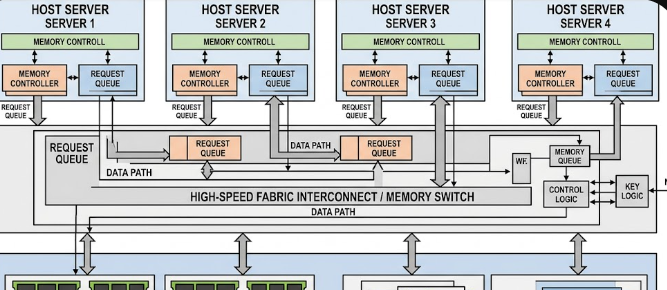
Another major breakthrough in modern data centers is the Compute Express Link (CXL) 3.1 protocol. Traditionally, each processor socket has a strict physical limit on how much RAM it can hold. CXL 3.1 changes this rule entirely by introducing a concept called memory disaggregation.

This specific protocol allows multiple servers or GPUs to share a single, massive pool of external RAM. Instead of being trapped inside one server socket, the memory sits in an external pool that any processor can access on demand.

However, to connect these massive memory pools to your GPUs, you need an incredibly reliable connection. This is exactly where PCIe 6.0 retimers in AI data fabrics become valuable. They ensure the CXL 3.1 signals remain crisp and fast over the longer cables required for shared memory hardware.

Conclusion

Building efficient AI systems requires both massive bandwidth and perfect signal control. By combining CXL 3.1 memory pools with high-speed PCIe connections, data centers can handle the toughest AI workloads. Ultimately, deploying PCIe 6.0 retimers in AI data fabrics solves the core physics and latency issues of modern computing. For further technical details on how these components integrate into data centers, you can read more on the PCI-SIG Official Website.

References

  • Compute Express Link Consortium. (2023). CXL 3.1 Specification Features and Advancements.
  • Microchip Technology Inc. (2024). XpressConnect Retimers for PCIe 6.0 and CXL 3.0 Ultra-Low Latency Solutions.
  • PCI-SIG. (2022). PCI Express Base Specification Revision 6.0.