1.First things first, go to Google Play Store and search for “ Photo and Picture resizer” and download.
(Note : to view the size of picture on your android phone, click to select photo, then look to the top right of your screen and click the 3 dots(vertical), then click; Details)
2.Start the Photo and Picture resizer app you just downloaded.
3.Click, Select Photos.
4.Navigate to and click on the photo or photos you want to resize.
5.Click on Resize.
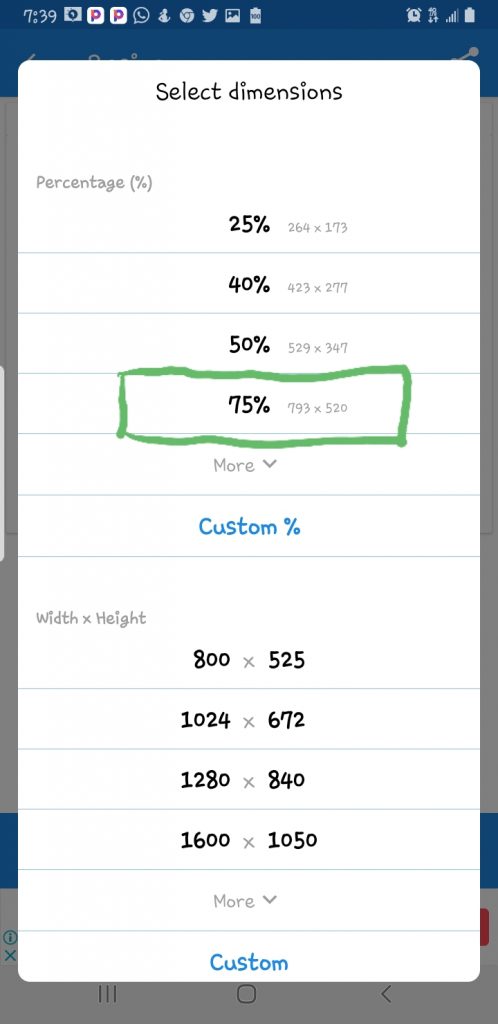
6.You will be presented with several resizing options including percentage, width & height and pixel resolution options.
If the preset picture sizing is not listed, click on Custom to set picture size to the one you want exactly.
7.In this example I will reduce the picture using the percentage option.
8. For instance click 75% to reduce the picture to 75% of its original dimension. Note the new reduced dimensions in pixels is stated.
9.To view the resized picture, click; See in resized photos
The Google search engine on your mobile phone is a portable version but still has all the necessary features to enable you to perform a good search.
Of course you can still access the desktop version of google search on your mobile phone.However, you may have to do a lot of panning and zooming depending on your screen size.
This article briefly describes how you can do image search using google search mobile.
There are 2 ways you can access google image search. You can either go to google.com then click, images at the top of your screen. Or, just directly go to images.google.com. Even if you entered image.google.com, Google will still take you to image search.
In the image search bar you can type the title of the picture you want to search for.
Google search engine is very smart. For instance you can go beyond just searching for a type of picture. You can type both the title of the picture and the file type and click search. Let say you want to search for pictures of sand, in addition you also want the file type to be png. Then just type sand png in the search bar and images of different types of sand with file type png will be returned.
You can still go a step further and type; sand png 1280 x 720px in the search bar. The search engine will return different sand images of file type png and size 1280 × 720 pixels.
When you click on an image result, you will be given the option to visit the website that has the picture. If you click and hold the picture, you will be given the option to download the image.
Google has other tools that can help refine your image search. Just take a good look at all the options available. Picking the settings icon at the top left just before the picture results will give you the option of searching only pictures with creative common license. That is, pictures you can reuse without having copyright issues.
Also note that once you perform an image search, other search categories such as videos, maps, books, etc become available.
There is so much more you can do with google image search and indeed google search engine as a whole. I have written this short article to give insight. Feel free to explore google search and get the search you want.
Reports from major Nigerian newspapers have it that gunmen in military uniform invaded the Nigerian Defence Academy in Afaka Kaduna. Two soldiers were killed and one was kidnapped.
The following facts have emerged so far;
1.That the bandits invaded the defence Academy at about 1am on Tuesday night.
2. That the soldiers on guard were caught unawares.
3. That the bandits wore military uniform
4. That the bandits attacked the military institution from several directions
5. That two soldiers were killed and one kidnapped.
6. The military are on the trail of the attackers and they would soon be apprehended.
The Paralympics games have begun today, Tuesday August 24 2021.In the same National stadium that was used for the just concluded Tokyo Olympic games but without fans in the stadium. This is due to the soaring new Covid 19 infections in the capital.
Japanese Emperor Naruhito got it underway again, with the theme”We Have Wings.” Among those present for the event were Douglas Emhoff, husband of U.S. Vice President International Paralympic Committee President Andrew Parsons and International Olympic President Thomas Bach
The opening ceremony was agog with acrobats, clowns, vibrant music and fireworks that ushered in the start of the long parade of athletes. Over 4400 athletes from all over the world will be competing for honours.
About 22 athletes will be representing Nigeria. Nigeria will be participating in 4 events namely; Para Powerlifting, Para-Athletics, Para Rowing and Para-Table Tennis.
I’m sure you are reading this because you plan to set up a solar system for generating electricity. Or you need basic information on solar system setup. You are in the right place.
Let’s go straight to the point.
Items you need to set up a solar system for electricity generation
1 Solar panel
solar panels
Simply put, solar panels convert energy from the sun into electrical energy. Solar panels are durable. A good one can last 10 years. Cost of solar panels varies depending on size. As of writing this article, the cost of a 100w solar panel is around 20 thousand naira.
2. Solar charge controller
Solar charge controller
As the name implies. It controls/regulates electricity coming from the solar panels. It also helps to charge the battery and direct DC current from battery to inverter. It costs about 10,000 naira upwards depending on size, quality and capability.
3. Battery
battery
The battery stores electrical energy produced by the solar panels and discharges through the inverter when needed. Cost of battery varies by size and quality. A 7ah battery can cost as low as 5,000 naira.
4. Inverter
Inverter
The inverter converts direct current produced by the solar panel / battery To alternating current needed to run your electrical appliances. Except you only need direct current, you will need the inverter. As the others cost of inverter varies by size, quality and capability. A 500 W inverter costs around 10,000 naira.