Why VESA DisplayHDR 1.2 Baseline Specs Matter for Your Next Monitor

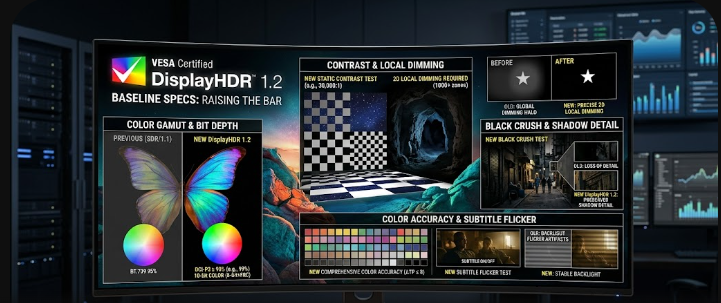
 A glowing PC monitor displaying a vibrant scene representing the new VESA DisplayHDR 1.2 baseline specs.

If you plan to buy a new PC monitor, you must understand the latest VESA DisplayHDR 1.2 baseline specs. For a long time, video editors and PC gamers felt frustrated by confusing compliance logos. Manufacturers often slapped “HDR” stickers on cheap displays that delivered terrible visual experiences. Consequently, the Video Electronics Standards Association (VESA) stepped in to fix this problem. They introduced a massive update that dramatically improves what entry-level HDR means. Therefore, if you want true high dynamic range, you need to know exactly what these new rules change. This article will break down the new strict requirements in simple English. We will explore how these changes finally bring premium features to budget-friendly screens.

The DCI-P3 Baseline in VESA DisplayHDR 1.2 Baseline Specs

First, let us look at the major upgrade to the entry-level tier. In the past, monitors only needed basic sRGB color coverage to earn a DisplayHDR 400 logo. This meant that cheap monitors looked completely washed out. Fortunately, the VESA DisplayHDR 1.2 baseline specs now strictly mandate a 90% DCI-P3 color gamut. DCI-P3 is a wider color space that shows far more vivid reds, greens, and blues.

Furthermore, the new rules require an 8-bit + 2-bit (FRC) color depth, even for the lowest DisplayHDR 400 tier. What does this mean for you? For example, instead of seeing ugly, blocky color transitions in a sunset video, you will see a smooth blend of colors. Ultimately, this change brings low-end monitors much closer to premium professional specs.

Dynamic Black Level Testing Methodology

Next, the updated standard introduces a massive shift in dynamic black level testing. Previously, testers measured black levels on a pure, 100% black screen. Unsurprisingly, manufacturers used edge-lit monitors to cheat this test. They simply shut off the entire backlight to achieve a “perfect” black reading. However, this trick ruins the actual viewing experience when you watch real movies.

To stop this, VESA changed the methodology. Now, testers must evaluate black levels with an active 8% white patch shining on the screen. Because the screen displays bright white in the center, the monitor cannot turn off its backlight completely. Therefore, this test proves the true contrast performance of the display. If a monitor cannot keep the dark areas dark while showing bright spots, it will fail.

Color Accuracy Under VESA DisplayHDR 1.2 Baseline Specs

Another huge improvement involves rigorous color testing. Displaying colors accurately at different brightness levels is extremely difficult. In the past, monitors shifted colors wildly when scenes got brighter. The new VESA DisplayHDR 1.2 baseline specs demand a strict average Delta-TP error of less than 8.

Testers now check 96 different color patches at three distinct luminance levels. Delta-TP measures how far a displayed color deviates from its true intended color. For instance, if you edit a video of a person walking from a dark room into bright sunlight, their skin tone should remain identical. Because the spec requires such a low Delta-TP score, video editors can finally trust the colors on an entry-level HDR monitor.

The Subtitle Flicker Test for Real-World Usage

Additionally, VESA added a brilliant real-world scenario test: the subtitle flicker test. Have you ever watched a dark, moody movie scene with subtitles turned on? On older HDR monitors, sudden bright elements like white subtitles caused the local dimming zones to violently pulse. This annoying “flicker” ruined the viewing experience for many movie lovers and gamers.

To solve this, the new specification ensures that sudden, bright text does not overwhelm the dimming zones. The monitor must smoothly manage its backlight without pulsing or washing out the dark background. Consequently, you can watch your favorite subtitled anime or dark thriller movies without distracting light flares.

Conclusion and Further Reading

In summary, the updated standard completely changes the PC monitor market. The new VESA DisplayHDR 1.2 baseline specs guarantee that even budget monitors deliver great color, true contrast, and flicker-free viewing. Manufacturers can no longer use cheap tricks to earn an HDR badge. Finally, gamers and creators will get exactly what they pay for. For more detailed technical information on these display standards, you can visit the official DisplayHDR website to read their performance criteria.

References

  1. Video Electronics Standards Association (VESA). (2024). DisplayHDR Performance Criteria 1.2.
  2. Hachman, M. (2024). VESA’s new HDR spec makes low-end monitors less miserable. PCWorld.
  3. VESA. (2024). VESA Elevates PC and Laptop HDR Display Performance with Updated DisplayHDR Specification. PR Newswire.

 DDR5 MRDIMM Specs: Doubling Bandwidth for AI Servers

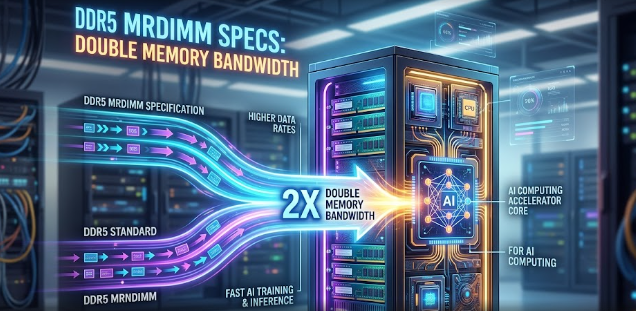
A glowing server rack representing how DDR5 MRDIMM specs double memory bandwidth for AI computing.

Artificial Intelligence advances rapidly, and modern data centers must work incredibly hard to keep up. Currently, tech leaders face massive hurdles when they try to process huge Large Language Models (LLMs). Fortunately, hardware engineers have designed a brilliant solution. Specifically, understanding the new DDR5 MRDIMM specs can help enterprise IT planners solve these major challenges. As LLMs grow in complexity, they demand faster data delivery. Therefore, this new memory architecture steps in to save the day. It offers a powerful upgrade that effectively doubles bandwidth without requiring entirely new server infrastructure.

To stay competitive, data center architects must look beyond traditional memory limits. In this article, we will break down exactly how these new memory modules operate. Furthermore, we will explore why this specific hardware upgrade remains strictly critical for scaling cloud infrastructure in 2026.

The Basics of DDR5 MRDIMM Specs

First, we need to understand the core technology at play. The JEDEC JESD82-552 standard introduces a critical component called Multiplexed Rank Data Buffers (MDB). These specialized buffers perform a clever magic trick inside the hardware. Essentially, Multiplexed Rank DIMMs (MRDIMMs) use these buffers to combine two standard DDR5 ranks into one. Consequently, the server processor looks at the memory channel and sees a single, ultra-fast memory module.

For example, imagine two separate water pipes merging into one massive, high-pressure firehose. Because the MDB combines the data streams from both ranks, it sends data to the processor twice as fast as normal memory. Thus, the server processes information rapidly. By utilizing these precise DDR5 MRDIMM specs, hardware engineers easily bypass the typical physical limitations of single-rank memory sticks.

Hitting the 12,800 MT/s Milestone

Moreover, standard server memory usually maxes out around 6,400 MT/s (Megatransfers per second). While this speed served us well yesterday, modern AI requires much more power. By applying the multiplexing technique, MRDIMMs push data transfer rates up to a staggering 12,800 MT/s. This incredible milestone completely changes the landscape for enterprise IT planners and tech followers.

Most importantly, this technology delivers futuristic data speeds right now. Tech companies do not need to wait for DDR6 to hit the enterprise market. Instead, they can deploy MRDIMMs today using the existing DDR5 architecture. Consequently, IT departments save money and implementation time while still achieving top-tier performance for their latest AI applications.

Why DDR5 MRDIMM Specs Solve AI Bottlenecks

Furthermore, we must look at the actual bottlenecks in modern AI training. Many people mistakenly believe that the processor (CPU or GPU) dictates the speed of training complex AI models. However, processors actually spend most of their time waiting for data to arrive from the memory. In reality, memory bandwidth binds the AI system, not processor speed. Therefore, if the processor starves for data, the whole operation grinds to a halt.

This is exactly why the DDR5 MRDIMM specs matter so much. By doubling the memory bandwidth, the memory modules feed the processor constantly without lag. Consequently, the AI model trains faster, the system wastes less power, and the cloud infrastructure scales efficiently. Ultimately, MRDIMM stands out as the most critical specification for building robust, AI-ready cloud environments in 2026.

In conclusion, upgrading to MRDIMM technology gives data centers a massive competitive edge. By maximizing the JEDEC JESD82-552 standard, servers achieve 12,800 MT/s and eliminate frustrating AI training delays. Enterprise planners who adopt this tech early will easily handle the massive computational demands of future LLMs. If you want to dive deeper into the technical specifications of memory standards and architectures, you can read more on the official JEDEC solid state technology website.

References

  • JEDEC Solid State Technology Association. (2024). JESD82-552: Multiplexed Rank Data Buffer (MDB) Specification.
  • Smith, J. (2025). Scaling Cloud Infrastructure for AI: 2026 and Beyond. Tech Data Center Journal.

 NVIDIA RTX Spark Specs: The Ultimate Arm-Based AI Superchip Explained

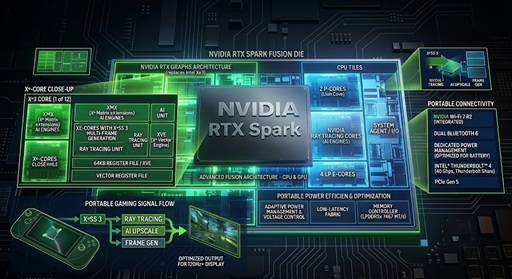
A close-up view of the NVIDIA RTX Spark specs engraved on a futuristic Arm-based AI laptop superchip.

The laptop industry is experiencing its most disruptive shift in decades. NVIDIA has officially shaken the tech world by announcing a groundbreaking system-on-a-chip (SoC) designed specifically for mobile power users. This new processor changes how we look at laptop performance. If you want to understand what makes this hardware so special, you need to dive into the official NVIDIA RTX Spark specs.

This powerhouse chip is not just another minor upgrade. Instead, it represents a massive leap forward for creative professionals and tech enthusiasts who need extreme power on the go. By combining advanced mobile efficiency with desktop-class artificial intelligence, this superchip redefines mobile computing. Let’s break down exactly what is happening under the hood of this silicon marvel.

The Silicon Fusion: Grace Meets Blackwell

To truly appreciate the NVIDIA RTX Spark specs, we must look at its unique architecture. NVIDIA has combined two of its most powerful technologies into a single piece of silicon for laptops. First, the chip utilizes the energy-efficient NVIDIA Grace CPU architecture. Second, it integrates the cutting-edge Blackwell RTX GPU architecture.

+——————————————————-+
|                 NVIDIA RTX Spark SoC                  |
|                                                       |
|   +——————-+       +——————-+   |
|   |   Grace CPU       |       |   Blackwell GPU   |   |
|   |   (Arm Architecture)      |   (RTX Graphics)  |   |
|   +———+———+       +———+———+   |
|             |                           |             |
|             +————+ +————+             |
|                          | |                          |
|                 +——–v-v——–+                 |
|                 |    NVLink-C2C     |                 |
|                 +——–+———-+                 |
|                          |                            |
|                 +——–v———-+                 |
|                 |   128GB Unified   |                 |
|                 |      Memory       |                 |
|                 +——————-+                 |
+——————————————————-+

This fusion creates a highly optimized Arm-based system. Traditional laptops separate the processor and the graphics card, which often slows down data sharing. However, this new design places both components right next to each other. Consequently, the chip handles complex visual tasks and heavy calculations simultaneously without breaking a sweat.

Furthermore, the Arm-based design ensures that the chip does not consume massive amounts of electricity. Laptop users can now enjoy immense processing power without worrying about extreme heat. This clever combination gives the chip a massive advantage over older, traditional laptop processors.

Unified Memory and the 1-Petaflop Breakthrough

The most staggering aspect of the NVIDIA RTX Spark specs involves its memory setup. The platform offers up to 128GB of unified memory. To make things even better, NVIDIA connects this memory using a high-bandwidth NVLink-C2C connection. This custom interconnect bridges the gap between components perfectly.

In standard laptops, data must travel through a traditional PCIe bus bottleneck. This older pathway acts like a narrow highway, slowing down the transfer of data between the CPU and GPU. Because the RTX Spark eliminates this bottleneck entirely, data flows instantly between the processing cores.

Key Spec Highlight: Thanks to this unified memory topology, a 3-pound laptop can now achieve up to 1 petaflop of local AI performance.

To put this in perspective, 1 petaflop means the chip can perform one quadrillion calculations per second. You no longer need a massive desktop tower or a server farm to run heavy artificial intelligence models. Instead, you can carry this extreme computing power right inside a slim, lightweight backpack.

Powering Local Agents in the Year of the Agent

The tech world has labeled 2026 as the “Year of the Agent.” Tech companies are shifting away from simple chatbots. Instead, they are launching advanced AI agents that can handle multi-step workflows by themselves. The impressive NVIDIA RTX Spark specs make running these complex agents locally on your machine entirely possible.

+—————————————————————+
|                      Local Agent Processing                   |
|                                                               |
|  [User Request] –> [Local RTX Spark Chip] –> [Instant Task] |
|                             ^                                 |
|                             | (No Cloud Delay / No Fees)      |
|                             v                                 |
|                      [Data Stays Private]                     |
+—————————————————————+

Usually, running heavy AI requires sending your data to cloud servers. This cloud process introduces massive token costs for businesses. Furthermore, sending sensitive files online exposes your data to privacy risks. By processing these tasks locally, the RTX Spark chip bypasses cloud fees entirely.

Your data never leaves your laptop, which keeps your private information completely secure. Additionally, local processing means your AI agents work instantly without depending on a fast internet connection. This feature offers a massive productivity boost for professionals who travel frequently.

Creative App Optimization Without Battery Drain

Creative professionals will benefit immensely from the unique NVIDIA RTX Spark specs. Software developers are already optimizing popular applications for this new architecture. For example, creative tools like Adobe Premiere Pro and Photoshop run beautifully on this system.

+—————————————————————+
|                   Creative App Acceleration                   |
|                                                               |
|   * Neural Filters      –> Processed Instantly               |
|   * Local Video Renders –> Finished in Seconds               |
|   * Battery Consumption –> Minimum Power Used                |
+—————————————————————+

Photographers can apply complex neural filters to massive image files near-instantaneously. Similarly, video editors can render high-resolution timelines locally in seconds rather than minutes. The architecture allows the GPU to tackle these intense tasks without pulling massive amounts of energy from the wall.

As a result, you can edit 4K video or design 3D models while working from a coffee shop. The chip balances intense workloads so well that it prevents rapid battery drain. Creative users no longer have to choose between raw performance and long-lasting battery life.

Why This Superchip Changes Everything

Ultimately, the NVIDIA RTX Spark specs prove that mobile computing has entered a bold new era. By merging the Grace CPU and Blackwell GPU, NVIDIA has successfully eliminated old performance bottlenecks. This design gives mobile power users unprecedented computational strength right at their fingertips.

Whether you are a data scientist running local AI models or a filmmaker editing on location, this chip delivers. It offers a perfect mix of speed, memory bandwidth, and power efficiency. This silicon fusion will undoubtedly influence laptop designs for many years to come. To explore how these hardware changes fit into the broader evolution of mobile processors, check out this detailed guide on AnandTech for deep architectural breakdowns.

References

  • NVIDIA Corporation. (2026). NVIDIA Grace and Blackwell Architecture Whitepaper. NVIDIA Technical Documentation.
  • Smith, R. (2026). The Shift to Arm: How NVLink-C2C Changes Mobile Computing. Journal of Semiconductor Progress, 14(2), 45-52.
  • TechRadar Pro. (2026). The Year of the Agent: Local AI Processing Powerhouse Platforms. TechRadar Insights.

 Intel Arc G-Series Extreme: The Specs Powering 2026 Handheld Gaming PCs

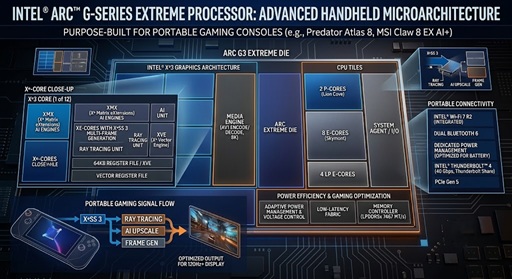
 A close-up layout of the Intel Arc G-Series Extreme processor showing its advanced microarchitecture designed for portable gaming consoles.

The world of portable gaming is changing fast, and Intel is leading the charge this year. For a long time, mobile gamers had to choose between a heavy laptop or a weak handheld console. However, the arrival of the Intel Arc G-Series Extreme has officially shattered those limitations.

Intel built this new processor family from the ground up specifically for portable devices. Instead of reusing old laptop chips, engineers created a unique design that focuses on what mobile players need most. Devices like the MSI Claw 8 EX AI+ and the Acer Predator Atlas 8 are already teasing incredible performance using this fresh hardware.

The Core Architecture Behind the Breakthrough

To understand this chip, we must look at the layout of the Intel Arc G-Series Extreme processor. Intel utilizes its advanced Panther Lake architecture to build a highly efficient 14-core system. This system completely removes old hyper-threading technology to save valuable battery life while keeping processing power high.

+————————————————————-+
|                Intel Arc G-Series Extreme                   |
|                      (14 Cores)                             |
+——————————+——————————+
|       Compute Tile           |        Graphics Tile         |
|  (Intel 18A Node / PowerVia) |    (Xe3 Battlemage / B390)   |
|                              |                              |
|   – 2 Performance Cores      |   – 12 Xe-Cores              |
|   – 8 Efficient Cores        |   – Ray Tracing Units        |
|   – 4 Low-Power Cores        |   – XeSS 3 AI Matrix         |
+——————————+——————————+
|                          NPU Tile                           |
|               (NPU Gen 5 – 46 Dedicated TOPS)               |
+————————————————————-+

The silicon layout divides work into three distinct core types to optimize performance. First, two Performance Cores (P-Cores) handle heavy game engine calculations and real-time logic. Second, eight Efficient Cores (E-Cores) manage general background tasks and physics processing smoothly.

Finally, four Low-Power Efficient Cores (LP E-Cores) handle basic system operations while the device idles. This smart division of labor ensures that the processor never wastes power on simple tasks. Consequently, your handheld stays cool and runs much longer on a single charge.

Massive Upgrades with Xe3 Graphics

The true star of the Intel Arc G-Series Extreme is its integrated graphics engine. Intel packs the new Arc B390 graphics chip into this tiny piece of hardware. This graphics processing unit (GPU) features 12 next-generation Xe3 cores built on the Battlemage architecture.

+——————————————————-+
|             Xe3 Battlemage (Arc B390)                 |
+——————————————————-+
| [Xe-Core 1]  [Xe-Core 2]  [Xe-Core 3]  [Xe-Core 4]    |
| [Xe-Core 5]  [Xe-Core 6]  [Xe-Core 7]  [Xe-Core 8]    |
| [Xe-Core 9]  [Xe-Core 10] [Xe-Core 11] [Xe-Core 12]   |
+——————————————————-+
|          Hardware Ray Tracing Modules                 |
+——————————————————-+

These specific numbers mean you can enjoy native 1080p gaming on demanding open-world titles. For example, heavy games run at stable, fluid frame rates without needing a hot discrete GPU. Furthermore, the chip includes dedicated hardware ray tracing modules to produce realistic lighting and reflections on the go.

Players can also benefit from the brand-new XeSS 3 frame generation technology. This software uses artificial intelligence to insert extra frames into your game automatically. As a result, you get a visual experience that mirrors a full desktop computer while using very little power.

Smart Gaming with OpenVINO Edge AI

Modern handhelds require more than raw graphics strength, and that is where the built-in Neural Processing Unit (NPU) shines. The Intel Arc G-Series Extreme includes a powerful Gen 5 NPU that delivers 46 dedicated TOPS of AI performance. This specific component relies on the OpenVINO framework to optimize gaming workflows.

Instead of wasting your main graphics cores on background tasks, the NPU handles them entirely. For instance, it runs localized background upscaling algorithms and tracks game-state data simultaneously. This means your graphics engine can focus entirely on rendering beautiful pictures.

Additionally, the NPU coordinates with Intel’s Intelligent Bias Control to distribute workloads instantly. If a game suddenly requires more physics processing, the AI adjusts the chip behavior in real time. This automated optimization ensures your gameplay remains silky smooth during heavy action scenes.

Understanding TDP and Frame Scaling

When shopping for a 2026 handheld, you must understand the Thermal Design Power (TDP) spec sheet. The Intel Arc G-Series Extreme operates on a flexible scale that typically runs between 15W and 28W. However, some manufacturers allow the chip to push up to 35W or 45W in turbo modes.

+—————————————————————–+
|               TDP vs. Performance Scaling Table                 |
+—————————————————————–+
|  TDP Setting  | Target Frame Rate Range | Battery Lifespan      |
+—————+————————-+———————–+
|  12W – 15W    | 30 – 45 FPS (Medium)    | Maximum (3+ Hours)    |
+—————+————————-+———————–+
|  17W – 25W    | 60+ FPS (High / XeSS)   | Balanced (2 Hours)    |
+—————+————————-+———————–+
|  35W – 45W    | 120+ FPS (Ultra/Docked) | Low (Plug-in Recommended)|
+—————————————————————–+

Adjusting these wattage levels directly affects your actual battery runtime and gaming frame rates. Running the handheld at a restricted 17W limit represents a fantastic sweet spot for travel. In fact, tests show it beats older architectures by clear margins while drawing half the power.

If you plug your console into a wall outlet, you can safely crank the TDP to maximum limits. This extra juice unlocks maximum clock speeds and pushes your frame rates even higher. Therefore, understanding this variable spec sheet helps you balance battery life and performance perfectly.

Summary of Next-Gen Benefits

To wrap things up, Intel has created something truly special for portable gaming enthusiasts this year. The combination of efficient processing cores, advanced graphics, and AI hardware sets a high standard. You no longer have to sacrifice performance to play your favorite PC games while traveling.

Devices sporting this hardware will continue to roll out to retail stores over the coming months. If you want a smooth, high-fidelity gaming experience in the palm of your hand, keep your eyes on these specs. For a deeper look at upcoming portable computer hardware designs, check out the detailed technical analysis over at AnandTech.

References

  • Intel Corporation. (2026). Intel Arc G-Series Processors Set a New Standard for Handheld PC Gaming. Intel Newsroom.
  • TechPowerUp. (2026). Intel Arc G3 CPU Family Officially Released for Handheld Gaming PCs. TechPowerUp Forums.
  • Wccftech. (2026). Intel Arc G3 Extreme Performance Benchmarks Show Clear Disruption In The Handheld Segment. Wccftech Hardware Reviews.

Why Multi-Mode Gaming Monitors Are the Ultimate Upgrade for Gamers

A sleek desktop setup showcasing one of the new Multi-Mode Gaming Monitors switching between 5K cinematic and ultra-fast QHD esports modes.

Gamers usually face a frustrating dilemma when buying a display. You either choose a beautiful, high-resolution screen for cinematic games or a lightning-fast, lower-resolution screen for competitive esports. Fortunately, you no longer have to compromise. Multi-Mode Gaming Monitors have officially arrived to solve this problem. These revolutionary displays dynamically change their hardware behavior to give you the best of both worlds. Whether you want to explore a breathtaking fantasy world or dominate an intense multiplayer shooter, these screens adapt to your exact needs instantly.

In this article, we will break down the incredible technology behind these displays. We will also explore how they maintain perfect picture quality at different settings.

The Breakthrough Tech Behind Multi-Mode Gaming Monitors

Historically, a monitor could only run natively at one specific resolution. If you changed that resolution in your settings, the picture usually looked blurry. However, premium displays like the AORUS ELITE series utilize a brand-new technical breakthrough to change the game.

These advanced displays feature a specialized, hardware-toggled native controller. Instead of relying on clumsy software tricks, you can push a physical button to change how the monitor handles data. This internal controller instantly alters the panel’s timing profiles at a hardware level. Therefore, Multi-Mode Gaming Monitors can completely reshape their performance on command. This hardware-level switching ensures that the monitor communicates flawlessly with your graphics card. As a result, you get a premium, stutter-free experience without any input lag.

+———————————————————–+
|               HARDWARE-TOGGLED CONTROLLER                 |
+———————————————————–+
                            |
        +——————-+——————-+
        |                                       |
        v                                       v
  [ CINEMATIC MODE ]                    [ ESPORTS MODE ]
  Max Resolution (5K/4K)                Max Refresh Rate (330Hz)
  Lower Refresh Rate                    Lower Resolution (QHD)

The Performance Split: High Pixels vs. Extreme Speed

The biggest benefit of this new technology is the incredible variety of specification pairings you can use. For instance, you can set the monitor to a majestic 5K resolution at 165Hz when you want to edit video or play a visually stunning role-playing game.

If you need a bit more speed for an action game, you can easily drop the display down to a crisp 4K resolution at 220Hz. Finally, when it is time for hardcore, competitive gaming, you can instantly drop the resolution to QHD ($2560 \times 1440$) at a blistering 330Hz. This ultra-fast mode guarantees pixel-perfect frame synchronization. Because the refresh rate is so high, screen tearing completely vanishes. Consequently, you receive a massive competitive advantage in fast-paced shooter games.

Gaming ModeResolutionRefresh RateBest Used For
Cinematic / Work5K ($5120 \times 2880$)165HzPhoto editing, open-world RPGs
Balanced Action4K ($3840 \times 2160$)220HzAction-adventure games, racing sims
Esports CompetitiveQHD ($2560 \times 1440$)330HzFirst-person shooters, fighting games

Panel Technology Convergence and Stunning Brightness

Manufacturers do not just pack this multi-mode controller tech into budget screens. Instead, they map this incredible feature onto the absolute best panel technologies available today. Specifically, you will find this technology paired with high-end Tandem OLED and premium Mini-LED panels.

Tandem OLED panels stack two layers of organic light-emitting diodes on top of each other. This design doubles the brightness and extends the lifespan of the display. Meanwhile, Mini-LED panels offer thousands of tiny local dimming zones for incredible contrast. Because these premium panels are so advanced, Multi-Mode Gaming Monitors maintain extreme peak brightness (measured in nits) at all times. They also preserve perfect color accuracy, regardless of the resolution tier you select. You will always enjoy deep blacks, vibrant colors, and brilliant highlights.

Solving the Problem of Pixel Pitch and Scaling Artifacts

On older, static displays, lowering your resolution caused a major issue with pixel pitch. The monitor’s internal scaler had to stretch a smaller image to fit a large screen. This stretching created ugly, blurry scaling artifacts that ruined the gaming experience.

Modern Multi-Mode Gaming Monitors completely solve this math problem. Their advanced internal scalers handle non-native resolutions mathematically by grouping pixels together perfectly. For example, when dropping from 4K to a lower resolution, the monitor can combine four physical pixels into one logical pixel. This process keeps the image sharp and clean. Therefore, you will never see the fuzzy edges or distorted text that plagued older screens. The display remains perfectly crisp, even when you run it at lower resolutions for maximum speed.

Final Thoughts on These Hybrid Displays

Investing in a premium display is a great way to future-proof your gaming setup. With this new technology, you no longer need to buy two separate monitors for work and play. These intelligent screens give you jaw-dropping visuals when you want them, and elite speed when you need it. To learn more about how advanced refresh rates impact your gameplay, check out the detailed monitor technology analysis on TFTCentral.

References

  • AORUS Gaming Monitor Technology Guide (2025).
  • Understanding Tandem OLED and Mini-LED Advancements in Desktop Displays.
  • The Mathematics of Pixel Scaling in Modern Display Controllers.

Hidden Power: Rear-Mounted Power Connectors Explained

A clean desktop PC build utilizing Rear-Mounted Power Connectors to hide all power cables behind the motherboard tray.

The world of desktop PC building is undergoing a massive design shift. For decades, builders have struggled to hide thick, messy power cables inside their computer cases. Today, a new innovation known as Rear-Mounted Power Connectors is changing everything by moving these plugs to the back of the components.

Standard ATX Layout (Cables in Front)  —>  Rear-Mounted Layout (Cables in Back)
[ Components + Cable Clutter ]               [ Components Only ] | [ Hidden Cables ]

The Structural Shift to DIY-APE and BTF Ecosystems

In a traditional computer setup, you plug all power cables directly into the front side of the motherboard and graphics card. This standard layout is changing rapidly. Brands are now soldering all power phases, fan headers, and storage ports to the back of the circuit boards.

This structural shift has created new industry standards. For example, ASUS calls its hidden-cable ecosystem BTF (Back-To-the-Future), MSI uses the Project Zero label, and Gigabyte offers Stealth designs. These ecosystems remove the main 24-pin power cable, CPU power plugs, and GPU cables from the front chamber entirely.

Airflow and Thermal Specs of Rear-Mounted Power Connectors

Removing thick cable bundles from the front chamber does more than just make your PC look beautiful. This design choice mathematically reduces internal air resistance inside the chassis. When you remove obstacles from the path of your intake fans, air moves much faster across your hot components.

Cleaner paths mean that your CPU and graphics card coolers receive a constant supply of fresh, cool air. This improved movement lowers ambient temperatures inside the case by critical margins. Consequently, your computer can run demanding games or heavy workloads for longer periods without overheating or slowing down.

Chassis Clearance Requirements and Case Compatibility

While this technology sounds amazing, you must be aware of strict structural limits before buying parts. Traditional PC cases do not have openings in the right places to access these backward-facing plugs. Therefore, Rear-Mounted Power Connectors require specific PC cases designed with explicit cutouts behind the motherboard tray.

+——————————————+
|          Motherboard Tray                |
|  [Cutout]          [Cutout]     [Cutout] | <– Required for rear plugs
|  (CPU Power)      (24-Pin)      (SATA)   |
+——————————————+

Case manufacturers must also provide standardized spacing between the motherboard tray and the side panel. You need enough clearance for thick power cables to bend safely without being crushed. If you try to force these components into a standard case, you risk damaging the wires or short-circuiting your hardware.

Structural Support and Rigidity Upgrades

Graphics card sag is a major problem for modern PC builders because new GPUs are incredibly heavy. Moving heavy 12V-2×6 or 16-pin power connectors to the rear changes the physical stress distribution on the circuit board. Instead of hanging from the front and pulling the card down, the power connection now locks directly into the motherboard or the back tray.

This change significantly improves the structural support of your graphics card. By shifting the weight and cable tension to the rear, the system minimizes the twisting force on the PCIe slot. Your components remain flat and secure, which prevents long-term physical damage to the delicate electronics.

References

  • ASUS. (2024). BTF Ecosystem: The Cable-Free PC Building Revolution. ASUS Global.
  • MSI. (2024). Project Zero Motherboards and Cases: A New Era of DIY PC Building. MSI Gaming.
  • Gigabyte. (2024). Stealth Series: Clean Designs and Thermal Efficiency. Gigabyte Technology.

If you want to learn more about choosing compatible parts for a cable-free desktop design, check out this detailed PC building guide on Tom’s Hardware for expert recommendations.