How to Build a Seamless Digital Workspace Using Free Cloud Tools

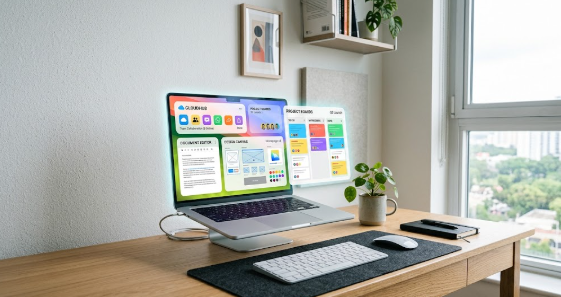
A modern computer screen showing how to build a seamless digital workspace using free cloud tools.

Modern teams no longer need expensive office software to work together efficiently online. Today, learning how to build a seamless digital workspace using free cloud tools allows small businesses, freelancers, and students to collaborate without spending money. Remote work relies heavily on flexible digital platforms that connect team members across different locations.

In this guide, you will explore powerful free platforms that handle design work, document editing, and project tracking. Furthermore, you will learn how to connect these applications into a smooth daily routine.

Why You Need a Digital Workspace Strategy

Managing a remote team without clear software tools quickly creates confusion and delays. Therefore, establishing a central digital environment helps everyone stay organized and productive.

Cloud Collaboration Workflow:
[Project Planning] ──> [Real-Time Document Editing] ──> [Visual Asset Design] ──> [Cloud Storage Archive]

When you organize your digital apps properly, your team spends less time searching for misplaced files. Consequently, everyone finishes assignments faster while maintaining high standards.

Centralizing Documents with Free Document Editors

Every productive virtual team needs a reliable platform for creating and editing written files. Google Docs provides a feature-rich document editor that works entirely inside your internet browser.

Because multiple users can edit a single document simultaneously, your team eliminates messy email attachments.

  • Multiple team members can type and leave comments in real time.
  • The system saves every change automatically to prevent data loss.
  • Built-in version history allows you to restore earlier document drafts easily.

For example, a marketing team can draft a sales strategy together during a live video call. As one member types the outline, another person adds supporting research links.

Thus, your team completes document drafts in a fraction of the usual time.

Creating Visual Assets with Accessible Design Platforms

Visual communication plays a vital role in marketing, social media, and business presentations. Canva offers an intuitive design platform that allows non-designers to build professional graphics effortlessly.

Feature AreaFree Canva CapabilityPrimary Team Benefit
TemplatesAccess thousands of free layoutsSpeeds up graphic production
Brand AssetsStore core logos and color palettesMaintains brand consistency
Team SharingShare editable design linksSimplifies feedback and approvals

For instance, you can design an eye-catching event flyer using drag-and-drop tools. You then send a share link to your colleague, who reviews and approves the visual layout instantly.

Tracking Projects Using Visual Task Boards

Keeping track of project deadlines requires a clear visual organization system. Trello uses simple visual boards, lists, and cards to help teams manage daily responsibilities.

Visual Task Flow:
[To-Do Column] ──> [In-Progress Column] ──> [Completed Column]

By moving task cards across columns, team members update project statuses without typing long status emails.

Key Advantage: Visual project boards provide immediate visibility, so managers instantly identify project bottlenecks before deadlines pass.

Storing and Sharing Files Safely in the Cloud

Safe file storage forms the backbone of any remote work setup. Cloud storage services like Google Drive offer ample free storage space for your documents, spreadsheets, and visual assets.

Additionally, cloud storage platforms secure your files against computer hardware failures. You can access your files safely from any smartphone, tablet, or laptop with an internet connection.

Hence, your important business records remain safe and accessible around the clock.

Step-by-Step Guide on How to Build a Seamless Digital Workspace Using Free Cloud Tools

Building your digital system requires careful planning and simple execution steps. Follow these key actions to connect your applications smoothly:

  1. Create Shared Cloud Folders: Set up core directories in your cloud storage for every active project.
  2. Establish Document Templates: Save standard document layouts to save time on recurring reports.
  3. Connect Task Cards to Document Links: Attach your document and graphic links directly into your project tracking cards.

When you link your platforms together, your team accesses all necessary resources from a single central location.

Transforming Your Remote Operations Today

Adopting accessible online platforms allows your team to achieve enterprise-level productivity on a zero-dollar budget. As your organization grows, maintaining simple cloud systems ensures smooth operational scaling.

Start setting up your free applications today to build an agile, organized, and collaborative remote work culture. To explore more about top cloud collaboration platforms, read PCMag’s Best Cloud Storage Services Guide for deeper tech insights.

References

  • Canva. (2026). Visual Collaboration and Graphic Design Solutions for Teams. Canva Knowledge Base.
  • Google. (2026). Google Workspace Cloud Storage and Real-Time Editing Guide. Google Help Center.
  • PCMag. (2026). The Best Free Cloud Applications and Productivity Software. PCMag Tech Reviews.
  • Trello. (2026). Visual Project Management and Workflow Strategy. Trello Resource Hub.
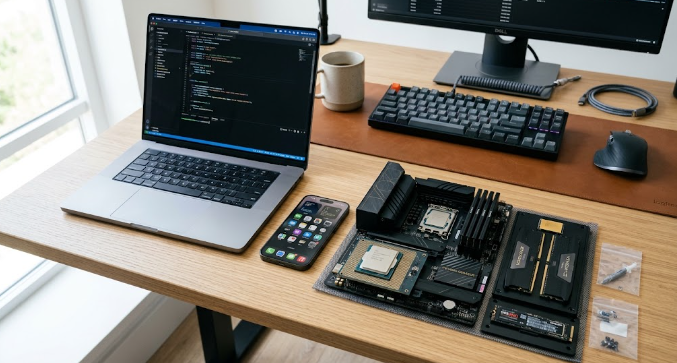
Best Laptop or Phone Hardware Upgrade Guide

 Best Laptop or Phone Hardware Upgrade Guide showing new devices and tech components.

Deciding when to buy a new device can feel overwhelming for many users today. Technology evolves rapidly, and older gadgets often slow down during daily tasks. If your current computer or mobile phone freezes frequently, you probably need a Best Laptop or Phone Hardware Upgrade Guide to make the right choice.

Understanding core technical specifications helps you avoid wasting money on unnecessary features. Furthermore, smart shopping ensures your new purchase lasts for several productive years. Let us explore the most important hardware factors you must check before buying any new gadget.

Why Hardware Upgrades Matter Today

Modern applications and operating systems demand significant processing power to run smoothly. Therefore, running updated software on ancient hardware causes frustrating performance lags.

Performance Evaluation Flow:
[Slow Device Performance] ──> [Check RAM & Storage] ──> [Smart Hardware Upgrade]

When you understand what makes a device fast, you make confident buying decisions. Moreover, knowing your exact performance needs prevents you from overpaying for high-end features you will never use.

Evaluating Processor Efficiency and Speed

The processor acts as the primary brain of any computer or smartphone. A powerful processor handles multiple demanding programs simultaneously without dropping speed.

When reviewing processors, look closely at core counts and clock speeds. For instance, modern multi-core processors let you edit videos, browse the web, and run design software all at once.

  • Quad-core processors easily handle standard daily office tasks and web browsing.
  • Octa-core or higher processors suit heavy gaming, video editing, and coding.
  • Energy-efficient chips extend your battery life significantly during travel.

Therefore, always prioritize a modern processor when following a Best Laptop or Phone Hardware Upgrade Guide for your next tech purchase.

Understanding RAM and Multitasking Capacity

RAM, or Random Access Memory, determines how many apps your device runs at once. Without enough RAM, your computer crashes or freezes when you open multiple browser tabs.

Key Takeaway: Buying a device with sufficient RAM guarantees smooth multitasking and prevents annoying system slowdowns.

For basic web browsing and typing, eight gigabytes of RAM usually suffices. However, professionals and students working with large spreadsheets or graphics should target sixteen gigabytes or more.

Choosing Fast SSD Storage Types

Old mechanical hard drives use moving parts, which make them very slow and prone to physical damage. Modern Solid State Drives, known as SSDs, use flash memory to load files instantly.

Storage TypeSpeed PerformanceBest Daily Use Case
Traditional HDDSlow moving partsCheap long-term file archives
SATA SSDModerate speedStandard budget laptop upgrades
NVMe SSDExtremely fastRapid system boots and heavy gaming

For instance, an NVMe SSD boots up your computer in mere seconds instead of minutes. Consequently, investing in an SSD represents the single best performance boost for your money.

Battery Life and Screen Display Quality

Hardware performance means little if your screen hurts your eyes and your battery dies quickly. Always check display resolutions and panel types before purchasing a mobile device.

  • Look for Full HD or higher resolutions for crisp text reading.
  • Choose OLED or IPS display panels for vibrant colors and wide viewing angles.
  • Verify manufacturer battery ratings to ensure true all-day mobile usage.

Checking these physical features guarantees comfort during long hours of work or entertainment.

Making Your Final Purchasing Decision

Buying new tech hardware requires careful balancing between your actual needs and available budget. First, list the specific tasks your old device struggles to complete. Second, match those specific pain points to the hardware specifications discussed in this Best Laptop or Phone Hardware Upgrade Guide.

By following these practical steps, you invest wisely in reliable technology that improves your daily workflow. To learn more about evaluating device components and technical benchmarks, check out Tom’s Hardware Component Guides for additional expert reviews.

References

  • Intel. (2026). Processor Performance and Efficiency Standards. Intel Technology Briefs.
  • PCMag. (2026). Laptop and Mobile Hardware Buying Advice. PCMag Tech Lab.
  • Samsung. (2026). Solid State Drive Storage Technology Overview. Samsung Semiconductor Insights.
  • Tom’s Hardware. (2026). PC Component Specs and Upgrading Manuals. Tom’s Hardware Publications.

 The Ultimate Guide to Finding Cheap Flights and Managing Travel Itineraries Like a Pro

The Ultimate Guide to Finding Cheap Flights and Managing Travel Itineraries Like a Pro featuring flight maps and travel planners.

Planning a trip can feel stressful when ticket prices change every single day. Therefore, mastering The Ultimate Guide to Finding Cheap Flights and Managing Travel Itineraries Like a Pro helps you save money and travel without anxiety. Smart travelers do not just buy random tickets. Instead, they use automated tools and proven strategies to book flights at the exact right moment.

In this article, you will discover how to track airfare prices automatically. Furthermore, you will learn how to organize your daily trip schedule like an expert.

Why Booking Windows Matter for Cheap Airfare

Airlines change ticket prices constantly based on seat demand and travel seasons. Consequently, buying tickets too early or too late costs you extra money.

Flight Pricing Timeline:
[Months Ahead] ──> [Optimal Booking Window] ──> [Last-Minute Price Surge]

Generally, booking domestic flights one to three months before departure secures the best rates. For international trips, you should start searching four to six months early.

When you track prices across these specific windows, you avoid paying peak airline fees.

Using Automated Price Trackers to Save Money

Manually checking airline websites every day wastes valuable time. Instead, smart travelers set up automated price alerts using tools like Google Flights.

You simply type in your destination, and the system emails you whenever ticket prices drop.

  • Set up email alerts for your preferred travel dates.
  • Monitor historical price charts to see if current rates are fair.
  • Use flexible date grids to find cheaper departure days during the week.

For instance, flying on a Tuesday often costs significantly less than flying on a Friday. Automation instantly reveals these hidden savings opportunities for your next vacation.

Organizing Your Trip with Digital Travel Planners

Finding cheap tickets represents only half the battle. Once you book your flights, you must manage hotels, car rentals, and daily tour schedules smoothly.

Therefore, centralizing your travel plans inside a digital map or mobile organizer eliminates chaos.

Organizer FeatureDigital Tool BenefitWhy It Helps You
Cloud AccessView plans offlinePrevents lost paper tickets
Map IntegrationPin hotel and flight locationsSaves time during transit
Real-Time AlertsGet gate change notificationsReduces airport stress

For example, saving all hotel bookings and flight confirmations in one cloud folder ensures you never scramble for papers at the airport check-in desk.

Practical Tips for Stress-Free Airport Transit

Smooth travel requires careful preparation before you leave your house. Arriving at the airport early gives you enough time to clear security without running.

Additionally, packing light helps you avoid baggage fees and long waits at the luggage carousel.

Key Takeaway: Organizing your digital documents and packing efficiently transforms chaotic airport visits into a relaxing travel experience.

Whenever you plan your next getaway, remember that preparation drives success. The Ultimate Guide to Finding Cheap Flights and Managing Travel Itineraries Like a Pro gives you the exact blueprint you need.

Start tracking your fares today and enjoy your next journey with total peace of mind. To explore more advanced itinerary planning tools, check out Google Travel Planner Guide for additional helpful resources.

References

  • Google. (2026). Google Flights Tracking and Price Insight Tools. Google Travel Documentation.
  • Lonely Planet. (2026). Expert Travel Planning and Budgeting Strategies. Lonely Planet Guides.
  • Skift. (2026). Global Travel Trends and Airline Booking Analytics. Skift Research Reports.

 Is My Hip and Leg Pain Caused by Sciatica or Something Else?

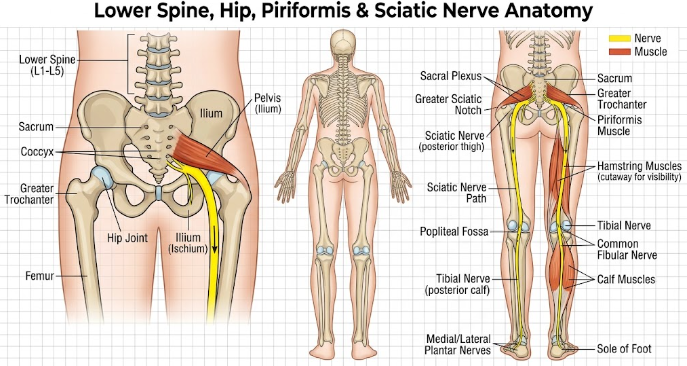
 Diagram showing hip and leg pain caused by sciatica along the nerve pathway.

Many people wonder if their severe discomfort is actually hip and leg pain caused by sciatica or a completely different medical issue. Sharp, shooting sensations that travel from your lower back down to your feet can easily disrupt your daily routine. Because several conditions create similar symptoms, understanding the root cause helps you find the right treatment quickly.

What Is Sciatica and How Does It Feel?

Sciatica occurs when something compresses or irritates your sciatic nerve. In fact, the sciatic nerve is the largest nerve in your body, running from your lower spine through your buttocks and down each leg. When a herniated disc or a bone spur presses on this nerve, you feel sharp, burning discomfort. For example, sitting for long periods can make this pain feel much worse. As a result, standing up or walking might become difficult.

Common Signs of Hip and Leg Pain Caused by Sciatica

You can easily spot sciatica if you know what symptoms to watch for. Typically, sciatica affects only one side of your body at a time. Furthermore, the pain follows a distinct path from your lower back down into your thigh and calf. You may also experience numbness, tingling, or muscle weakness in your affected leg. Therefore, if your pain shoots past your knee, you are likely dealing with hip and leg pain caused by sciatica.

Could It Be Piriformis Syndrome?

However, sciatica is not the only cause of lower body discomfort. Piriformis syndrome produces very similar feelings because of a small muscle located deep in your buttock. This piriformis muscle assists with hip rotation. When this muscle becomes tight or spasms, it directly squeezes the nearby sciatic nerve. Consequently, you feel a deep ache in your buttock that radiates down your thigh. Runners and cyclists frequently experience this condition due to repetitive motion.

Is Hip Bursitis Causing Your Symptoms?

Another frequent culprit is hip bursitis, which involves inflammation of the fluid-filled sacs near your hip joint. These small sacs, called bursae, cushion your bones and tendons during movement. Unlike nerve compression, bursitis creates pain on the outside of your hip joint rather than deep inside your spine. Additionally, pressing directly on the side of your hip usually causes sharp tenderness. As a result, lying down on that side at night becomes very uncomfortable.

Other Potential Causes of Lower Body Discomfort

In addition to muscle spasms and bursitis, a simple pinched spinal nerve or joint arthritis can trigger aching sensations. For instance, spinal stenosis narrows your spinal canal and squeezes nerve roots in your lower back. Similarly, sacroiliac joint dysfunction causes severe pain where your spine meets your pelvis. Because these issues overlap in symptoms, consulting a doctor is essential for an accurate diagnosis.

How to Treat and Prevent Nerve Irritation

Fortunately, most non-severe cases improve with conservative home care. First, gentle stretching opens up tight hip muscles and releases pressure. Second, applying ice packs reduces acute inflammation, while heat relaxes tight muscles. In addition, practicing good posture and taking short walking breaks during work protects your spine. If your symptoms persist, physical therapy or targeted medical treatments can restore your mobility effectively.

Final Thoughts and Next Steps

In summary, determining whether your discomfort stems from hip and leg pain caused by sciatica or another condition requires paying attention to pain location and triggers. While nerve irritation usually radiates past the knee, muscle tightness and joint bursitis focus mainly around the hip joint. Consequently, proper identification ensures you choose the right recovery plan. For further reading on managing spinal nerve conditions, visit the official Mayo Clinic Sciatica Guide.

References

  • Cleveland Clinic. (2022). Piriformis Syndrome: Symptoms, Causes & Treatment.
  • Mayo Clinic. (2023). Sciatica: Symptoms and Causes.
  • OrthoInfo / American Academy of Orthopaedic Surgeons. (2021). Hip Bursitis.

 Why Do Leg and Hip Joints Make Cracking Noises?

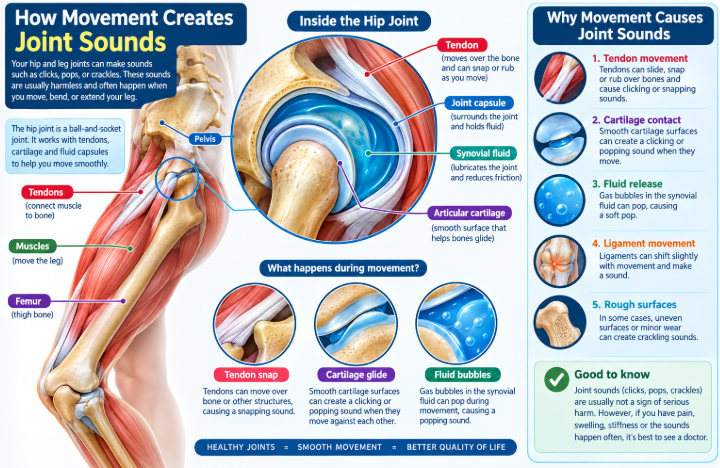
 Illustration explaining why leg and hip joints make cracking noises

Many people notice that their leg and hip joints make cracking noises when they stand up, squat, or walk. You might hear a quick pop, a loud click, or a grinding sound during daily activities. Fortunately, medical experts call this sound joint crepitus. While these sounds often seem alarming, they usually do not indicate severe structural damage unless pain accompanies them.

What Causes Joint Popping and Snapping?

Several harmless factors cause joint popping in your lower body. First, small gas bubbles frequently form within the fluid that lubricates your joints. When you bend your leg or rotate your hip, these nitrogen bubbles burst quickly and produce a popping sound. This process resembles popping bubble wrap, and it causes no harm to your joint structure.

Second, tight tendons or ligaments often snap over bony protrusions as you move. For example, when you stand up from a deep chair, a tight muscle tendon in your thigh may slide across your hip bone. As the tendon catches and releases, it creates a distinct clicking sound.

Understanding Snapping Hip Syndrome

In many cases, doctors diagnose this condition as snapping hip syndrome. This issue occurs when tendons or muscles catch on the outer, inner, or front part of your hip joint. Athletes, dancers, and runners frequently experience this phenomenon because they perform repetitive leg motions.

For instance, an outer snapping hip happens when the iliotibial (IT) band slides across the top of the thigh bone. Although the snapping sound feels strange, it typically causes no discomfort. However, if the tendon rubs continuously against the bone, inflammation may gradually develop.

Why Your Leg and Hip Joints Make Cracking Noises with Pain

Although harmless popping is common, you should pay attention when your leg and hip joints make cracking noises that cause pain. Pain, swelling, or stiffness during joint movement usually signals an underlying joint problem rather than simple gas bubbles.

For example, osteoarthritis causes the protective cartilage inside your joints to wear away over time. As a result, raw bone surfaces rub directly against each other, creating a rough grinding sensation. Similarly, tendinitis occurs when overworked tendons become inflamed, causing them to catch painfully against nearby bones.

Simple Ways to Keep Your Joints Healthy

Fortunately, you can take simple steps to protect your joints and reduce unpleasant cracking sounds. Regular stretching exercises keep your thigh and hip muscles flexible, which prevents tight tendons from snapping. Furthermore, gentle low-impact exercises like swimming and cycling strengthen the supportive muscles around your joints without adding extra stress.

Additionally, maintaining a healthy body weight reduces unnecessary pressure on your lower body joints. Drinking enough water also helps maintain fluid balance inside your joint capsules. If you sit at a desk for long hours, take frequent standing breaks to stretch your hips.

When to Seek Medical Attention

In conclusion, occasional joint sounds without discomfort are completely normal. However, if your leg and hip joints make cracking noises alongside persistent pain, catching, or joint swelling, you should consult a healthcare provider. A doctor can evaluate your joint health, recommend physical therapy, or suggest targeted treatments to restore smooth movement. For detailed medical guidelines on evaluating joint crepitus and mobility, visit the official Johns Hopkins Medicine Health Library.

References

  • American Academy of Orthopaedic Surgeons. (2022). Snapping Hip Syndrome. OrthoInfo.
  • Cleveland Clinic. (2023). Crepitus (Joint Popping): Causes and Treatments.
  • Mayo Clinic. (2023). Osteoarthritis: Symptoms and Causes.

What Causes the Pins and Needles Feeling in Hands and Feet?

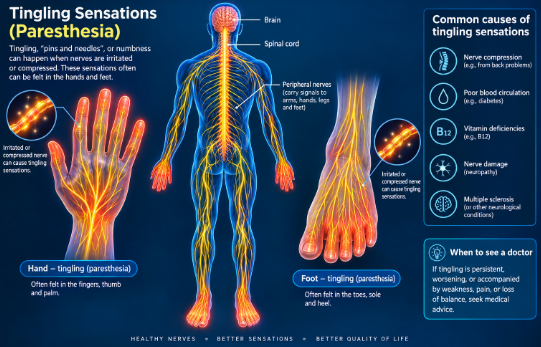
Medical illustration depicting the pins and needles feeling in hands and feet along human nerve paths.

Many people experience a sudden pins and needles feeling in hands and feet at some point in their lives. Doctors medically call this tingling sensation paresthesia. Sometimes, sitting on your leg for too long cuts off blood flow and causes a brief prickling feeling. However, when this sensation occurs frequently or persists for days, it often signals an underlying nerve issue that requires attention.

Understanding the Pins and Needles Feeling in Hands and Feet

Your nervous system acts like a vast network of electrical wires that send messages to your brain. When something irritates or squeezes these nerves, the signals become scrambled. As a result, your brain interprets these disrupted signals as tingling, numbness, or a prickling sensation.

For instance, when paresthesia affects both your upper and lower limbs at the same time, peripheral nerve irritation is usually responsible. Understanding these underlying mechanisms helps you identify whether your symptoms stem from a simple temporary issue or a long-term condition.

Spinal Nerve Compression and Lower Body Symptoms

When nerve pressure starts in your lower back, it frequently affects your legs and feet. For example, a herniated spinal disc can press against the sciatic nerve root. Consequently, this compression triggers a sharp pins and needles feeling in hands and feet or radiating hip pain down one leg.

Furthermore, poor posture and heavy lifting can aggravate spinal alignment. When severe pressure compresses these spinal nerves, walking or sitting comfortably becomes difficult. Therefore, restoring proper spine health often relieves lower body tingling quickly.

When the Pins and Needles Feeling in Hands and Feet Signals Neuropathy

If you feel tingling in both hands and both feet simultaneously, peripheral neuropathy is often the primary cause. Peripheral neuropathy occurs when peripheral nerves outside your brain and spinal cord suffer damage.

For example, high blood sugar levels from unmanaged diabetes frequently damage delicate blood vessels that supply oxygen to your nerves over time. Consequently, diabetic neuropathy often starts in the toes and fingers before spreading upward. In addition, chronic alcohol use and toxic chemical exposure can also trigger widespread nerve damage.

Vitamin Deficiencies and Systemic Causes

Your body relies on essential vitamins to maintain healthy nerve function. Specifically, a severe lack of vitamin B12 weakens the protective myelin sheath surrounding your nerve fibers. Without this protective coating, your nerves cannot transmit signals properly.

Similarly, autoimmune conditions like lupus, rheumatoid arthritis, or multiple sclerosis cause your immune system to attack healthy nerve tissue. Furthermore, thyroid disorders and kidney disease can cause fluid buildup that presses directly on delicate nerve pathways throughout your body.

Effective Tips to Manage Nerve Health

Fortunately, you can take simple daily steps to protect your nerves and reduce uncomfortable tingling sensations. First, eat a balanced diet rich in leafy greens, eggs, and lean proteins to support your vitamin B levels. Second, exercise regularly to boost blood circulation and deliver vital oxygen to your extremities.

Additionally, manage chronic health conditions like diabetes by keeping your blood sugar levels within a healthy range. If you work at a desk, change your sitting posture frequently to avoid placing direct pressure on your nerves.

When to See a Doctor and Final Thoughts

In conclusion, identifying what causes the pins and needles feeling in hands and feet helps you address potential health issues early. While temporary tingling after sitting awkwardly is harmless, persistent numbness or muscle weakness requires medical evaluation. Therefore, a healthcare provider can run blood tests or nerve conduction studies to find the exact cause and create a treatment plan. For additional insights on managing peripheral nerve conditions, explore the official NINDS Paresthesia Information Page.

References

  • American Academy of Neurology. (2022). Understanding Peripheral Neuropathy: Causes and Treatments.
  • Cleveland Clinic. (2023). Paresthesia: Causes, Symptoms, and Diagnosis.
  • Mayo Clinic. (2023). Peripheral Neuropathy: Symptoms and Causes.