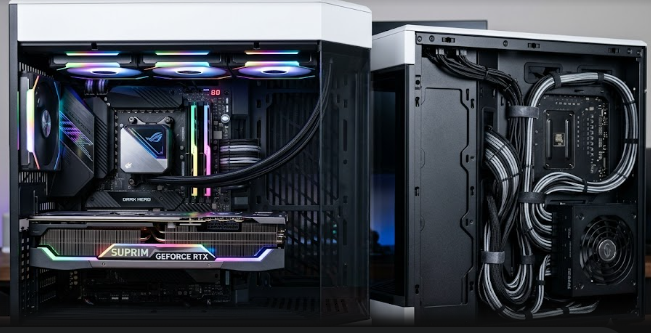
The world of desktop PC building is undergoing a massive design shift. For decades, builders have struggled to hide thick, messy power cables inside their computer cases. Today, a new innovation known as Rear-Mounted Power Connectors is changing everything by moving these plugs to the back of the components.
Standard ATX Layout (Cables in Front) —> Rear-Mounted Layout (Cables in Back)
[ Components + Cable Clutter ] [ Components Only ] | [ Hidden Cables ]
The Structural Shift to DIY-APE and BTF Ecosystems
In a traditional computer setup, you plug all power cables directly into the front side of the motherboard and graphics card. This standard layout is changing rapidly. Brands are now soldering all power phases, fan headers, and storage ports to the back of the circuit boards.
This structural shift has created new industry standards. For example, ASUS calls its hidden-cable ecosystem BTF (Back-To-the-Future), MSI uses the Project Zero label, and Gigabyte offers Stealth designs. These ecosystems remove the main 24-pin power cable, CPU power plugs, and GPU cables from the front chamber entirely.
Airflow and Thermal Specs of Rear-Mounted Power Connectors
Removing thick cable bundles from the front chamber does more than just make your PC look beautiful. This design choice mathematically reduces internal air resistance inside the chassis. When you remove obstacles from the path of your intake fans, air moves much faster across your hot components.
Cleaner paths mean that your CPU and graphics card coolers receive a constant supply of fresh, cool air. This improved movement lowers ambient temperatures inside the case by critical margins. Consequently, your computer can run demanding games or heavy workloads for longer periods without overheating or slowing down.
Chassis Clearance Requirements and Case Compatibility
While this technology sounds amazing, you must be aware of strict structural limits before buying parts. Traditional PC cases do not have openings in the right places to access these backward-facing plugs. Therefore, Rear-Mounted Power Connectors require specific PC cases designed with explicit cutouts behind the motherboard tray.
+——————————————+
| Motherboard Tray |
| [Cutout] [Cutout] [Cutout] | <– Required for rear plugs
| (CPU Power) (24-Pin) (SATA) |
+——————————————+
Case manufacturers must also provide standardized spacing between the motherboard tray and the side panel. You need enough clearance for thick power cables to bend safely without being crushed. If you try to force these components into a standard case, you risk damaging the wires or short-circuiting your hardware.
Structural Support and Rigidity Upgrades
Graphics card sag is a major problem for modern PC builders because new GPUs are incredibly heavy. Moving heavy 12V-2×6 or 16-pin power connectors to the rear changes the physical stress distribution on the circuit board. Instead of hanging from the front and pulling the card down, the power connection now locks directly into the motherboard or the back tray.
This change significantly improves the structural support of your graphics card. By shifting the weight and cable tension to the rear, the system minimizes the twisting force on the PCIe slot. Your components remain flat and secure, which prevents long-term physical damage to the delicate electronics.
References
- ASUS. (2024). BTF Ecosystem: The Cable-Free PC Building Revolution. ASUS Global.
- MSI. (2024). Project Zero Motherboards and Cases: A New Era of DIY PC Building. MSI Gaming.
- Gigabyte. (2024). Stealth Series: Clean Designs and Thermal Efficiency. Gigabyte Technology.
If you want to learn more about choosing compatible parts for a cable-free desktop design, check out this detailed PC building guide on Tom’s Hardware for expert recommendations.