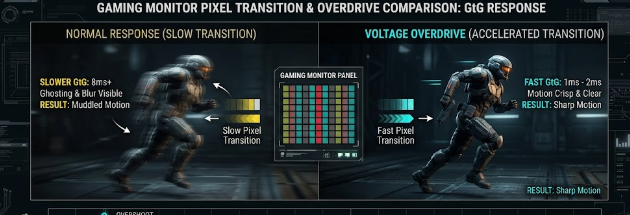
When you buy a gaming monitor, the retail box usually boasts an ultra-fast speed like 1ms or 0.5ms. However, competitive gamers know that these basic marketing numbers do not tell the whole story. To truly understand motion clarity, you must look closely at the response time G2G specs. This specific metric determines how fast your monitor can update moving images during fast-paced gameplay. Consequently, understanding this specification will help you calibrate your screen for the ultimate competitive edge.
Understanding the Physics Behind Response Time G2G Specs
Grey-to-Grey (G2G) measures the exact time in milliseconds (ms) that a display pixel takes to transition from one shade of grey to another shade. Monitor manufacturers use grey shades for testing because liquid crystals change between greys much faster than they change between fully saturated colors. Therefore, checking the response time G2G specs gives a realistic average of daily monitor performance during dynamic gameplay.
In contrast, moving picture response time (MPRT) measures how long a pixel remains continuously visible on the screen. While MPRT relates directly to the motion blur your eyes track, G2G focuses entirely on the physical speed of the pixel itself. Consequently, a monitor might have a great MPRT score due to backlight strobing but still suffer from slow underlying pixel transitions.
How the Overdrive Voltage Protocol Accelerates Your Screen
To speed up pixel transitions, monitor firmware uses a clever trick called “Overdrive.” Under normal conditions, liquid crystals twist at a native physical limit when they receive standard voltage. However, the overdrive protocol temporarily pumps a much higher electrical voltage into the liquid crystals or pixel controllers.
[Standard Voltage] —> Slow Crystal Twist —> High Response Time
[Overdrive Voltage] —> Fast Crystal Twist —> Low Response Time (Faster)
This sudden surge of power forces the crystals to twist and change states much faster than their native limits. As a result, the monitor achieves those coveted 1ms response times advertised on the box. For example, if a pixel needs to shift from dark grey to light grey, overdrive gives it an aggressive electrical push. Therefore, active overdrive significantly reduces traditional motion blur during intense gaming sessions.
The Dark Side: Inverse Ghosting and Pixel Overshoot
Although overdrive improves speed, aggressive settings introduce a critical trade-off known as pixel overshoot. When you crank the overdrive setting too high, the excessive voltage forces the pixel to zoom past its targeted color value. For instance, a pixel aiming for a medium grey might accidentally shoot all the way to bright white before settling back down.
This physical error creates a distracting visual artifact called inverse ghosting. Instead of a smooth trailing smear, you will see a prominent, dark shadow trail or a bright halo behind moving objects. Therefore, maximizing your response time G2G specs through extreme overdrive often ruins overall image quality. Competitive gamers must find a balanced setting that provides speed without causing these ugly artifacts.
Why You Need Variable Overdrive in VRR Ecosystems
The challenge gets more complicated when you use Variable Refresh Rate (VRR) technologies like G-Sync or FreeSync. These tools synchronize your monitor‘s refresh rate directly with your game’s changing framerate. Consequently, if your game drops from 144 frames per second to 60 frames per second, your monitor slows down its refresh rate to match.
Because the refresh rate changes instantly, a static overdrive voltage becomes a major problem. A high voltage that works perfectly at 144Hz will severely overshoot at 60Hz because the pixels have more time between refreshes. Therefore, high-end gaming monitors must feature dynamic or variable overdrive. This feature ensures the overdrive voltage continuously scales its power output in lockstep with real-time framerate fluctuations. As a result, you get clean transitions without overshoot, even when your game performance drops during heavy combat.
Finding the Perfect Balance for Competitive Play
Ultimately, tuning your monitor requires a careful balance between raw speed and visual clarity. You should test different overdrive profiles in your monitor’s on-screen display (OSD) menu to see which one works best. Usually, the middle or “Normal” setting yields the best response time G2G specs without triggering horrible inverse ghosting. To dive deeper into testing your display and optimizing motion performance, you can read more technical breakdowns on TFT Central.
References
- Blur Busters. (2021). LCD Motion Artifacts: Ghosting vs. Inverse Ghosting.
- TFT Central. (2023). Response Time Testing and Overdrive Explanations.