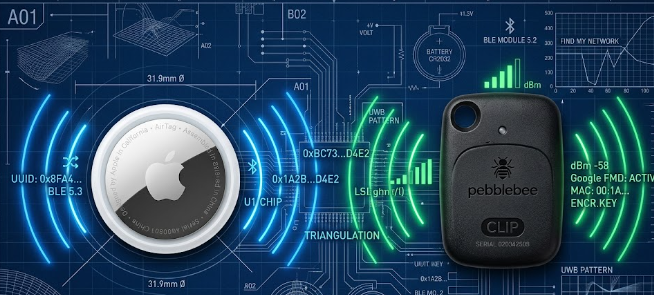
lost keys and wallets. However, choosing the right tracker depends heavily on the technology operating behind the scenes. When you look at Apple Find My vs Android Find My Device, the true differences lie in their underlying Bluetooth broadcast specifications.
Both systems use advanced wireless networks to pinpoint your lost items. Yet, they handle battery consumption, data privacy, and location tracking in distinct ways. Understanding these technical specifications helps you choose the best tracking tag for your specific needs.
BLE Beacon Frequency and Power Specs
Tracking tags must operate for up to a year on a single, tiny CR2032 coin cell battery. To achieve this impressive battery life, hardware manufacturers utilize Bluetooth Low Energy (BLE) technology. This protocol allows tags to broadcast their location without draining power.
[Battery: CR2032] —> [BLE Beacon] —> Broadcasts every 2-3 seconds at 0 dBm (1 mW)
These tracking tags emit cryptographic BLE advertisements at fixed milliwatt power floors, typically around 0 dBm or 1 milliwatt. Furthermore, the tags restrict their background broadcast intervals to a strict window of every 2 to 3 seconds. This precise timing ensures passing smartphones can catch the signal without forcing the tag to transmit continuously. Consequently, the device saves maximum energy while remaining highly discoverable.
Rolling Public Key Architecture for Privacy
Privacy is a major concern for users of tracking technology. Therefore, both platforms deploy a robust rolling public key architecture to protect your identity. You might worry that a malicious actor could track your tag’s unique BLE MAC address across public spaces. Fortunately, the hardware specifications actively prevent this type of tracking.
The hardware rotates its public cryptographic key identifiers over the air every 15 minutes. Because the beacon changes its digital signature so frequently, an outsider cannot link the signal back to you. Only your personal owner device holds the matching private key required to decrypt the location data.
Crowdsourced Network Density Compared
The actual tracking power does not come from the tag itself, but rather from the crowdsourced network density around it. When we evaluate Apple Find My vs Android Find My Device, the density of active host devices in your geographic location dictates real-world performance.
Apple utilizes hundreds of millions of active iPhones, iPads, and Macs worldwide. Because Apple forces background location reporting by default, the network is incredibly dense. Consequently, a lost AirTag in a city often updates its location every few minutes.
+———————————–+———————————–+
| Feature | Apple Find My Network | Android Find My Device |
+———————————–+———————————–+
| Host Devices | iPhones, iPads, Macs | Android smartphones and tablets |
| Default Network State | Opt-out (Highly dense by default) | Opt-in / Aggregated (Varies) |
| Real-World Update Intervals | Minutes (Highly frequent) | Minutes to Hours (Location dep.) |
+———————————–+———————————–+
Google handles its Android Find My Device network a bit differently. Google commands billions of active Android units globally, which offers massive theoretical scale. However, Google uses a more conservative, privacy-centric aggregation model by default. As a result, the Android network requires multiple passing Android devices to spot a tag before updating the location. This choice occasionally stretches location update intervals from minutes down to several hours in quiet areas.
Anti-Stalking Hardware Protocols
In the past, bad actors misused tracking tags to follow people without their consent. To combat this serious issue, Apple and Google created a cross-platform specification consensus. This unified standard protects security-focused users regardless of the smartphone ecosystem they choose.
The joint protocol requires rival operating systems to actively detect foreign trackers. If an unrecognized BLE tracking beacon moves continuously in close physical proximity to your device, your phone will sound an alert. Additionally, the system provides clear instructions on how to locate the hidden tag and disable its battery completely.
If you want to dive deeper into wireless engineering and smart asset tracking protocols, you can read more technical documentation on the Bluetooth SIG official website.
References
- Bluetooth Special Interest Group. (2024). Bluetooth Low Energy Core Specifications. Bluetooth.org.
- Apple Inc. (2025). Find My Network Hardware Specification Proximity Guidelines. Apple Developer Documentation.
- Google LLC. (2025). Find My Device Network Privacy and Security Overview. Android Developers Safety Hub.