How long can a UPS supply power to a laptop. Meanwhile UPS stands for Uninterrupted Power Supply. The capacity of a UPS depends on the battery it is fitted with. A UPS consists basically of a battery and an inverter.
To get a sense of how long a UPS can power your laptop check its battery capacity. The smallest UPS comes fitted with a 7AH battery. Theoretically, it should power a laptop rated 60w for 1.4 hours when fully charged.
But in reality, this is not the case. A laptop rated 60w may not last more than 30 minutes.Why is this so?, the UPS converts DC to AC and in the process, a lot of energy is lost.The battery may have deteriorated considerably upon storage before the UPS was sold.
So if you really want a UPS that can power your laptop for 2 – 3 hours and above, get a UPS fitted with an 100AH battery and above
System Mechanic is a software application that optimizes performance of personal computers and laptops. Your brand new and fast computer will gradually slow down upon use. This slow down is mostly as a result of software issues. With System Mechanic, your PC can work as fast as before, once again.
This game actually requires a computer with 2gb RAM and 256MB VRAM to run.
Excellent performance on an 8gb RAM with 1 GB graphics processor
You can enjoy the game at over 30 fps even when graphics are set to maximum.
Dirt Rally 2
The recommended system specifications are core i5 processor or equivalent, 8 gb RAM and 8gb dedicated graphics.Runs good when resolution is set to 1280 x 720 or a little bit higher for a pc with 8gb RAM, 1gb VRAM.
A O Tennis 2:
The graphics and gameplay is excellent. The game requires a Core I series processor and at least 8gb RAM to run. lts also needs at least a dedicated graphics processor of 2 gb RAM to run smoothly
It is however playable on a PC with 8gb RAM and 1gb VRAM,when set to reduced resolution of 1280 x 720 in graphics options of the game.
Grand Theft Auto 5:
This is a very popular game that requires high processing power to run. The excellent graphics in gameplay means that it requires a dedicated graphics processor of 2gb or more memory to run.The PC must be of core i 5 or equivalent with at least 8gb RAM. It has been tested to be playable on a pc/ laptop with 8gb RAM and 1gb graphics card. However at a reduced resolution of 1280 x 720 or lower. You may occasionally experience some lag but you will still enjoy the game
Need for Speed Shift
Runs excellent all the time on an 8gb RAM with graphics card installed. Actually a PC with 2gb RAM is sufficient
To ensure that your pc games perform optimally at all times, regularly defragment your hard drive,registry,
and RAM. Also, regularly clean up junk files that have accumulated due to system usage over time. There are many software that can automate these processes for you.
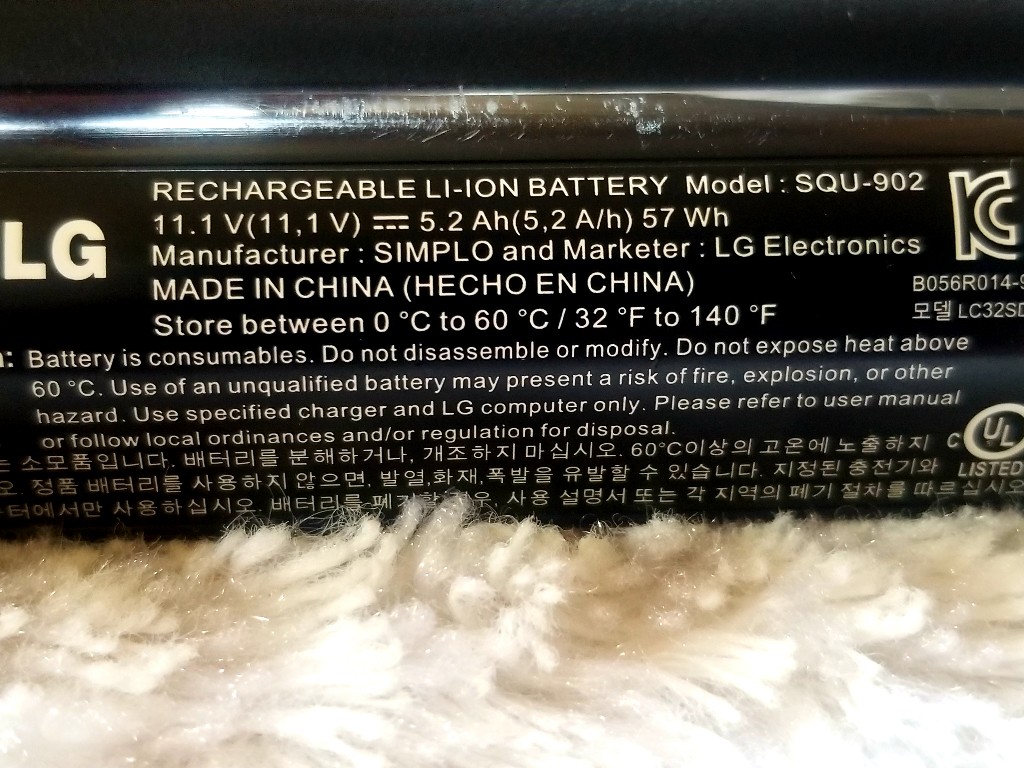
Your laptop battery power rating can be found labelled on the battery. A typical laptop battery rating is as stated below;
Laptop battery
11.1V, 5.2Ah, 57Wh.
This means that the battery supplies 11.1 volts, a current of 5.2 Ampere hours and a power of 57 Watts hour.
What does this information really tell? 5.2Ah means the battery can supply a current of 5.2A in one hour before it runs out . Or 57 Watts in one hour before it depletes provided the voltage supplied remains constant.
So let’s say your laptop power rating is 30Watts then on a battery capacity of 57Wh, your laptop will run for( 57Wh÷30W)= 1.9h or almost 2 hours. In reality it may be more or less as a result of several factors.
Both Watts hour( Wh) and Ampere hour( Ah) are measures of battery capacity. However, Wh is more reliable.
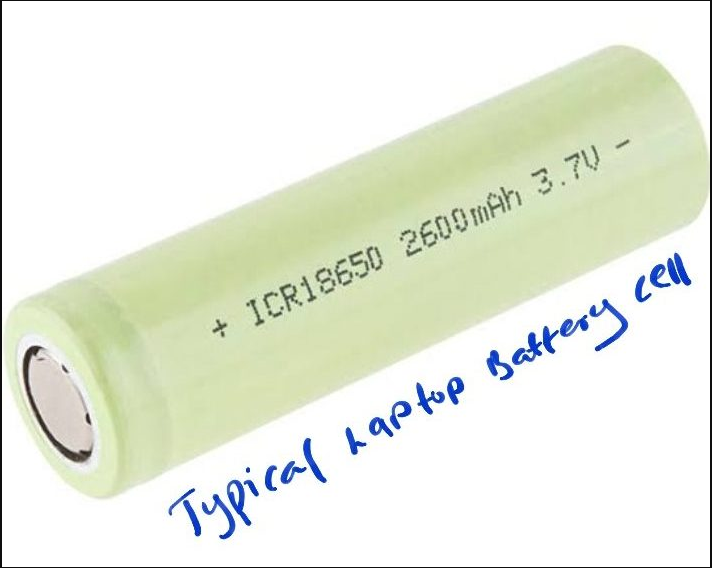
A laptop battery is usually made up of small battery cells. These battery cells are similar in shape to AA alkaline batteries but bigger..
6 cell laptop battery
Laptop battery usually consists of at least 3 or 4 battery cells arranged in series. To increase the laptop battery capacity, 2 or more sets of 3 or 4 battery cells in series are arranged in parallel.
The smallest laptop batteries I have come across are the 3 cell batteries. That is, consisting of 3 battery cells in series. These types of batteries are usually made for netbooks.
The standard laptop battery is made up of 6 cells. It consists of 2 sets of 3 battery cells in series, connected in parallel.
Similarly, a 9 cell laptop battery consists of 3 sets of 3 battery cells in series, connected in parallel. Of course there are laptop batteries. comprising sets of 4 battery cells in series, connected in parallel.
Laptop battery cells are connected in series and then in parallel to fulfill 2 purposes;
To meet the voltage rating required for the laptop to operate. This condition is met when the battery cells are connected in series.
To increase the time the laptop can run on batteries. This condition is met when sets of battery cells in series are connected in parallel.
Decoding laptop battery power ratings
Laptop battery cell
A single battery cell can supply 3.6 or 3.7 volts and a current of over 2Ah. Since in electrical terms, power = current × volts, a battery cell can supply ( 3.6V× 2Ah = 7.2Wh) a power of over 7.2 Wh.
Battery power ratings for your laptop are labelled on the battery.
For example assuming the battery power ratings are;
11.1V, 5.2Ah and 57Wh.
11.1V is the result of three, 3.7V battery cells in series. That is (3.7 + 3.7 +3.7)V= 11.1V. If the battery rating was 10.8V, then it implies that three 3.6V battery are connected in series, that is (3.6+3.6+3.6)V= 10.8.
5.2Ah is the result of two sets of three 3.7V batteries in series, connected in parallel. It means each of the 3.7V battery supplies a current of 2.6Ah. Even though 3cells are in series, the same 2.6Ah flows through the series connection. But because 2 sets of 3 battery cells in series are connected together in parallel, then the current supplied becomes 2× 2.6Ah = 5.2Ah.
From the calculations given above, you will realise that the laptop battery comprises 6 cells. Since power = current × volts, then each battery cell produces ( 2.6Ah×3.7V) = 9.62Wh ( when fully charged)
57Wh is the result of multiplying the power produced by one battery cell by 6.( since there are six cells in the laptop battery).
I.e. 9.62×6= 57.72Wh rounded down to 57Wh by the manufacturers.
Windows Experience Index (WEI) score is a score that states your computer’s hardware performance characteristics and capabilities. WEI score implies how good your PC is at handling various tasks.
The Windows System Assessment Tool (Win SAT) calculates the WEI score. It reports individual scores of the various hardware components of your PC and states the hardware component with the lowest score as your PC’s Window Experience Index Score. For windows 10 PCs it’s on a scale of 1-10.
How to Determine the WEI Scores of Your Windows 10 PC
Locate the command prompt app, (you can use the search feature), right click and run it as administrator.
In the command prompt interface, type, winsat formal, as shown and press enter.
The WinSAT command will run and determine the WEI scores, wait for it to finish, it can take a while.
When finished it will state total time it took to complete the process.
Close command prompt then navigate to your PC’s main disk storage. In this case, Local Disk (C:), yours may have a different name.
Click on it, then Windows, Performance, Win SAT, Data Store
Inside the data store folder you will see files containing the WEI scores of major hardware components.
For summary of these scores, open the file containing the name formal assessment; Right click and use a browser to open.
You will see the WinSat scores as shown.
The system score of 5.9 is the Windows experience Index Score for the PC tested. It is the same as the hard disk score which is the lowest score of all the hardware components measured.
To get a better presentation of WEI score you can run the PowerShell app. Run it as administrator. At the command prompt, type;
Get-CimInstance Win32_WinSat as shown. The Windows Experience Index score is revealed.
Another way you can do this is through the Performance Monitor app.
In Performance Monitor, expand data collector sets, expand System then click and start System Diagnostics.
Then, expand Reports followed by System, then System Diagnostics.
Under System Diagnostics, click on the report file that bears your computername.
To the right of the interface expand Hardware Configuration, then Desktop Rating.
Inside Desktop Rating, click the plus sign to the left of Query, then the plus sign next to Returned Objects. The WinSat Scores are revealed.
As stated earlier the score of the least performing hardware is the WEI Score. It is intended to show the particular hardware creating a bottleneck in the system.In this case the Hard Disk Drive. Replacing with a Solid State Drive (SSD) will improve WEI score.
Yes it’s true, you can connect a PlayStation 4 (PS4) controller wirelessly to a windows PC using an emulator.
Items needed
1. Internet and Bluetooth enabled windows based PC. Preferably a window 10 PC
2. DS4 Windows Software.
3. Fully charged PS4 controller
Video Demonstration
Here is how to connect PS4 controller to PC
Connect your PS4 controller to PC via Bluetooth. Press the PS button on your PS4 controller and check the Bluetooth interface of your pc to ensure it is connected.
Open the extracted folder and locate the executable file. You can make a shortcut to the file on your desktop
Start DS4 windows by clicking on the executable file.
DS4 windows will find your connected PS4 controller and may give a prompt to download additional software needed to make the PS4 controller work. This will only happen if you are doing this for the first time.
After additional software have been downloaded and installed, reboot your PC
Make sure your PC’s Bluetooth is active, then press the PS button on your PS4 controller to connect.
Start DS4 windows and it will immediately activate your PS4 controller for gaming. If properly connected, the PS4 controller light will show boldly.
To check that the controller is working perfectly you can click on TEST CONTROLLER on the DS4 windows interface.
It will take you to a webpage where you can test your controller.
Note that the DS4 windows software makes the Windows PC think that the PS4 controller is an Xbox 360 controller.