CXL 3.1 Fabric Topologies: Memory Pooling Specs in Modern Workstations

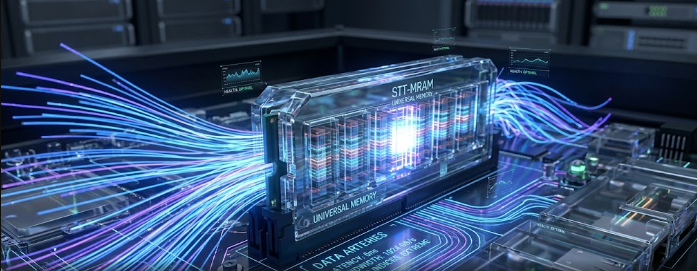
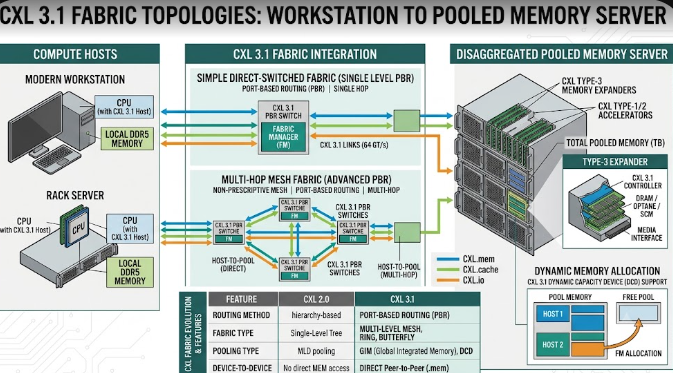
 Illustration showing CXL 3.1 Fabric Topologies connecting a modern workstation to a pooled memory server.

Enterprise IT professionals and structural engineers constantly need more computing power. To meet this demand, technology companies have introduced CXL 3.1 Fabric Topologies. Consequently, modern workstations can now handle massive data loads better than ever before. CXL stands for Compute Express Link. In essence, it is a high-speed connection that changes how computer parts talk to each other. Furthermore, this new specification allows computers to share memory over a network. Therefore, data analysts and engineers can run heavy simulations without slowing down their machines. In this article, we will explore how this technology works and why it matters for your heavy-duty computing tasks.

Direct Core-to-Memory Links in CXL 3.1 Fabric Topologies

First, let us look at direct core-to-memory links. The Compute Express Link (CXL) 3.1 specification runs over the fast PCIe Gen 6 infrastructure. Basically, it creates a superhighway between the computer’s processor (CPU) and the memory (RAM).

Traditionally, a CPU could only use the RAM plugged directly into its own motherboard. However, CXL 3.1 Fabric Topologies change this old setup entirely. Now, a CPU can access external RAM pools over a fast network. Specifically, it does this with near-zero latency overhead. Latency simply means delay. Because the delay is so tiny, the CPU treats this external memory exactly like its own internal memory. For example, if a civil engineer loads a massive bridge design, the computer pulls memory from the external pool instantly.

Dynamic Resource Allocation for Heavy Tasks

Next, we must discuss dynamic resource allocation. This feature is a game-changer for extreme workstation planners. Modern workflows require a flexible architectural specification. With CXL 3.1 Fabric Topologies, a master workstation can dynamically borrow blocks of memory from a centralized server fabric.

Imagine you are running massive structural simulations or complex 3D rendering tasks for a skyscraper. Suddenly, your workstation runs out of memory. Previously, the computer would crash or slow down drastically. Instead, the system automatically borrows extra memory from the centralized pool just for that specific task. Once the simulation finishes, the workstation returns the memory to the server. Consequently, other computers on the network can use that same memory block later. This process saves money and boosts overall efficiency.

The Cache Coherency Metric in CXL 3.1 Fabric Topologies

Finally, we must understand the cache coherency metric. Cache coherency remains the foundational specification of CXL technology. Without it, sharing memory would cause massive data corruption across the server.

When multiple computer parts share the same memory, they need to know what the others are doing. For instance, suppose a graphics card (GPU) modifies data in the pooled memory during a 3D rendering job. Thanks to CXL 3.1 Fabric Topologies, the main CPU instantly recognizes this change. Therefore, the CPU will not accidentally use the old, outdated data. The system constantly checks and updates all data across the network. As a result, engineers enjoy smooth, error-free simulations every single time.

In conclusion, this technology prepares your IT infrastructure for the future of civil engineering. If you want to learn more about the technical side of the Compute Express Link standard, please visit the official CXL Consortium website for further reading.

References

  • Compute Express Link Consortium. (2024). CXL 3.1 Specification.
  • PCI-SIG. (2024). PCI Express (PCIe) 6.0 Specification.
 High-Gain Wi-Fi 7/8 Antennas: Fixing Dead Zones in Complex Homes

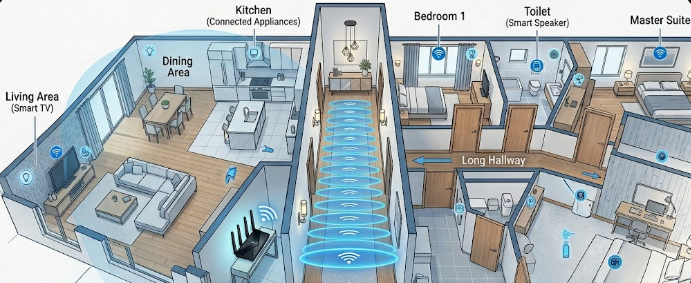
A smart home network router utilizing High-Gain Wi-Fi 7/8 Antennas to broadcast strong signals down a hallway.

Do you struggle with wireless dead zones in your large or multi-unit home? If you are a DIY home builder or a smart home network installer, you know how frustrating weak signals can be. Fortunately, High-Gain Wi-Fi 7/8 Antennas offer a powerful solution to this exact problem. However, to get the best results, you must understand how antenna specifications work. Many users believe that a bigger antenna simply creates a more powerful signal. In reality, the secret lies in how the antenna shapes and directs the energy throughout your living space.

Decoding the dBi Rating in High-Gain Wi-Fi 7/8 Antennas

When you look at a router specification sheet, you will see a number followed by “dBi.” This term stands for decibels isotropic. Specifically, it measures how effectively an antenna focuses its wireless signal in a particular direction.

It is crucial to understand that a higher dBi rating does not mean the router produces more overall power. Instead, the antenna simply reshapes the existing signal. Think of a standard lightbulb versus a flashlight. A standard bulb sends light in all directions, but it cannot reach very far. On the other hand, a flashlight focuses that exact same amount of light into a tight, powerful beam. Therefore, High-Gain Wi-Fi 7/8 Antennas act just like flashlights for your home network data.

Signal Geometry: Shapes for Different Home Layouts

Antenna gain directly changes the physical shape of your wireless coverage. For instance, a low-gain antenna, such as a 2 dBi model, creates a round, donut-shaped bubble. This bubble spreads the signal evenly in all directions, including up and down. Consequently, this shape works perfectly for multi-story properties where devices sit on different floors.

Conversely, high-gain directional antennas (ranging from 5 dBi to 9 dBi) squash that bubble into a flat, elongated disc. This design works wonderfully for punching signals down long hallways or across wide, open outdoor spaces. However, because the disc is flat, it sends very little signal upward or downward. If you place a high-gain router in a multi-story home, the upper floors might suffer from terrible reception.

Beamforming Synergy with Next-Gen Wi-Fi

Modern wireless technology makes these specialized antennas even smarter. Specifically, Wi-Fi 7 and Wi-Fi 8 utilize an advanced feature called explicit beamforming. This technology allows the router to locate your specific devices and aim concentrated data beams directly at them.

When you combine beamforming with High-Gain Wi-Fi 7/8 Antennas, you achieve outstanding network performance. The high-gain antenna provides a tightly focused signal disc, while beamforming dynamically steers the data beams within that disc to hit high-bandwidth targets. Therefore, your smart TVs and gaming consoles receive a laser-focused connection, which effectively eliminates lag.

Choosing the Right Setup for Your Home

Ultimately, you must match your antenna choice to your building layout. If you manage a sprawling, single-story home or a large outdoor property, then High-Gain Wi-Fi 7/8 Antennas are an excellent choice. They will push the signal horizontally to reach every far corner. For multi-story homes, you should stick with lower-gain options to ensure good vertical coverage. For deeper technical insights into wireless networking standards and next-generation hardware, you can read the latest updates on the official Wi-Fi Alliance website.

References

  • IEEE Xplore Digital Library. (2025). Analysis of Antenna Gain and Beamforming in Next-Generation Wireless Networks.
  • Wi-Fi Alliance. (2026). Wi-Fi 7 and Wi-Fi 8 Technical Specifications and Deployment Guide.

DisplayPort 2.1a and the DP54 cable specification

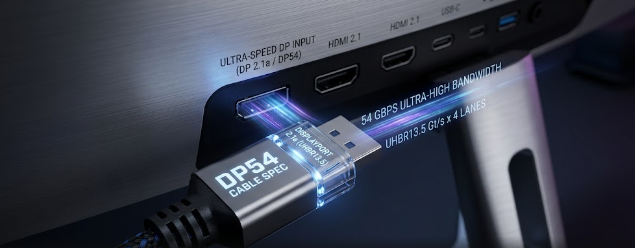
A high-quality gaming monitor connection highlighting DisplayPort 2.1a and the DP54 cable specification.

For power users and esports gamers, building a modern 4K or 8K ecosystem demands the best connections. Therefore, understanding DisplayPort 2.1a and the DP54 cable specification is vital. VESA recently introduced this new standard, which effectively replaces older, less efficient formats. Specifically, the update changes how we connect ultra-high-definition displays to high-performance graphics cards. Moreover, it solves the cable length issues that previously frustrated PC builders. In this article, we will explore the major benefits of this technology.

The Sweet Spot of DisplayPort 2.1a and the DP54 Cable Specification

First and foremost, the core of the new update lies in its bandwidth capability. The update officially introduces the DP54 cable standard. Consequently, it utilizes four lanes of the Ultra-High Bit Rate (UHBR) 13.5 transmission mode. This powerful combination delivers a massive 54 Gbps of total throughput.

To put this into perspective, earlier connections struggled to handle heavy data loads without compression. However, the 54 Gbps throughput hits a perfect sweet spot for modern setups. Gamers can now push incredible pixel density seamlessly. Ultimately, DisplayPort 2.1a and the DP54 cable specification ensure your graphics card communicates flawlessly with your display.

Passive Cable Lengths: DP54 vs. DP80

Additionally, cable length has always been a major concern for multi-monitor power users. Previously, the DP80 (80 Gbps) standard offered immense speed but strictly limited passive cables to just one meter. Therefore, users often needed expensive active repeaters to reach monitors placed further away on their desks.

Fortunately, DisplayPort 2.1a and the DP54 cable specification solve this problem beautifully. Mathematically, the DP54 spec allows passive copper cables to stretch up to 2 meters without any signal degradation. As a result, you gain much more flexibility when routing cables around workstation setups. Furthermore, this completely eliminates the need for costly active components, saving hardware enthusiasts both time and money.

Resolution and Refresh Rate Ceilings

Of course, bandwidth only matters if it translates to better visuals. By utilizing the new 54 Gbps throughput, DisplayPort 2.1a and the DP54 cable specification unlock stunning resolution and refresh rate ceilings. For instance, the spec physically allows a user to run dual 4K monitors at a blazing 144Hz completely uncompressed. This is an absolute game-changer for esports gamers who demand zero latency and flawless visual fidelity.

Alternatively, hardware enthusiasts pushing the limits can run a single 8K display at an astounding 240Hz. To achieve this, the connection uses Display Stream Compression (DSC). Because DSC operates without visual artifacts, the picture remains breathtakingly sharp and fluid.

Conclusion and Further Reading

In summary, this new technology delivers exactly what modern PC builders need. It perfectly balances extreme bandwidth, practical cable length, and unparalleled display support. From dual 4K setups to single 8K workstations, DisplayPort 2.1a and the DP54 cable specification will dominate the future of digital display interfaces. If you want to dive deeper into the technical data and standards shaping the future of monitors, you can learn more by visiting the official VESA DisplayPort website.

References

  • VESA. “VESA Announces Updated DisplayPort 2.1a Specifications to Allow for Longer Cables.” VESA.org, 2024.
  • MSI. “What are DP2.1 and DP2.1a: The difference you ought to know.” MSI Blog, 2024.
  • Cable Matters. “What is DisplayPort 2.1 & 2.1a?” Cable Matters Blog, 2024.
  • Wikipedia contributors. “DisplayPort.” Wikipedia, The Free Encyclopedia, 2026.

 High-NA EUV Lithography: The Specs Shrinking 2026 Silicon

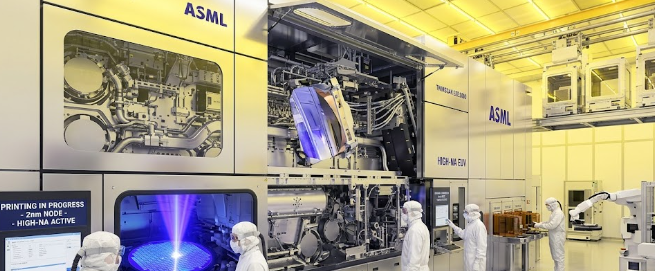
A glowing silicon wafer being printed with High-NA EUV lithography inside a cleanroom.

PC builders, tech speculators, and engineering enthusiasts always look forward to the next big leap in computing power. Today, companies like Intel and TSMC race to build faster and smaller chips. To achieve this, they rely on cutting-edge manufacturing tools. The most important tool driving the future of 2026 silicon is High-NA EUV lithography. This groundbreaking technology changes how engineers print microscopic circuits onto silicon wafers. Consequently, it unlocks a new era of processing power for our computers and smartphones.

Furthermore, this leap in technology is not just a minor upgrade. It requires a complete redesign of the optical systems that print microchips. Let us explore the technical specifications behind this massive shift in semiconductor fabrication.

The Numerical Aperture Jump in High-NA EUV Lithography

First, we must understand what Numerical Aperture (NA) means in optical lithography. Simply put, NA measures how well a lens or mirror system can collect and focus light. Think of it like the aperture on a professional camera. A larger aperture gathers more light, which allows the camera to capture sharper, more detailed photos.

Historically, chipmakers relied on standard Extreme Ultraviolet (EUV) systems with a 0.33 NA. However, the new generation of High-NA EUV lithography pushes this number to a 0.55 NA. This significant jump allows the internal lasers to print sub-10nm optical resolutions directly onto silicon wafers. Therefore, manufacturers can pack billions of additional transistors into the exact same physical space, making our daily devices dramatically faster and much more power-efficient.

Anamorphic Lenses and the Field Size Trade-Off

Despite the incredible benefits, achieving a 0.55 NA creates a massive physical challenge. The mirrors required to capture and focus this light are absolutely massive. Because these mirrors take up so much space inside the machine, engineers had to change the shape of the lenses. They introduced anamorphic lenses.

Specifically, anamorphic lenses magnify light at different ratios on the X and the Y axis. For example, imagine looking into a funhouse mirror that stretches your reflection horizontally but keeps your vertical height exactly the same. Because the system squishes the light asymmetrically to fit the massive mirrors, it creates a serious trade-off. This design cuts the printable wafer field size entirely in half, reducing the maximum print area down to just 26 mm x 16.5 mm.

Why High-NA EUV Lithography Demands Die Stitching

Because the printable area shrinks so drastically, chip designers face a major hurdle. Modern consumer hardware, like massive artificial intelligence processors and high-end gaming GPUs, feature incredibly large die sizes. Consequently, the new machines cannot print these giant chips in one single exposure.

To solve this problem, manufacturers use a clever technique called die stitching. Since the field size is smaller, engineers print two separate halves of a microchip side-by-side. Next, they fuse these two halves seamlessly together on the silicon wafer. You can compare this to a tailor sewing two pieces of fabric together to create a large, seamless blanket. Ultimately, this stitching specification ensures that High-NA EUV lithography can still produce the massive chips required for next-generation PC builds and AI data centers.

In conclusion, understanding these intricate manufacturing details helps us appreciate the engineering miracles happening inside our computers. As Intel and TSMC adopt these machines, we will see entirely new classes of hardware hit the market. If you want to dive even deeper into the physics of how these advanced lasers operate, you can read more about it on the ASML official technology page.

References

  • ASML. (2024). High-NA EUV (EUV 0.55 NA) Lithography. ASML Corporate Website.
  • IEEE Spectrum. (2023). How High-NA EUV Will Keep Moore’s Law Alive. IEEE.
  • Intel Newsroom. (2024). Intel’s Adoption of High-NA EUV for Future Nodes. Intel Corporation.

 JEDEC DDR6 Early Draft Specs: What to Expect from Next-Gen PC RAM

An illustration of a next-gen RAM module highlighting the JEDEC DDR6 Early Draft Specs for extreme speed and performance.

Computer enthusiasts always look for the next big upgrade. Consequently, hardware makers are now preparing for the future of computer memory. Currently, experts are finalizing the JEDEC DDR6 Early Draft Specs. This upcoming memory standard promises massive upgrades over the current DDR5 modules. Furthermore, extreme overclockers and PC builders will soon experience unprecedented data processing speeds. Therefore, understanding these JEDEC DDR6 Early Draft Specs helps you prepare your future PC builds. In this article, we break down what you should expect from this next-gen PC RAM.

The Baseline Speeds of JEDEC DDR6 Early Draft Specs

When you build a modern PC, memory speed directly affects overall performance. Therefore, the JEDEC DDR6 Early Draft Specs introduce incredible performance numbers. Engineers aim to establish a starting baseline speed of 12,800 MT/s right out of the gate. This massive speed jump guarantees that standard gaming rigs will handle heavy workloads effortlessly. Furthermore, the technology does not stop there. The draft specifications outline a clear path for enthusiasts. Over time, manufacturers will eventually scale these modules toward an astonishing 17,000 MT/s for extreme overclocked memory. Ultimately, this means that your future PC will load massive game worlds and process demanding software almost instantly.

Four Sub-Channel Architecture in JEDEC DDR6 Early Draft Specs

Speed alone does not solve all performance problems. Therefore, the physical structure of the memory module requires a complete redesign. Previously, DDR5 utilized dual 32-bit channels to manage data traffic. However, the JEDEC DDR6 Early Draft Specs detail a massive structural change on the module itself. The new design shifts from DDR5’s dual 32-bit setup to an innovative four 16-bit sub-channel architecture. Consequently, this spec change drastically increases parallel data processing. For example, imagine upgrading a two-lane highway into a four-lane expressway. Data can now travel simultaneously across more lanes without creating a traffic jam. As a result, the computer processor receives data much faster and handles multiple tasks smoothly.

Lower Voltage Ceilings in JEDEC DDR6 Early Draft Specs

With such incredible speeds, managing electricity becomes a major challenge. Typically, pushing more data generates extreme heat. However, the JEDEC DDR6 Early Draft Specs highlight a brilliant electrical specification. Engineers push to drop the core operating voltage below 1.1V. Lowering the voltage keeps the memory modules cooler during intense gaming sessions. In addition, developers pair this lower voltage with Decision Feedback Equalization (DFE). This clever technology ensures that the massive jump in speed does not melt standard motherboard DIMM slots. Consequently, PC builders will enjoy extreme performance without worrying about dangerous overheating issues.

Preparing for the Next Generation of PC RAM

In summary, the JEDEC DDR6 Early Draft Specs provide a thrilling glimpse into the future of computer hardware. You can expect faster baseline speeds, superior sub-channel architecture, and smarter voltage control. As hardware companies continue testing, we will soon see these memory sticks hit the market. If you want to keep your computer running flawlessly, you should definitely plan ahead for this upgrade. To learn more about upcoming memory standards and detailed technology roadmaps, you can visit TechPowerUp for further reading.

References

  1. JEDEC Solid State Technology Association. “Memory Standards and Specifications.”
  2. TechPowerUp. “DDR6 Memory Arrives in 2027 with Speeds up to 17,600 MT/s.”
  3. Tom’s Hardware. “JEDEC publishes first LPDDR6 standard — new interface promises double the effective bandwidth.”

 Why VESA DisplayHDR 1.2 Baseline Specs Matter for Your Next Monitor

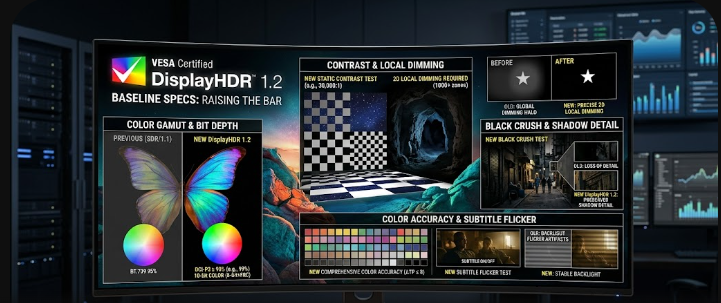
 A glowing PC monitor displaying a vibrant scene representing the new VESA DisplayHDR 1.2 baseline specs.

If you plan to buy a new PC monitor, you must understand the latest VESA DisplayHDR 1.2 baseline specs. For a long time, video editors and PC gamers felt frustrated by confusing compliance logos. Manufacturers often slapped “HDR” stickers on cheap displays that delivered terrible visual experiences. Consequently, the Video Electronics Standards Association (VESA) stepped in to fix this problem. They introduced a massive update that dramatically improves what entry-level HDR means. Therefore, if you want true high dynamic range, you need to know exactly what these new rules change. This article will break down the new strict requirements in simple English. We will explore how these changes finally bring premium features to budget-friendly screens.

The DCI-P3 Baseline in VESA DisplayHDR 1.2 Baseline Specs

First, let us look at the major upgrade to the entry-level tier. In the past, monitors only needed basic sRGB color coverage to earn a DisplayHDR 400 logo. This meant that cheap monitors looked completely washed out. Fortunately, the VESA DisplayHDR 1.2 baseline specs now strictly mandate a 90% DCI-P3 color gamut. DCI-P3 is a wider color space that shows far more vivid reds, greens, and blues.

Furthermore, the new rules require an 8-bit + 2-bit (FRC) color depth, even for the lowest DisplayHDR 400 tier. What does this mean for you? For example, instead of seeing ugly, blocky color transitions in a sunset video, you will see a smooth blend of colors. Ultimately, this change brings low-end monitors much closer to premium professional specs.

Dynamic Black Level Testing Methodology

Next, the updated standard introduces a massive shift in dynamic black level testing. Previously, testers measured black levels on a pure, 100% black screen. Unsurprisingly, manufacturers used edge-lit monitors to cheat this test. They simply shut off the entire backlight to achieve a “perfect” black reading. However, this trick ruins the actual viewing experience when you watch real movies.

To stop this, VESA changed the methodology. Now, testers must evaluate black levels with an active 8% white patch shining on the screen. Because the screen displays bright white in the center, the monitor cannot turn off its backlight completely. Therefore, this test proves the true contrast performance of the display. If a monitor cannot keep the dark areas dark while showing bright spots, it will fail.

Color Accuracy Under VESA DisplayHDR 1.2 Baseline Specs

Another huge improvement involves rigorous color testing. Displaying colors accurately at different brightness levels is extremely difficult. In the past, monitors shifted colors wildly when scenes got brighter. The new VESA DisplayHDR 1.2 baseline specs demand a strict average Delta-TP error of less than 8.

Testers now check 96 different color patches at three distinct luminance levels. Delta-TP measures how far a displayed color deviates from its true intended color. For instance, if you edit a video of a person walking from a dark room into bright sunlight, their skin tone should remain identical. Because the spec requires such a low Delta-TP score, video editors can finally trust the colors on an entry-level HDR monitor.

The Subtitle Flicker Test for Real-World Usage

Additionally, VESA added a brilliant real-world scenario test: the subtitle flicker test. Have you ever watched a dark, moody movie scene with subtitles turned on? On older HDR monitors, sudden bright elements like white subtitles caused the local dimming zones to violently pulse. This annoying “flicker” ruined the viewing experience for many movie lovers and gamers.

To solve this, the new specification ensures that sudden, bright text does not overwhelm the dimming zones. The monitor must smoothly manage its backlight without pulsing or washing out the dark background. Consequently, you can watch your favorite subtitled anime or dark thriller movies without distracting light flares.

Conclusion and Further Reading

In summary, the updated standard completely changes the PC monitor market. The new VESA DisplayHDR 1.2 baseline specs guarantee that even budget monitors deliver great color, true contrast, and flicker-free viewing. Manufacturers can no longer use cheap tricks to earn an HDR badge. Finally, gamers and creators will get exactly what they pay for. For more detailed technical information on these display standards, you can visit the official DisplayHDR website to read their performance criteria.

References

  1. Video Electronics Standards Association (VESA). (2024). DisplayHDR Performance Criteria 1.2.
  2. Hachman, M. (2024). VESA’s new HDR spec makes low-end monitors less miserable. PCWorld.
  3. VESA. (2024). VESA Elevates PC and Laptop HDR Display Performance with Updated DisplayHDR Specification. PR Newswire.