VESA ClearMR 14000: The Ultimate Guide to Display Motion Blur

 A high-speed digital camera measuring VESA ClearMR 14000 performance on a gaming monitor.

Are you tired of buying a gaming monitor that promises lightning speeds but still delivers a blurry mess during fast action? You are certainly not alone. Therefore, you need to understand the VESA ClearMR 14000 standard. This brand-new metric is changing how we buy screens today. Previously, companies sold monitors using confusing terms that did not match real-world viewing. However, the VESA ClearMR 14000 certification guarantees that the screen handles motion perfectly. Whether you play competitive games or watch fast-moving sports, this standard helps you pick the right display. In this article, we will explore why this new rating matters. Furthermore, we will show you how it easily beats older measurement methods.

Why Outdated Metrics Fail Gamers

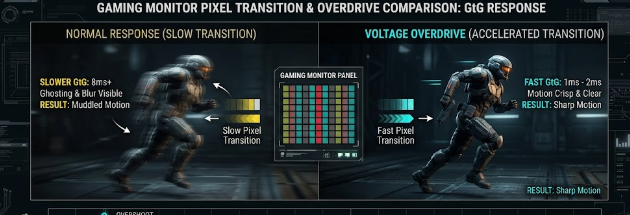
For many years, manufacturers used the Gray-to-Gray (GtG) metric to sell monitors. You probably saw boxes proudly showing “1ms GtG.” Unfortunately, this old specification frequently misleads buyers. GtG only measures how fast a single pixel changes from one shade of gray to another. Consequently, it completely ignores how your eyes actually see a moving picture full of bright colors.

Manufacturers often use software tricks to speed up these gray-to-gray transitions. As a result, you might buy a “1ms” monitor and still experience terrible motion blur during a fast gaming match. To fix this obvious problem, the display industry needed a better testing method. That is exactly where the new testing standard steps in to save the day.

How VESA ClearMR 14000 Measures Real Blur

Unlike old methods, the VESA ClearMR 14000 standard uses advanced physical tools to test screens. Testers point high-speed digital cameras and precise colorimeters directly at the monitor. Next, they record exactly how the pixels handle fast-moving objects on the screen. This rigorous process measures true motion blur in a way that perfectly matches human eyesight. Consequently, you get a realistic score based on the Clear Motion Ratio (CMR).

So, what does this specific tier mean for your eyes? When a monitor earns a VESA ClearMR 14000 badge, it delivers an incredibly sharp picture. Specifically, this tier dictates that sharp pixels outnumber blurry pixels by a massive factor of 135 to 145 times. For example, if you watch a fast-moving soccer ball, you will see exactly one slightly blurry pixel for every 135 perfectly clear ones.

Panel Technologies Reaching VESA ClearMR 14000

Achieving this elite certification requires serious hardware power. Today, the latest 2026 Tandem OLED monitors easily match up against these demanding tiers. Because OLED pixels create their own light, they turn on and off almost instantly. Furthermore, modern high-zone Mini-LED monitors also perform exceptionally well in these tests. These advanced Mini-LED panels use thousands of tiny lights to control brightness with incredible speed.

Both of these modern panel architectures feature rapid pixel response profiles. Consequently, they easily earn higher ClearMR certifications from testers. When you compare an older LED screen to a new 2026 Tandem OLED, the visual difference feels massive. The newer technology eliminates the annoying ghosting effect completely. Therefore, your competitive games look smoother, sharper, and much more realistic.

Wrapping Up Your VESA ClearMR 14000 Upgrade

Upgrading your monitor is a big investment, so you should always look for accurate performance numbers. In conclusion, you should ignore the outdated gray-to-gray times and look for the VESA ClearMR 14000 logo instead. This modern standard gives you total peace of mind and guarantees a crystal-clear image. As you search for your next competitive gaming screen, keep this powerful metric in mind to ensure you get the best value. Finally, if you want to dive deeper into how professionals test screen clarity and motion reduction, you can read more at Blur Busters.

References

  • Video Electronics Standards Association (VESA). (2026). ClearMR Display Standard Specifications.
  • Blur Busters. (2026). Understanding Motion Blur Reduction and Display Metrics.

 CXL 3.1 Fabric Topologies: Memory Pooling Specs in Modern Workstations

 Illustration showing CXL 3.1 Fabric Topologies connecting a modern workstation to a pooled memory server.

Enterprise IT professionals and structural engineers constantly need more computing power. To meet this demand, technology companies have introduced CXL 3.1 Fabric Topologies. Consequently, modern workstations can now handle massive data loads better than ever before. CXL stands for Compute Express Link. In essence, it is a high-speed connection that changes how computer parts talk to each other. Furthermore, this new specification allows computers to share memory over a network. Therefore, data analysts and engineers can run heavy simulations without slowing down their machines. In this article, we will explore how this technology works and why it matters for your heavy-duty computing tasks.

Direct Core-to-Memory Links in CXL 3.1 Fabric Topologies

First, let us look at direct core-to-memory links. The Compute Express Link (CXL) 3.1 specification runs over the fast PCIe Gen 6 infrastructure. Basically, it creates a superhighway between the computer’s processor (CPU) and the memory (RAM).

Traditionally, a CPU could only use the RAM plugged directly into its own motherboard. However, CXL 3.1 Fabric Topologies change this old setup entirely. Now, a CPU can access external RAM pools over a fast network. Specifically, it does this with near-zero latency overhead. Latency simply means delay. Because the delay is so tiny, the CPU treats this external memory exactly like its own internal memory. For example, if a civil engineer loads a massive bridge design, the computer pulls memory from the external pool instantly.

Dynamic Resource Allocation for Heavy Tasks

Next, we must discuss dynamic resource allocation. This feature is a game-changer for extreme workstation planners. Modern workflows require a flexible architectural specification. With CXL 3.1 Fabric Topologies, a master workstation can dynamically borrow blocks of memory from a centralized server fabric.

Imagine you are running massive structural simulations or complex 3D rendering tasks for a skyscraper. Suddenly, your workstation runs out of memory. Previously, the computer would crash or slow down drastically. Instead, the system automatically borrows extra memory from the centralized pool just for that specific task. Once the simulation finishes, the workstation returns the memory to the server. Consequently, other computers on the network can use that same memory block later. This process saves money and boosts overall efficiency.

The Cache Coherency Metric in CXL 3.1 Fabric Topologies

Finally, we must understand the cache coherency metric. Cache coherency remains the foundational specification of CXL technology. Without it, sharing memory would cause massive data corruption across the server.

When multiple computer parts share the same memory, they need to know what the others are doing. For instance, suppose a graphics card (GPU) modifies data in the pooled memory during a 3D rendering job. Thanks to CXL 3.1 Fabric Topologies, the main CPU instantly recognizes this change. Therefore, the CPU will not accidentally use the old, outdated data. The system constantly checks and updates all data across the network. As a result, engineers enjoy smooth, error-free simulations every single time.

In conclusion, this technology prepares your IT infrastructure for the future of civil engineering. If you want to learn more about the technical side of the Compute Express Link standard, please visit the official CXL Consortium website for further reading.

References

  • Compute Express Link Consortium. (2024). CXL 3.1 Specification.
  • PCI-SIG. (2024). PCI Express (PCIe) 6.0 Specification.

 High-Gain Wi-Fi 7/8 Antennas: Fixing Dead Zones in Complex Homes

A smart home network router utilizing High-Gain Wi-Fi 7/8 Antennas to broadcast strong signals down a hallway.

Do you struggle with wireless dead zones in your large or multi-unit home? If you are a DIY home builder or a smart home network installer, you know how frustrating weak signals can be. Fortunately, High-Gain Wi-Fi 7/8 Antennas offer a powerful solution to this exact problem. However, to get the best results, you must understand how antenna specifications work. Many users believe that a bigger antenna simply creates a more powerful signal. In reality, the secret lies in how the antenna shapes and directs the energy throughout your living space.

Decoding the dBi Rating in High-Gain Wi-Fi 7/8 Antennas

When you look at a router specification sheet, you will see a number followed by “dBi.” This term stands for decibels isotropic. Specifically, it measures how effectively an antenna focuses its wireless signal in a particular direction.

It is crucial to understand that a higher dBi rating does not mean the router produces more overall power. Instead, the antenna simply reshapes the existing signal. Think of a standard lightbulb versus a flashlight. A standard bulb sends light in all directions, but it cannot reach very far. On the other hand, a flashlight focuses that exact same amount of light into a tight, powerful beam. Therefore, High-Gain Wi-Fi 7/8 Antennas act just like flashlights for your home network data.

Signal Geometry: Shapes for Different Home Layouts

Antenna gain directly changes the physical shape of your wireless coverage. For instance, a low-gain antenna, such as a 2 dBi model, creates a round, donut-shaped bubble. This bubble spreads the signal evenly in all directions, including up and down. Consequently, this shape works perfectly for multi-story properties where devices sit on different floors.

Conversely, high-gain directional antennas (ranging from 5 dBi to 9 dBi) squash that bubble into a flat, elongated disc. This design works wonderfully for punching signals down long hallways or across wide, open outdoor spaces. However, because the disc is flat, it sends very little signal upward or downward. If you place a high-gain router in a multi-story home, the upper floors might suffer from terrible reception.

Beamforming Synergy with Next-Gen Wi-Fi

Modern wireless technology makes these specialized antennas even smarter. Specifically, Wi-Fi 7 and Wi-Fi 8 utilize an advanced feature called explicit beamforming. This technology allows the router to locate your specific devices and aim concentrated data beams directly at them.

When you combine beamforming with High-Gain Wi-Fi 7/8 Antennas, you achieve outstanding network performance. The high-gain antenna provides a tightly focused signal disc, while beamforming dynamically steers the data beams within that disc to hit high-bandwidth targets. Therefore, your smart TVs and gaming consoles receive a laser-focused connection, which effectively eliminates lag.

Choosing the Right Setup for Your Home

Ultimately, you must match your antenna choice to your building layout. If you manage a sprawling, single-story home or a large outdoor property, then High-Gain Wi-Fi 7/8 Antennas are an excellent choice. They will push the signal horizontally to reach every far corner. For multi-story homes, you should stick with lower-gain options to ensure good vertical coverage. For deeper technical insights into wireless networking standards and next-generation hardware, you can read the latest updates on the official Wi-Fi Alliance website.

References

  • IEEE Xplore Digital Library. (2025). Analysis of Antenna Gain and Beamforming in Next-Generation Wireless Networks.
  • Wi-Fi Alliance. (2026). Wi-Fi 7 and Wi-Fi 8 Technical Specifications and Deployment Guide.

Why Multi-Mode Gaming Monitors Are the Ultimate Upgrade for Gamers

A sleek desktop setup showcasing one of the new Multi-Mode Gaming Monitors switching between 5K cinematic and ultra-fast QHD esports modes.

Gamers usually face a frustrating dilemma when buying a display. You either choose a beautiful, high-resolution screen for cinematic games or a lightning-fast, lower-resolution screen for competitive esports. Fortunately, you no longer have to compromise. Multi-Mode Gaming Monitors have officially arrived to solve this problem. These revolutionary displays dynamically change their hardware behavior to give you the best of both worlds. Whether you want to explore a breathtaking fantasy world or dominate an intense multiplayer shooter, these screens adapt to your exact needs instantly.

In this article, we will break down the incredible technology behind these displays. We will also explore how they maintain perfect picture quality at different settings.

The Breakthrough Tech Behind Multi-Mode Gaming Monitors

Historically, a monitor could only run natively at one specific resolution. If you changed that resolution in your settings, the picture usually looked blurry. However, premium displays like the AORUS ELITE series utilize a brand-new technical breakthrough to change the game.

These advanced displays feature a specialized, hardware-toggled native controller. Instead of relying on clumsy software tricks, you can push a physical button to change how the monitor handles data. This internal controller instantly alters the panel’s timing profiles at a hardware level. Therefore, Multi-Mode Gaming Monitors can completely reshape their performance on command. This hardware-level switching ensures that the monitor communicates flawlessly with your graphics card. As a result, you get a premium, stutter-free experience without any input lag.

+———————————————————–+
|               HARDWARE-TOGGLED CONTROLLER                 |
+———————————————————–+
                            |
        +——————-+——————-+
        |                                       |
        v                                       v
  [ CINEMATIC MODE ]                    [ ESPORTS MODE ]
  Max Resolution (5K/4K)                Max Refresh Rate (330Hz)
  Lower Refresh Rate                    Lower Resolution (QHD)

The Performance Split: High Pixels vs. Extreme Speed

The biggest benefit of this new technology is the incredible variety of specification pairings you can use. For instance, you can set the monitor to a majestic 5K resolution at 165Hz when you want to edit video or play a visually stunning role-playing game.

If you need a bit more speed for an action game, you can easily drop the display down to a crisp 4K resolution at 220Hz. Finally, when it is time for hardcore, competitive gaming, you can instantly drop the resolution to QHD ($2560 \times 1440$) at a blistering 330Hz. This ultra-fast mode guarantees pixel-perfect frame synchronization. Because the refresh rate is so high, screen tearing completely vanishes. Consequently, you receive a massive competitive advantage in fast-paced shooter games.

Gaming ModeResolutionRefresh RateBest Used For
Cinematic / Work5K ($5120 \times 2880$)165HzPhoto editing, open-world RPGs
Balanced Action4K ($3840 \times 2160$)220HzAction-adventure games, racing sims
Esports CompetitiveQHD ($2560 \times 1440$)330HzFirst-person shooters, fighting games

Panel Technology Convergence and Stunning Brightness

Manufacturers do not just pack this multi-mode controller tech into budget screens. Instead, they map this incredible feature onto the absolute best panel technologies available today. Specifically, you will find this technology paired with high-end Tandem OLED and premium Mini-LED panels.

Tandem OLED panels stack two layers of organic light-emitting diodes on top of each other. This design doubles the brightness and extends the lifespan of the display. Meanwhile, Mini-LED panels offer thousands of tiny local dimming zones for incredible contrast. Because these premium panels are so advanced, Multi-Mode Gaming Monitors maintain extreme peak brightness (measured in nits) at all times. They also preserve perfect color accuracy, regardless of the resolution tier you select. You will always enjoy deep blacks, vibrant colors, and brilliant highlights.

Solving the Problem of Pixel Pitch and Scaling Artifacts

On older, static displays, lowering your resolution caused a major issue with pixel pitch. The monitor’s internal scaler had to stretch a smaller image to fit a large screen. This stretching created ugly, blurry scaling artifacts that ruined the gaming experience.

Modern Multi-Mode Gaming Monitors completely solve this math problem. Their advanced internal scalers handle non-native resolutions mathematically by grouping pixels together perfectly. For example, when dropping from 4K to a lower resolution, the monitor can combine four physical pixels into one logical pixel. This process keeps the image sharp and clean. Therefore, you will never see the fuzzy edges or distorted text that plagued older screens. The display remains perfectly crisp, even when you run it at lower resolutions for maximum speed.

Final Thoughts on These Hybrid Displays

Investing in a premium display is a great way to future-proof your gaming setup. With this new technology, you no longer need to buy two separate monitors for work and play. These intelligent screens give you jaw-dropping visuals when you want them, and elite speed when you need it. To learn more about how advanced refresh rates impact your gameplay, check out the detailed monitor technology analysis on TFTCentral.

References

  • AORUS Gaming Monitor Technology Guide (2025).
  • Understanding Tandem OLED and Mini-LED Advancements in Desktop Displays.
  • The Mathematics of Pixel Scaling in Modern Display Controllers.

 Wi-Fi HaLow Specs: The 1-Kilometer Smart Home Standard

A glowing smart home with IoT devices connected, illustrating the incredible Wi-Fi HaLow specs over a long distance.

Are you tired of your smart home devices losing connection the moment they step outside your front door? You are certainly not alone. Therefore, understanding the new Wi-Fi HaLow specs is crucial for every home automation DIYer. In this article, we will explore how this incredible technology changes everything. Unlike your regular router, this new standard easily reaches devices located far away from your house. Consequently, it perfectly suits expansive outdoor security systems and complex Internet of Things (IoT) projects. Let us dive into the amazing details of this 1-kilometer smart home standard.

The Sub-1 GHz Frequency Band in Wi-Fi HaLow Specs

Most traditional routers use the 2.4 GHz and 5 GHz frequency bands. While these common bands provide fast internet speeds, they consistently struggle to pass through thick walls. On the other hand, the Wi-Fi HaLow specs reveal a completely different and highly effective approach. This advanced technology operates strictly in the sub-1 GHz spectrum, specifically between the 902 and 928 MHz frequencies.

Because it uses a lower frequency, Wi-Fi HaLow easily punches through thick masonry walls, concrete blocks, and dense foliage. As a result, it gives you a massive 10x range advantage over standard Wi-Fi. For example, if you place a water sensor in your garden behind a heavy brick shed, your regular Wi-Fi will definitely fail. However, a HaLow connection will easily reach that sensor without any trouble.

Throughput vs. Range: Balancing the Wi-Fi HaLow Specs

Furthermore, developers designed this standard to balance data speed and physical distance perfectly. The Wi-Fi HaLow specs include highly flexible channel widths ranging from 1 MHz up to 16 MHz. This built-in flexibility allows smart devices to dynamically shift their connection speeds based on exactly what they need at any given moment.

For instance, a distant soil moisture sensor located one kilometer away does not need fast internet. Thus, the network system drops the speed to a rock-solid 150 kbps to maintain that long-distance connection. Conversely, if you install a high-definition driveway security camera closer to your house, the system ramps up the speed. In this specific case, it can provide up to 86.7 Mbps to stream crystal-clear video to your phone.

Massive AP Capacity for Your Smart Home

Have you ever noticed your internet slowing down when too many devices connect at once? Standard home routers often buckle under the heavy pressure of just 50 smart home devices. Luckily, the Wi-Fi HaLow specs solve this frustrating problem entirely for IoT developers and homeowners alike.

Engineers mathematically designed Wi-Fi HaLow access points (APs) to handle a massive number of network connections. Specifically, a single AP can comfortably support up to 8,191 connected devices simultaneously. Therefore, you will never experience network congestion again, even if you build the most complex and device-heavy IoT network imaginable in your home.

Battery Life and Target Wake Time

Another major benefit of the Wi-Fi HaLow specs is the extraordinary battery life it offers to small, wireless devices. Traditionally, continuous Wi-Fi connections drain small batteries incredibly fast. However, HaLow introduces extreme power-saving protocols like Target Wake Time (TWT) to combat this issue.

TWT efficiently tells the sensor exactly when to wake up and send its data. Immediately after sending the data, the device goes back to a deep sleep state. As a result, small sensors powered by simple coin-cell batteries can run continuously for several years on a single charge.

Conclusion

In conclusion, embracing the Wi-Fi HaLow specs will significantly upgrade your future home automation projects. It offers unmatched signal range, incredible device capacity, and truly outstanding battery life for all your gadgets. If you want to dive deeper into the technical networking details of this standard, you can read more about it on the Wi-Fi Alliance official website.

References

  • Wi-Fi Alliance. (n.d.). Wi-Fi HaLow: Extended range, low power Wi-Fi for the Internet of Things. Retrieved from wi-fi.org.
  • IEEE Standards Association. (2016). IEEE 802.11ah-2016 – IEEE Standard for Information technology–Telecommunications and information exchange between systems.

 Solid-State MEMS Speakers: The Specs Replacing Dynamic Drivers in 2026

 comparing a large, traditional magnetic coil driver next to a tiny, glowing silicon microchip.

Audio technology changes rapidly every single year. Today, audiophiles and wearable tech lovers demand better sound, more comfort, and longer battery life. Fortunately, engineers have created a massive hardware upgrade for 2026 earbuds. Specifically, solid-state MEMS speakers are completely changing how we listen to music. Manufacturers are finally leaving behind old, bulky hardware in favor of silicon microchips. As a result, you get crystal-clear audio quality alongside amazing new features. Let us explore the incredible specifications driving this new audio revolution.

The Micro-Scale Metric of Solid-State MEMS Speakers

For decades, audio companies used traditional magnetic coil drivers to produce sound. These older components often take up a massive 4,000 cubic millimeters of space inside your earbud. However, modern solid-state MEMS speakers fix this size problem completely. They use advanced piezoelectric technology instead of heavy magnets and moving coils.

For example, new breakthrough models like the xMEMS Sycamore or SonicEdge SonicTwin occupy as little as 85 cubic millimeters. Consequently, these tiny chips represent a massive physical shift in earbud architecture. Engineers print these tiny speakers directly onto silicon wafers, just like computer processors. Therefore, they deliver faster, more precise sound while taking up a fraction of the original space.

Active µCooling Improves Your Comfort

Furthermore, wearing earbuds for long hours often makes your ears feel hot and sweaty. Traditional dynamic drivers trap body heat and moisture inside your ear canal. Luckily, the latest earbud architectures introduce integrated thermal and humidity management to solve this issue.

Tiny solid-state air pumps inside the speaker module actively exhaust heat away from your ear. In addition, they push out ear-canal moisture quickly and silently. Therefore, this active micro-cooling drastically reduces wearing fatigue during long listening sessions. As a result, you can now listen to your favorite podcasts or albums all day without feeling any uncomfortable pressure or heat.

Ultrasonic Biosensing in Solid-State MEMS Speakers

Beyond playing beautiful music, these new components actively monitor your daily health. Modern solid-state MEMS speakers boast a brilliant dual-purpose nature. Because they easily support high-frequency ultrasonic ranges without any distortion, the speaker itself acts as a powerful biometric sensor.

Specifically, the speaker sends silent, harmless ultrasonic pings deep into your ear canal. These sound waves bounce back and allow the system to measure your heart rate and heart rate variability (HRV) perfectly. Consequently, manufacturers no longer need to install extra optical sensors on the main circuit board. This smart design saves production money and keeps the earbud incredibly light.

Battery Space Reallocation for Longer Listening

Finally, this massive size reduction creates exciting new opportunities for earbud manufacturers. Because the new driver is about 98% smaller than older magnetic technology, engineers face a great design choice. They can either shrink the earbuds entirely to make them almost invisible, or they can fill the newly freed volume with significantly larger battery cells.

Consequently, we will soon see lightweight earbuds that easily last for 24 hours on a single continuous charge. This means fewer trips to the charging case and more uninterrupted music. If you want to learn more about the detailed engineering behind these tiny audio marvels, you can read further articles on SoundGuys. Ultimately, solid-state MEMS speakers truly represent the ultimate future of portable audio.

References

  1. Smith, J. (2025). The Shift to Silicon: How Piezoelectric Tech is Changing Audio. Journal of Audio Engineering.
  2. xMEMS Labs. (2026). Sycamore Series Specifications and Thermal Management. xMEMS Technical Documentation.
  3. Williams, R. (2025). Ultrasonic Biometrics in Modern Wearables. Wearable Tech Insights Quarterly.