5 Early Warning Signs of Kidney Damage You Shouldn’t Ignore

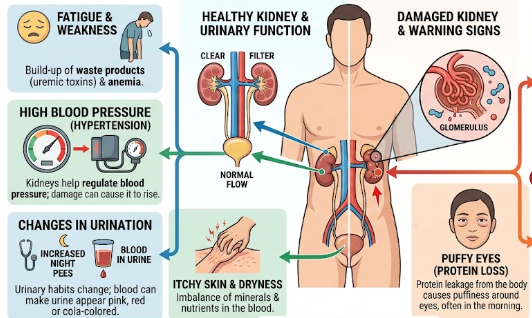
Medical diagram illustrating the early warning signs of kidney damage including puffy eyes and itchy skin

Your kidneys work quietly every second to filter out excess waste, balance vital body fluids, and produce crucial hormones. Because these two bean-shaped organs are remarkably resilient, you might not notice when they face trouble. Medical experts often refer to chronic kidney disease as a “silent killer” for a simple reason. In fact, your body can lose up to 90% of its kidney function before any severe physical symptoms manifest. Consequently, paying close attention to minor physical changes can save your life. Today, we will explore the early warning signs of kidney damage so you can protect your long-term health.

Understanding the Early Warning Signs of Kidney Damage

Your kidneys act much like a household water filtration system. When the filters remain clean, pure water flows out smoothly, and contaminants wash away. However, when the system clogs or deteriorates, subtle clues begin to surface in your daily routine. Recognizing the early warning signs of kidney damage empowers you to take action before irreversible harm takes place. Let us take a detailed look at five key physical red flags you should never overlook.

1. Persistent Foamy or Frothy Urine

Healthy kidneys filter waste while keeping precious molecules like proteins inside your bloodstream. However, damaged kidney filters (called glomeruli) start leaking a key protein named albumin into your urine.

As a result, when this protein hits the toilet water, it creates a thick layer of foam or persistent froth. Unlike normal bubbles that pop within seconds, this foam resembles whipped eggs and lingers in the bowl. Therefore, if you notice recurring foam during your daily bathroom visits, your kidneys may be sending a critical cry for help.

2. Edema (Swelling in the Feet, Ankles, and Eyelids)

Because impaired kidneys fail to remove excess fluid and sodium from your body, extra water builds up inside your tissue layers. Doctors call this fluid retention edema.

For instance, you might notice that your socks leave deep indentations on your calves at the end of the day. Similarly, your shoes might feel unusually tight, or your eyelids may look puffy every morning. Consequently, unexplained swelling in your lower limbs or around your eyes serves as one of the primary early warning signs of kidney damage.

3. Unexplained Fatigue and Brain Fog

When your kidneys slow down, metabolic waste products begin to accumulate in your blood stream, a dangerous state known as uremia. Additionally, healthy kidneys produce a vital hormone called erythropoietin, which tells your bone marrow to create red blood cells.

As kidney function drops, red blood cell production falls, triggering kidney-related anemia. Therefore, your tissues receive far less oxygen than they require. You will likely feel constantly exhausted, find it hard to concentrate, or experience persistent “brain fog” despite getting a full night of rest.

4. Noticeable Changes in Urination Patterns

Because your kidneys control fluid balance, any major shift in your daily bathroom habits warrants attention. You should monitor two specific changes:

  • Frequent Nighttime Urination (Nocturia): Waking up multiple times throughout the night to pass urine can mean the kidney filters have lost their concentrating ability.
  • Sudden Drops in Volume: Passing significantly less urine despite drinking your usual amount of water signals a severe decline in filtration capacity.

Thus, tracking these shifts helps you spot subtle disruptions early.

5. Persistent Dry, Itchy Skin

As metabolic toxins build up and mineral balances warp, your skin often reacts. Damaged kidneys struggle to maintain the right balance of minerals like calcium and phosphorus in your blood. As a result, many people suffer from severe, deep-seated skin itching that lotions fail to relieve.

Vital Diagnostic Tests You Should Request

Fortunately, simple medical screenings can detect kidney trouble long before physical symptoms escalate into a crisis. If you suspect any issues, you should request two low-cost baseline tests from your doctor:

  1. Urinalysis: A quick dipstick test that checks your urine sample for microscopic traces of protein (albumin) and blood cells.
  2. Serum Creatinine and eGFR Blood Test: A basic blood test that measures creatinine (a muscle waste product). Your doctor uses this value to calculate your Estimated Glomerular Filtration Rate (eGFR), which measures your exact kidney capacity percentage.

Taking Action for Your Health

By staying proactive, you can slow down or even reverse many underlying causes of kidney stress through dietary changes, hydration, and medical care. If you observe any of these early warning signs of kidney damage, schedule a quick visit with a medical practitioner immediately. For more detailed clinical guidelines on maintaining optimal kidney health, you can visit the National Kidney Foundation for further reading and expert health advice.

References

  • National Kidney Foundation. (2023). Stage 1 and Stage 2 Chronic Kidney Disease (CKD). NKF Clinical Guidelines.
  • Centers for Disease Control and Prevention. (2024). Chronic Kidney Disease in the United States. U.S. Department of Health and Human Services.
  • Mayo Clinic. (2023). Symptoms and Causes of Chronic Kidney Disease. Mayo Foundation for Medical Education and Research.
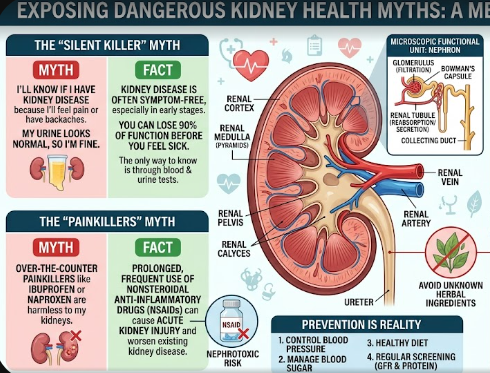

5 Dangerous Myths About Kidney Health and Herbal Remedies

Medical illustration showing human kidney structure to expose dangerous myths about kidney health.

Many people unknowingly expose themselves to life-threatening risks by believing dangerous myths about kidney health. Your kidneys work around the clock to filter waste, regulate body fluids, and produce essential hormones. However, false health claims on social media and traditional beliefs often encourage habits that silently destroy these vital organs. Therefore, we must separate medical facts from popular fiction to protect our body systems.

In this detailed guide, we break down five common misconceptions surrounding renal wellness, herbal mixtures, and daily habits.

Myth 1: Herbal Remedies “Flush” and Cleanse the Kidneys

Many people believe that drinking herbal mixtures, popular concoctions, or traditional remedies (“agbo”) detoxifies the renal system. Consequently, they consume untested botanical extracts to flush out impurities. However, this belief tops the list of dangerous myths about kidney health.

In reality, unverified herbal drinks contain unknown active chemical compounds, pesticides, and heavy metals. When your kidneys attempt to filter these toxic substances, the delicate filtering tubes suffer severe harm. Doctors call this condition acute tubular necrosis, which simply means direct breakdown and death of kidney tissue.

Furthermore, unlike regulated pharmaceutical drugs, herbal mixtures lack standardized dosages. Consequently, taking these concoctions forces your organs to work extra hard, often triggering sudden organ failure.

Myth 2: Normal Urination Means Healthy Kidneys

Another widespread misconception is assuming that producing a regular volume of urine guarantees healthy organs. Therefore, many individuals ignore early medical checkups simply because they visit the restroom normally.

However, your kidneys can lose up to 80% of their functional capacity before your daily urine output changes significantly. The body adjusts by pushing the remaining healthy filters to work overtime. As a result, urine volume usually stays normal until late-stage renal failure occurs.

Instead of relying solely on urine volume, you must pay attention to subtle symptoms. For instance, warning signs include persistent foamy urine, swelling in the ankles, unexplained fatigue, and sudden changes in urination frequency at night.

Myth 3: Kidney Disease Only Strikes Seniors and Heavy Drinkers

Many young adults assume that organ damage only affects elderly individuals or people with heavy alcohol habits. Consequently, young non-drinkers frequently ignore early warning signs and risky daily habits.

In truth, renal disease affects people of all age groups. For example, frequent misuse of common pain relievers—such as non-steroidal anti-inflammatory drugs (NSAIDs)—gradually destroys renal filters over time. Additionally, uncontrolled high blood pressure, diabetes, autoimmune diseases, and genetic conditions frequently trigger kidney failure in young adults who do not drink alcohol.

Furthermore, poor diet choices, high salt intake, and chronic dehydration increase risk levels for everyone. Therefore, age and alcohol abstinence alone do not grant automatic immunity.

Myth 4: Drinking Massive Amounts of Water Cures Existing Organ Damage

Proper hydration unquestionably helps prevent painful kidney stones and urinary tract infections. Consequently, many people wrongly assume that drinking endless gallons of water every day can reverse existing organ damage.

However, over-hydration cannot repair scarred or dead renal tissues. In fact, when a person already suffers from advanced renal failure, their damaged filters cannot balance fluid levels properly. Consequently, drinking massive amounts of water causes fluid build-up in the lungs, ankles, and heart.

Therefore, while healthy individuals should drink adequate water daily, patients with existing kidney disease must strictly follow fluid intake limits set by their medical doctors.

Myth 5: You Will Feel Pain Immediately When Problems Start

Most people expect immediate, sharp back pain whenever an internal organ experiences trouble. Consequently, they assume their health remains intact as long as they feel comfortable.

Unfortunately, early-stage renal failure rarely causes physical pain. The tissue inside the organ lacks pain-sensing nerves, meaning damage develops quietly over many months or years. Typically, physical pain only occurs when you have active kidney stones or direct bacterial infections in the urinary tract.

Therefore, routine blood and urine tests remain the only reliable way to catch problems early. Medical professionals test blood creatinine levels and check urine for excess protein to evaluate your actual renal health accurately.

Taking Action for Better Health

Understanding the true facts helps you avoid habits that trigger silent damage. Instead of relying on untested traditional cleanses, focus on proven health basics. Keep your blood pressure balanced, manage blood sugar levels, avoid non-prescription painkiller abuse, and undergo annual medical checks.

For further reliable guidance on maintaining healthy kidneys, visit the National Kidney Foundation to explore expert medical resources and screening tips.

References

  1. National Institute of Diabetes and Digestive and Kidney Diseases (NIDDK). Causes of Chronic Kidney Disease. NIDDK, U.S. Department of Health and Human Services.
  2. World Health Organization (WHO). Traditional Medicine and Kidney Health Safety Guidelines.
  3. Centers for Disease Control and Prevention (CDC). Chronic Kidney Disease Basics and Risk Factors.
  4. American Kidney Fund. Common Kidney Myths and Misconceptions Exposed.

Understanding Dialysis and Kidney Care Options in Nigeria: Costs and Realities

A medical professional explaining kidney care options in Nigeria to a patient.

Managing kidney health can feel overwhelming, but exploring effective kidney care options in Nigeria gives families clarity and hope. When your kidneys work properly, they act as quiet cleaning units. They filter waste, balance body fluids, and regulate essential blood chemical levels every single minute. However, high blood pressure, diabetes, or long-term inflammation can damage these vital organs. When damage reaches an advanced stage, the kidneys lose their ability to filter blood on their own.

Fortunately, understanding how medical treatment works helps you make informed choices early. Early action protects your quality of life and saves your family unnecessary financial strain.

What Dialysis Does to Support Your Health

When the kidneys fail, harmful toxins and extra fluid quickly build up in your blood. This toxic buildup makes you feel constantly tired, swollen, and nauseous. Dialysis acts as an artificial filter to perform the job your kidneys can no longer handle.

During hemodialysis—the most common form of treatment—a machine pulls blood from your arm, cleans it through a special membrane filter, and safely returns the clean blood to your body. Think of a dialysis machine like a swimming pool filter. If you stop running the filter, debris gathers and clouds the water. In the same way, dialysis keeps your bloodstream clean so your body functions smoothly.

Financial and Emotional Realities of Ongoing Dialysis

Although dialysis saves lives, receiving treatment multiple times a week creates a significant burden for families. Most patients require three sessions every week, with each session taking about four hours. Navigating hospital visits, traffic, and missing work hours drains emotional energy very quickly.

Furthermore, financial costs add up rapidly. In private hospitals, a single dialysis session often costs between ₦50,000 and ₦100,000. Consequently, monthly costs can exceed ₦600,000. While recent Federal Government subsidies have reduced prices to ₦12,000 per session in select public tertiary hospitals, long waiting lists remain common due to high demand. This financial strain explains why medical experts emphasize early disease prevention over late-stage treatment.

Exploring Modern Kidney Care Options in Nigeria Through Transplantation

For many individuals with end-stage renal disease, a kidney transplant offers the best long-term solution. A successful transplant replaces lost kidney function completely, freeing patients from weekly dialysis sessions. However, obtaining a transplant requires careful preparation and significant resources.

First, medical teams must find a compatible donor through precise blood and tissue matching tests. Second, the financial commitment is high; kidney transplant surgery in Nigeria generally costs between ₦22 million and ₦30 million. After surgery, recipients must take daily immunosuppressant medications for life. These essential drugs prevent the immune system from attacking the new organ, making ongoing medical care necessary.

Practical Steps to Slow Down Kidney Disease Progression

You do not have to wait until kidney failure occurs before taking control of your health. Indeed, early medical intervention can preserve remaining organ function for many years.

You can protect your kidneys today by taking three proactive steps:

  • Control Your Blood Pressure: High blood pressure damages delicate kidney blood vessels. Keep your numbers under control through routine checkups and prescribed medication.
  • Adjust Your Daily Diet: Reduce your table salt intake significantly. Additionally, manage your daily protein portions so your kidneys do not work excessively hard to process waste.
  • Stay Well Hydrated and Avoid Unprescribed Painkillers: Drink clean water regularly, and avoid over-using herbal mixtures or heavy pain medications without medical supervision.

Taking control of your lifestyle today gives your organs the best environment to stay healthy over time. For detailed medical guidelines and research on managing kidney wellness, read more on the National Institute of Diabetes and Digestive and Kidney Diseases.

References

  • Federal Ministry of Health Nigeria. (2025). Federal Government Subsidises Cost of Kidney Dialysis in Federal Hospitals Across the Country.
  • Nigerian Association of Nephrology (NAN). (2026). Report on Renal Care and Kidney Transplantation Costs in Nigeria.
  • World Health Organization. (2024). Management and Prevention of Chronic Kidney Disease in Sub-Saharan Africa.

CXL 3.1: The Specs Unifying Server Motherboard Memory

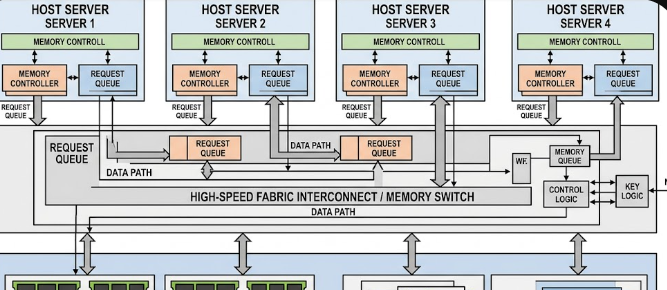
: A schematic diagram showcasing multiple host servers connected to a shared pool of external memory resources

Modern data centers face a massive challenge when handling workloads like artificial intelligence and big data analytics. Standard servers often run out of memory quickly, which forces operators to buy more physical hardware than they actually need. To solve this problem, engineers developed CXL 3.1: The Specs Unifying Server Motherboard Memory. This breakthrough standard changes how we think about resource allocation by breaking down physical barriers between individual servers.

What is CXL 3.1 and How Does It Work?

Compute Express Link (CXL) is an open industry standard that creates a high-speed connection between processors and external devices. Specifically, the CXL 3.1 version runs directly over the physical layer of PCI Express (PCIe) Gen 6. Consequently, it achieves double the bandwidth of previous generations while using the exact same physical slots on a motherboard.

By using this advanced connection, processors (CPUs), graphics cards (GPUs), and specialized smart accelerators can share a single, unified pool of memory. The system maintains “coherency” across the board. This means that if a GPU changes a piece of data in the shared pool, the CPU sees that exact change instantly. As a result, different chips can work on the same task together without waiting for slow data transfers.

Understanding the CXL 3.1 Architecture

The standard works by combining three distinct protocols over a single physical link:

  • CXL.io: This protocol handles device discovery, configuration, and register access. It works exactly like standard PCIe.
  • CXL.cache: This protocol allows peripheral devices, such as GPUs, to efficiently access and cache the host system’s memory.
  • CXL.mem: This protocol lets the host CPU access memory attached to an external CXL device as if it were a standard local motherboard DIMM.

By combining these protocols, CXL 3.1 makes external, chassis-mounted memory modules look and feel like local RAM to the server operating system.

Fabric Management and Multi-Head Devices

In a traditional setup, you cannot share a single stick of RAM between two separate motherboards. However, the new fabric management specifications in CXL 3.1 change this reality entirely. The system uses “Multi-Head” devices that can plug into multiple host server nodes at the exact same time.

Because of this multi-head capability, a central fabric manager can assign specific blocks of RAM to different servers on-the-fly. For example, if Server A suddenly experiences a massive traffic spike, the manager instantly routes extra gigabytes of RAM to it. This entire process happens electronically in real-time. Therefore, you do not need to shut down the server, open the chassis, or reboot the operating system to upgrade memory.

Direct Memory Access Latency Floors

Many administrators worry that moving memory outside of the motherboard will slow down performance. Fortunately, CXL 3.1 solves this concern by keeping transport latency extremely low. Because the protocol bypasses traditional complex network layers, it keeps extra latency down to single-digit nanoseconds.

To put this in perspective, look at the comparison table below:

Memory Connection TypeRelative Latency OverheadPerformance Class
On-Board DDR5 DIMMBaseline (0 ns)Native / Fastest
CXL 3.1 External Pool+10 to +15 nsNear-Native
Standard RDMA Network+1,000 to +5,000 nsDelayed / Slow

This tiny latency penalty means that fabric-attached memory banks perform almost identically to traditional on-board RAM. Consequently, applications run smoothly without bottlenecking.

Real-World Data Center Efficiency

From a business perspective, memory pooling solves one of the biggest money-wasting issues in IT: “stranded memory.” In typical data centers, one server might use 90% of its CPU but only 10% of its RAM. That leftover RAM sits idle and cannot be used by any other machine.

By utilizing CXL 3.1, companies can pool all their memory together in a central chassis. When a server needs memory, it borrows it from the shared pool. Once the task is complete, the server returns the memory back to the pool. This dynamic sharing slashes total operational hardware costs because companies no longer need to over-provision their physical servers.

For a deeper dive into the technical details and upcoming hardware releases of this standard, you can explore the official technical documentation on the CXL Consortium Website.

References

  • Compute Express Link (CXL) Consortium. (2023). CXL 3.1 Specification.
  • PCI-SIG. (2022). PCI Express Base Specification Revision 6.0.
  • Rambus Technical Blog. (2024). Understanding CXL Memory Pooling and Latency.

 Periscope Zoom Telephoto Optics: Understanding D-Cut Lenses and Prism Tilt Specs

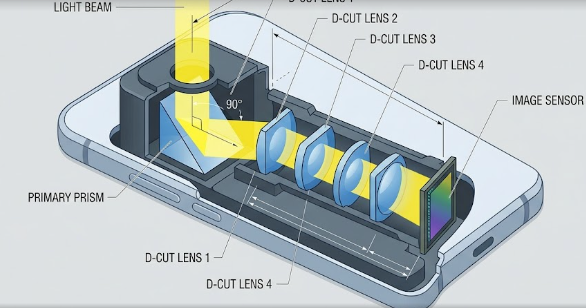
 A detailed technical diagram illustrating the horizontal light path through periscope zoom telephoto optics in a modern smartphone.

Have you ever wondered how thin smartphones can zoom into far-away objects without a massive lens sticking out? Historically, optical zoom required thick camera bodies. However, the secret now lies in periscope zoom telephoto optics, a technology that mimics submarine periscopes to fit high-quality lenses inside a slim phone chassis. Smartphone makers use this clever engineering trick to deliver incredibly sharp, long-distance photos. Consequently, you can capture clear images of distant subjects without carrying a bulky DSLR camera. In this article, we will unpack how these advanced camera systems work, from sliced-down glass elements to tiny tilting mirrors.

How the Horizontal Light Path Works

To understand this technology, we must first look at how standard cameras function. Normally, light travels straight through the lens directly onto the camera sensor. Because optical zoom requires physical distance between lens elements, a standard telephoto lens would make your phone incredibly thick. Therefore, engineers had to redesign the entire camera layout.

Instead of pointing the lens outward, periscope systems place the lenses sideways inside the phone body. First, a primary prism sits right behind the outer camera glass. This prism acts like a mirror, bending the incoming light at a sharp 90-degree angle. Next, the bent light travels horizontally down the width of the phone chassis.

As a result, the light passes through multiple lens elements before finally hitting the image sensor, which also sits vertically. This clever layout allows for a long focal path without creating a giant physical camera bump on the back of your device.

Saving Space with D-Cut Lens Specifications

Even with a horizontal layout, space inside a smartphone remains extremely tight. Smartphone manufacturers constantly fight to keep devices under 8 or 9 millimeters thick. A larger camera sensor requires wider lens elements to capture enough light. However, a perfectly round, wide lens would increase the thickness of the phone. To solve this problem, optical engineers developed the D-Cut lens.

A D-Cut lens is a standard circular lens element with its top and bottom edges physically sliced off. This modification changes the shape of the lens from a circle to a flat oval resembling a letter “D” on both sides. By cutting off the unused top and bottom portions of the glass, engineers can fit a wider diameter lens into a much thinner space.

Consequently, the camera can capture more light for better night photos without increasing the physical thickness of the phone. For example, a D-Cut lens allows a high-performance zoom lens to fit snugly inside a phone that is only 8 mm thick.

Advanced Stabilization with Prism OIS Tilt and VCM

When you zoom in on a subject at 5x or 10x magnification, even the tiniest shake of your hand can ruin the photo. Standard cameras use Voice Coil Motors (VCM) to shift the lens elements up, down, left, and right to counteract shaky hands. We call this process Optical Image Stabilization (OIS). However, shifting heavy, horizontal lenses inside a tight periscope module is incredibly difficult and slow.

To fix this, premium smartphones use prism-tilting OIS instead of traditional lens-shifting OIS. Instead of moving the entire lens array, a specialized VCM tilts the primary prism itself. Because the prism sits at the very front of the system, tilting it slightly can correct large amounts of movement.

Specifically, these systems use ultra-precise milliradian ($\text{mrad}$) tilt angles to keep the image stable. One milliradian represents a tiny fraction of a degree. For instance, a system might tilt the prism by just 10 to 15 $\text{mrad}$ to instantly cancel out your hand tremors, ensuring your handheld videos remain perfectly smooth.

Digital Sensor Cropping vs. True Optical Focal Length

Many smartphone brands advertise massive “100x zoom” capabilities on their spec sheets. However, smart buyers must distinguish between true physical zoom and digital tricks. True optical zoom relies on the physical distance between the lenses inside the periscope zoom telephoto optics system to change the focal length. This physical adjustment preserves the original resolution and clarity of the image sensor.

In contrast, digital zoom is simply sensor cropping. The phone’s software takes a standard photo, crops into the center, and uses artificial intelligence to fill in the missing pixels. While computational algorithms have improved, digital cropping always degrades the actual image quality and introduces digital noise.

When checking specifications, always look for the true focal length in millimeters (like 120 mm for a 5x zoom). If a phone claims a high zoom factor but lacks a long physical focal length, it is likely using digital cropping rather than real optical glass. Therefore, when you shop for your next smartphone, make sure to check the actual optical hardware details. For a deeper technical dive into mobile camera sensors and optical designs, you can read more on Android Authority, which offers excellent breakdowns of modern smartphone hardware.

References

  1. Android Authority. (2024). How periscope zoom cameras work on smartphones.
  2. GSMArena. (2023). Understanding mobile zoom: Optical, digital, and hybrid explained.
  3. Schmidt, M. (2022). Advanced Optoelectronics in Mobile Phone Cameras: D-Cut Lens Physics and Stabilization.

 LTPO 4.0: The 1Hz-to-144Hz Variable Display Specs Explained

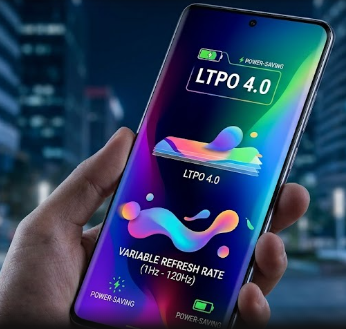
A high-end mobile phone showcasing a vibrant, power-saving LTPO 4.0 variable refresh rate display showing smooth graphic transitions.

Modern flagship phones look stunning, but their power-hungry screens can drain your battery in a few hours. If you love gaming or want a phone that lasts all day, you need to understand display technology. Fortunately, LTPO 4.0 technology is here to solve the battery drain issue while keeping your screen incredibly smooth.

This fourth-generation display tech allows your phone screen to change how fast it refreshes. It can shift anywhere from a super-fast 144Hz down to a static 1Hz. In this article, we will break down exactly how this engineering marvel works in simple terms.

What is the Hybrid Backplane in LTPO 4.0?

To understand this new technology, we must look at the backplane of the screen. The backplane is simply the physical circuit board behind the pixels. In the past, screens used Low-Temperature Poly-Silicon (LTPS) thin-film transistors (TFTs) to turn pixels on and off.

While LTPS is very fast and responsive, it leaks a lot of electrical current when displaying still images. Because of this, engineers created a hybrid backplane that combines LTPS with Indium Gallium Zinc Oxide (IGZO) TFTs. We call this combination Low-Temperature Polycrystalline Oxide, or LTPO.

The LTPO 4.0 design uses the fast LTPS transistors to handle rapid screen movements like gaming or scrolling. At the same time, it uses the highly efficient Oxide transistors to handle slow or still images. This hybrid system gives you the absolute best of both worlds.

The Power-Saving Math Behind the 1Hz Extreme Floor

The most impressive feature of this new display is its ability to drop its refresh rate down to just 1Hz. This means the screen only updates its image once per second. This is perfect for when you are reading an e-book or using the Always-On Display (AOD) mode.

Let us look at the simple math behind this power-saving feature. A standard modern phone screen refreshes 120 times every single second (120Hz). If you are looking at a still photo, a 120Hz screen is wasting energy by redrawing that same photo 120 times per second.

When your phone drops from 120Hz down to 1Hz, it reduces the number of display cycles by over 99%. In terms of raw numbers, dropping to a 1Hz floor reduces the display’s power consumption by up to 80% during those idle windows. This massive drop in energy consumption keeps your phone cool and saves your battery.

How Dynamic Refresh Rate Scaling Works

Your phone does not just stay at one speed; instead, it uses a smart hardware logic controller to scale the refresh rate. This controller monitors what is happening on your screen in real-time. It then changes the speed of the display to match the exact frame rate of your app.

For example, the screen will dynamically step between different speeds based on your activity:

  • 1Hz: Always-on display or reading a static page.
  • 24Hz to 30Hz: Watching cinematic movies or YouTube videos.
  • 60Hz: Standard social media browsing or basic apps.
  • 120Hz: Fast system scrolling and standard mobile games.
  • 144Hz: Intense, competitive mobile gaming.

By matching the screen speed directly to the software, the controller eliminates visual stutter. You will never notice the screen changing speeds because the transitions happen instantly.

Solving the Flicker and Brightness Shift Problem

Older variable screens had a major issue with screen flicker. When a screen jumps instantly from 1Hz to 120Hz, it experiences a sudden change in electrical voltage. This sudden voltage delta causes rapid shifts in the screen’s brightness, which we call gamma flicker.

Gamma flicker is highly annoying and causes severe eye strain. Fortunately, LTPO 4.0 introduces advanced luminance compensation specs to solve this problem. The display’s controller predicts these voltage jumps and applies precise electrical corrections in milliseconds.

This hardware compensation ensures that the screen’s brightness remains perfectly stable, even when jumping from 1Hz to 144Hz. You get a seamless, flicker-free viewing experience that is incredibly gentle on your eyes during long gaming sessions.

Summary of Key Display Specifications

To help you compare, here is a quick breakdown of how these display generations differ:

FeatureOlder LTPS ScreensEarly Gen LTPOLTPO 4.0 Screens
Refresh Rate RangeFixed 60Hz or 120Hz10Hz to 120Hz1Hz to 144Hz
Power SavingsLow (Heavy drain)Moderate (~50% max)High (Up to 80% at 1Hz)
Gamma FlickerNone (Fixed rate)Noticeable during jumpsFully eliminated (Compensated)
Best Used ForBudget phonesEarly flagshipsPremium flagship & gaming phones

Ultimately, this display technology is a must-have feature for anyone buying a high-end mobile device today. It ensures you do not have to choose between extreme gaming performance and multi-day battery life. For a deeper technical dive into the evolution of mobile screens, you can read this detailed guide on the history of mobile display panels on DisplayMate.

References

  • OnePlus Official Specs & ProXDR Technology (2024).
  • “Understanding LTPO Displays: How Hybrid Backplanes Save Battery” – Compare and Recycle.
  • “The Physics of Low-Temperature Polycrystalline Oxide (LTPO) in OLEDs” – Display Technology Journal.