Smart Ring Buying Guide: Essential Specs You Must Check

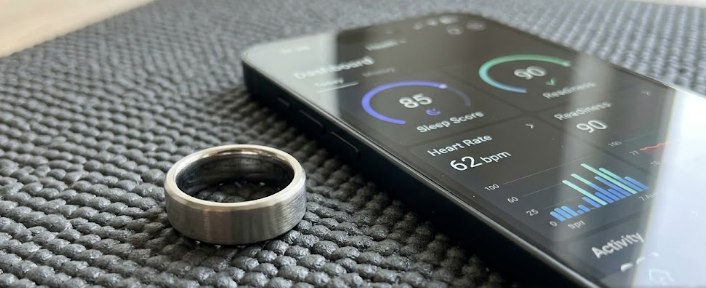
 A sleek titanium fitness tracker on a mat, representing our comprehensive smart ring buying guide.

Are you tired of wearing a bulky smartwatch to track your fitness? If so, you are definitely not alone. Many fitness enthusiasts now prefer something smaller and more discreet. A smart ring is the perfect alternative. In this smart ring buying guide, we will explore the essential specifications you need to check before making a purchase. Ultimately, knowing what to look for helps you choose a device that perfectly matches your lifestyle. Let us dive right into the key features you must consider.

Sensor Loadout in Our Smart Ring Buying Guide

First and foremost, the sensors inside the ring determine its true value. Since you want to track your health, you must look for specific sensors. For example, an Optical Heart Rate (OHR) sensor tracks your pulse during workouts and rest. Furthermore, an SpO2 sensor is crucial because it measures your blood oxygen levels. This feature helps you understand how well your body recovers after a tough run.

Additionally, many top-tier rings now include skin temperature sensors. These sensors monitor tiny changes in your body heat while you sleep. Consequently, they can predict if you are getting sick or track menstrual cycles. Therefore, checking the sensor loadout is a vital step in any smart ring buying guide.

Battery Capacity and Expected Life

Next, you must consider how long the device will stay powered. Smart rings are incredibly small, so they carry tiny batteries. In most cases, the battery capacity falls under 25 mAh. However, because rings do not have bright, power-hungry screens like smartwatches, this small battery actually lasts a remarkably long time.

Typically, you can expect real-world usage of about 4 to 7 days on a single charge. Moreover, charging times are usually quite fast. You generally simply place the ring on a magnetic dock, and it powers up fully in about an hour or two. As you follow this smart ring buying guide, remember to balance the battery life with the number of health sensors running in the background.

Durability Ratings: IP68 versus ATM

Because you wear a ring on your finger all day, it faces constant exposure to water, sweat, and soap. Therefore, you must carefully check its durability ratings. Manufacturers usually rate water resistance using either IP68 or ATM standards. IP68 means the ring can easily handle basic splashes, like when you wash your hands or sweat heavily during a workout.

On the other hand, ATM ratings provide a much clearer picture for swimming. For instance, a 10 ATM rating means the ring withstands water pressure equivalent to a depth of 100 meters. Thus, you can safely wear a 10 ATM ring while diving or swimming laps. If you are an active swimmer, this smart ring buying guide highly recommends choosing a high ATM rating over a simple IP rating.

Material Specs for the Perfect Fit

Finally, the materials dictate both the weight and the scratch resistance of your device. You generally have three main options: Titanium, Stainless Steel, and Resin. Titanium is incredibly popular because it is extremely lightweight—often weighing just 2 to 4 grams—and highly scratch-resistant. Consequently, it feels like you are wearing almost nothing on your finger.

Conversely, stainless steel is slightly heavier and might show tiny scratches over time, but it still offers excellent everyday durability. Resin rings, meanwhile, feel very light and usually cost less, though they might not look quite as premium. Choosing the right material ensures your ring survives daily wear and tear without losing its visual appeal.

Final Thoughts

In conclusion, ditching a bulky smartwatch for a sleek ring is a fantastic choice for modern fitness tracking. By carefully checking the sensors, battery life, water resistance, and materials, you guarantee a great purchase. Hopefully, this smart ring buying guide clarifies the tech specs for you. As a final note, always compare the companion smartphone apps before you buy, because a great app makes the hardware shine even brighter. For further reading on the latest wearable technology trends and in-depth fitness tracker reviews, you can check out this comprehensive overview on TechRadar.

References

  • TechRadar. (2025). Wearables and Fitness Trackers Overview.
  • Wearable Technologies. (2024). Understanding Smart Ring Sensors and Battery Life.
  • International Electrotechnical Commission (IEC). (2024). IP Ratings Explained.
 Foldable Laptops vs 2-in-1 Convertibles: A Spec-by-Spec Comparison

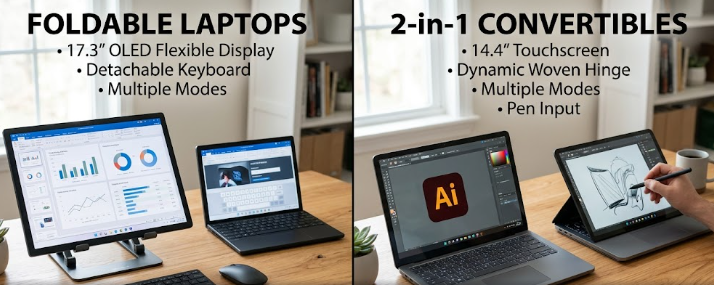
A side-by-side view comparing foldable laptops vs 2-in-1 convertibles on a sleek wooden desk.

Are you searching for the perfect portable workstation? The tech world constantly evolves, offering incredible new tools for early adopters and productivity-focused users. Right now, a major debate dominates the market: foldable laptops vs 2-in-1 convertibles. Choosing between these two innovative designs can feel overwhelming. However, understanding their specific features will help you make a smart investment. In this article, we will break down a spec-by-spec comparison to guide your final decision. Therefore, you can quickly choose the device that perfectly matches your daily workflow.

Display Tech and Durability in Foldable Laptops vs 2-in-1 Convertibles

First, let us examine display technology. Manufacturers build foldable laptops with flexible OLED screens. These stunning displays fold completely in half, giving you a massive screen in a compact footprint. Conversely, 2-in-1 convertibles use traditional glass screens, usually featuring IPS or OLED touchscreen panels. While foldables offer a futuristic, seamless look, durability remains a valid concern for many buyers. Specifically, laptop makers test foldable hinges vigorously, often rating them for up to 300,000 folds. For instance, if you fold your device 50 times a day, the hinge should easily last over 16 years. On the other hand, the rigid glass on a 2-in-1 convertible provides better protection against scratches and daily bumps.

Weight and Thickness Differences

Next, we must compare the physical dimensions. Portability heavily influences the debate between foldable laptops vs 2-in-1 convertibles. When unfolded, a foldable laptop boasts incredible thinness, often measuring a mere 8 mm thick. However, when you fold it shut, the thickness instantly doubles to around 16 mm or more. Furthermore, foldables generally weigh less as standalone screens, often dropping below 1.5 kg (3.3 lbs). In contrast, standard 2-in-1 convertibles maintain a consistent thickness, usually around 14 mm to 16 mm. Because convertibles carry a permanently attached metal keyboard base, they typically weigh slightly more, averaging between 1.3 kg and 1.8 kg. Consequently, if you want a massive screen that fits in a small bag, foldables win.

Keyboard Solutions and Battery Specs

Additionally, the typing experience sharply divides these two categories. 2-in-1 convertibles feature integrated, 360-degree hinge keyboards. You simply flip the screen back to enter tablet mode, and the keyboard stays securely attached. This design provides a sturdy, traditional typing experience on your lap. Meanwhile, foldable laptops require a different approach. They rely on physical, attachable Bluetooth keyboards. Often, you place this thin keyboard over the bottom half of the folded screen. As a result, you must manage a separate battery for the Bluetooth keyboard. While these attachments charge magnetically, they still lack the firm rigidity of a classic laptop base. Therefore, if you type heavy documents on your lap, a 2-in-1 convertible might serve you better.

Port Selection for Foldable Laptops vs 2-in-1 Convertibles

Finally, we must look at port selection. Connectivity is crucial for any productivity-focused user. Unfortunately, foldable laptops often sacrifice I/O ports to achieve their ultra-thin, flexible designs. You will usually find just two USB-C ports on a foldable device. Therefore, you must carry external dongles to connect HDMI cables or older USB-A flash drives. Alternatively, 2-in-1 convertibles offer a much wider variety of ports. Because they feature a thicker, permanent base, manufacturers can easily include USB-A ports, HDMI slots, and SD card readers. Ultimately, if you despise carrying adapters, standard convertibles hold a significant advantage in this area.

In conclusion, both devices offer unique advantages for modern professionals. The choice ultimately depends on your specific workflow. If you want a massive OLED screen that shrinks into a tiny package, a foldable laptop is perfect. However, if you prioritize rigid keyboards, diverse ports, and glass screen durability, stick with a convertible. To explore more about the latest mobile computing trends and make an informed purchase, check out this comprehensive guide on laptop buying advice from PCMag.

References

  • PCMag. (2025). The Best 2-in-1 Convertible and Hybrid Laptops.
  • TechRadar. (2025). Foldable laptops: everything you need to know about the newest PC form factor.