Shopping for a new laptop or smartphone feels noticeably different this year. Consumers across the world are noticing that electronics cost significantly more than they did just twelve months ago. Understanding tech price trends in 2026 helps you navigate this tricky market without overspending. In fact, major manufacturers have raised device prices due to sharp increases in component costs. Consequently, buyers face tough decisions when replacing older personal computers and mobile devices. However, you can still make smart purchases if you understand what causes these sudden price hikes.
The Main Culprit: AI Infrastructure Demand and Tech Price Trends in 2026
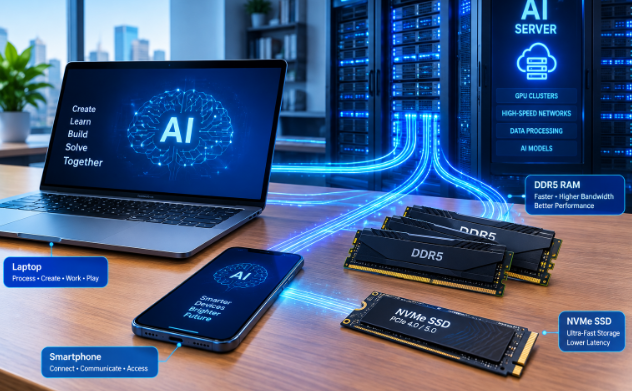
The primary driver behind rising hardware prices stems from the artificial intelligence boom. Tech giants are building massive AI data centers across the globe. As a result, chip makers like Samsung and SK Hynix are shifting their factory production lines. They now focus heavily on producing High Bandwidth Memory (HBM) and enterprise-grade server RAM. Consequently, standard consumer memory chips face severe supply shortages.
For instance, contract prices for consumer DDR5 memory modules and NAND flash SSDs have jumped dramatically. DRAM prices soared by over 90 percent in the first half of the year alone. Furthermore, solid-state drive costs doubled as enterprise demand absorbed available storage inventory. Because memory chips account for a large portion of device manufacturing, these chip price spikes directly inflate retail prices.
Impact on Laptops, PCs, and Smartphones
Rising component costs hit laptop and computer manufacturers particularly hard. Previously, RAM and storage made up about 16 percent of a computer’s total bill of materials. However, that figure has now climbed toward 23 percent. To preserve their profit margins, major PC brands have increased average selling prices by 15 to 20 percent. Therefore, mid-range laptops now carry price tags that previously belonged to premium models.
Similarly, smartphone makers are feeling the squeeze from elevated mobile DRAM prices. Because mobile memory costs rose over 70 percent, phone companies face higher manufacturing expenses. Brands are responding in two distinct ways. First, premium phone makers are pushing average selling prices higher by roughly 7 to 10 percent. Second, budget brands are reconfiguring baseline hardware models to keep retail prices visible to average shoppers.
How Manufacturers Are Changing Base Hardware Specs
To avoid sticker shock on store shelves, many hardware companies are altering entry-level hardware configurations. For example, some PC makers are returning to 8 gigabytes of RAM or older DDR4 memory on entry-level models. In addition, smartphone manufacturers are offering base models with less storage space than expected. Consequently, buyers must pay premium prices if they want modern 16-gigabyte memory standards or larger storage capacities.
Moreover, companies are heavily marketing high-end “Pro” or “Ultra” variants. Manufacturers incentivize consumers to skip base models entirely because premium tiers yield higher profit margins. As a result, buyers who need longevity often end up spending significantly more money than they originally budgeted.
How to Buy Smart Despite Tech Price Trends in 2026
Fortunately, you do not have to overpay when upgrading your tech hardware. By applying strategic shopping techniques, you can easily save money despite current market conditions. First, evaluate your mandatory hardware specifications versus optional upgrades. For example, if you perform basic daily tasks like web browsing and office work, you do not need 32 gigabytes of high-speed RAM or a top-tier processor.
Second, consider buying certified refurbished hardware or previous-generation models. Manufacturers often discount last year’s models to clear existing warehouse inventory. These previous-generation laptops and smartphones offer excellent performance for a fraction of current retail costs. Furthermore, certified refurbished devices come with manufacturer warranties, offering peace of mind alongside great savings.
Third, time your component purchases carefully and choose upgradeable devices. If you are building or upgrading a desktop PC, look for sales bundles that pair motherboards with memory. Additionally, choose laptops that feature user-upgradeable RAM and SSD slots rather than soldered components. This flexibility allows you to buy a lower-spec laptop today and add extra memory later when chip prices stabilize.
Market Outlook and Long-Term Refresh Planning
Industry analysts predict that tight memory supplies will persist for the foreseeable future. Analysts expect high hardware prices to remain elevated as AI infrastructure expansion continues. Because of this structural shift, corporate buyers and individual consumers must plan hardware refreshes much further in advance. Furthermore, component suppliers are shortening quote validity windows, meaning custom PC quotes or enterprise pricing offers expire within days rather than months.
In conclusion, navigating current hardware shifts requires patience and informed decision-making. By prioritizing upgradeability and timing your purchases, you can easily beat high retail prices. To stay updated on industry hardware forecasts and market analysis, check out the comprehensive market insights at Gartner Research.
References
- TrendForce. (2026). Global DRAM and NAND Flash Market Price Forecast and Supply Chain Analysis. TrendForce Market Reports.
- Gartner Research. (2026). Surging Memory Costs Impact Global PC and Smartphone Shipments. Gartner Press Release.
- Counterpoint Research. (2026). Global Smartphone Shipment Tracker and Component Cost Analysis. Counterpoint Technology Market Research.
- PCMag Strategy Desk. (2025/2026). How AI Data Center Growth Drives Consumer Memory Prices Upward. PCMag Industry Insights.