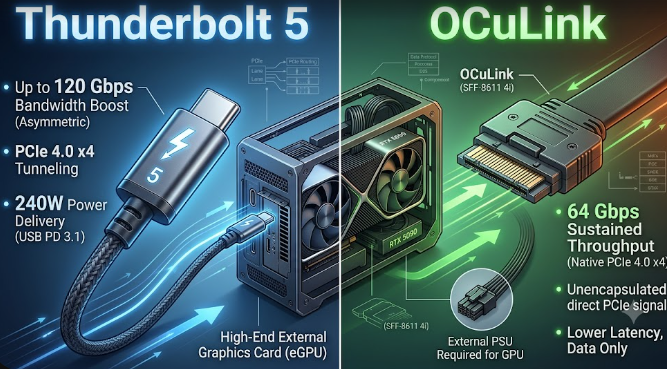
Are you a handheld PC gamer wanting higher frame rates? Maybe you are a laptop power user or an AI developer running local Large Language Models (LLMs). In 2026, boosting your portable device with an external graphics card (eGPU) is easier than ever before. However, picking the right connection standard can feel overwhelming. Today, the ultimate hardware battle comes down to OCuLink vs. Thunderbolt 5. Both options promise massive speeds, but they achieve their performance goals in fundamentally different ways. Understanding these technical specifications will help you invest your money wisely.
Understanding OCuLink vs. Thunderbolt 5 Architecture
To grasp how these technologies differ, we must look at how they talk to your computer. OCuLink operates as a direct, un-tunneled PCIe 4.0 x4 connection. Consequently, it delivers a clean 64 Gbps stream of raw data straight to your processor. Think of OCuLink as an open, private highway where your graphics card drives directly to the CPU without stopping at any toll booths.
In contrast, Thunderbolt 5 acts as a complex protocol layer. This interface encapsulates the PCIe data alongside display and power signals to achieve its 80 Gbps bi-directional limit. Therefore, even though Thunderbolt 5 boasts a higher raw bandwidth number on paper, it introduces a controller “middleman” that must pack and unpack the data. This encapsulation creates protocol overhead, which can slow down real-world performance during intense tasks.
Real-World Latency and Stutter-Free Gaming
For passionate gamers, raw bandwidth numbers do not tell the whole story. Instead, frame stability and system response time dictate your actual experience. Because OCuLink completely lacks an extra protocol controller, it drastically reduces round-trip latency. Specifically, OCuLink keeps system latency under 25 milliseconds. This ultra-low latency provides a remarkably stable, stutter-free experience in ray-traced gaming compared to Thunderbolt setups.
Furthermore, heavy visual workloads like ray tracing force the GPU and CPU to communicate constantly. When you use Thunderbolt 5, the data packets must travel through the Intel controller chip. This extra step frequently introduces micro-stutters during heavy gaming sessions. For example, open-world games that stream assets on the fly will feel noticeably smoother on a direct OCuLink line because your system drops fewer frames.
Accelerating Local AI Inference Speeds
If you are an AI developer, interface speeds directly alter your workflow productivity. Running local Large Language Models demands rapid data transfers between your laptop’s RAM and the external VRAM. Fortunately, the raw connection of OCuLink shines brightest in this area. When you load heavy LLMs, such as a massive 70B parameter model, a raw OCuLink connection finishes the job much faster than competing protocols.
Additionally, OCuLink accelerates the critical “time to first token” generation phase. Thunderbolt 5 introduces roughly 110 milliseconds of round-trip controller overhead for every API call. In contrast, OCuLink bypasses this delay completely. Consequently, if you deploy agentic AI chains that fire dozens of short prompts in a sequence, OCuLink will save you several seconds per task.
The Hot-Swap and Power Delivery Trade-off
However, absolute performance requires a few daily lifestyle sacrifices. We must be entirely transparent about OCuLink’s primary limitation. Unlike the user-friendly Thunderbolt 5, OCuLink lacks seamless hot-swapping capabilities. This means you cannot simply unplug the cable when you want to take your laptop to another room. Instead, you must completely power down your handheld device or laptop before connecting or disconnecting the external GPU.
Furthermore, OCuLink does not offer reverse power delivery. While a single Thunderbolt 5 cable can send up to 240 watts of power to charge your laptop while receiving graphics data, OCuLink handles data exclusively. Therefore, you must plug a separate power brick into your machine. If you value a clean, single-cable docking station experience, Thunderbolt 5 remains the undisputed king of convenience.
Final Verdict on OCuLink vs. Thunderbolt 5
Ultimately, your choice depends on whether you value maximum frame rates or daily convenience. If you want a seamless plug-and-play setup that charges your laptop, choose Thunderbolt 5. However, if you want to extract every single ounce of performance for local AI development or high-end competitive gaming, OCuLink provides the best raw value in 2026. For further technical details on setting up external graphics enclosures and testing protocols, you can read more on the StorageReview Hardware Guides.
References
- XDA Developers. (2026). “I expected Thunderbolt 5 to replace OCuLink for eGPU setups, but it didn’t.”
- TechPowerUp. (2025). “External GPU Connection Battle: OCuLink Beats Thunderbolt 5 by About 16%.”
- Local AI Master. (2026). “Thunderbolt vs OCuLink for eGPU AI: Real Benchmarks.”
- Intel Corporation. (2025). “Thunderbolt 5 Technology for Next-Generation Gaming.”