How to Wirelessly Connect PlayStation 4 Controllers to Console .

The PS4 usually ships, with one controller which you must connect to the console for the first time with the USB cable supplied. Once connected you can use it to control the console wirelessly, until you reset or use it on another console. You can also connect a new second controller with the usb cable, however it can also be connected wirelessly. Here is how;

Let’s say you just purchased 2 controllers for your console, this is what you should do.

Switch on the console.

Connect one of the controllers to the console using your PS4 USB cable or a compatible one.

The controller will glow if USB cable is properly connected.

Press the PS button on the controller, then logon to an account on your console.

Now go to, SETTING-DEVICES- BLUETOOTH DEVICES

You will see the already connected controller and the account it is connected to.

Now, to connect the second controller wirelessly; press the, PS button and the share button simultaneously for  about 5 seconds until the controller blinks.

The console detects the controller and it is shown on your TV screen under Bluetooth devices.

Use the first controller to select and register this second controller.

Immediately, the second controller is available for use with the console.

Subsequently, you can connect more controllers using this method.

How to Update PS4 System Software to latest version from USB Flash Drive.

Update PS4 from USB flash

To update PS4 system software to latest version via USB flash drive,go to Google search, and type; “PlayStation software update”.

On the search results, click on any PS4 system software update link that emanates from www.playstation.com. In this case, search result 1 will suffice.

PS4 system software search

On the webpage, locate the latest PS4 system software update link, and download.

Locate the downloaded file, and rename to; PS4UPDATE.PUP, if necessary.

Insert USB flash drive into your laptop or desktop.

Open the flash drive and in it, create a folder named; PS4.

Next open this newly created PS4 folder, and inside it create another folder named; UPDATE.

Locate the downloaded PS4UPDATE.PUP file and place it inside the newly created UPDATE folder.

Now inside the flash drive we have the PS4 folder, inside the PS4 folder we have the, UPDATE folder and inside the update folder we have the PS4UPDATE.PUP file.

This is how the update file should be set up inside the flash drive for the console to recognize it.

Now insert the flash drive into your PS4 console and switch it on.

Log into your account.

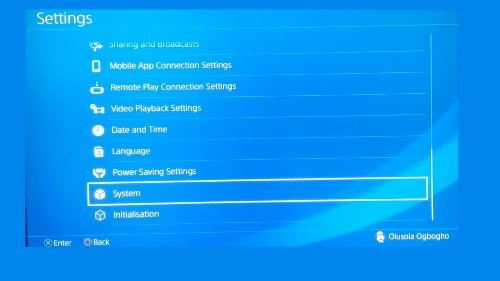
Go to settings, then, system software update.

Your console automatically detects update software including the version it will be updating to, on USB flash drive,

 click NEXT

 then Click UPDATE and the wait for your console’s system software to update,

your console will restart during the update process.

After update is complete, you can confirm by going to SETTINGS, SYSTEM, SYSTEM INFROMATION. There you will see the new version it has updated to.

To watch video of the process, Click this link to video on my YouTube channel.

Virtual Reality (VR Gaming)

PS4 VR Hadset.

Virtual reality gaming is the latest generation gaming system that puts the player in a virtual 3D environment. For some virtual 3D games, it would seem as if the player is really in the game. (that’s why it is called virtual reality).
Virtual reality games are usually played with a VR headset(also called head mounted display ). the virtual reality headset will typically take the form of Head mounted googles with a screen in front of the eyes. (see Picture below of the PS4 virtual reality headset).
VR gaming is already attracting more gamers and investors. Since it is still very much in development, it will at some point eventually overshadow the conventional video gameplay system. (in which a gamer controls characters displayed on a non 3D screen).

The VR gaming problem.

People who play VR games are prone to motion sickness. Because virtual reality creates the illusion that one is in the game, when in reality, it is not,it creates a communication breakdown between the brain and bodysystem. for example in a VR game where the player appears to be moving in the virtual world, the brain might send signals to the body believing there is actual movement while the body might not respond adequately because it is actually stationary (or vice-versa), this communication breaking causes dizziness or tiredness during game play.

However practice makes perfect, as one continues to play VR games, the body eventyually ajusts, but this may not be the game for everyone.

If one experiences dizziness or other forms of sickness during VR gaming, it is strongly advised to stop immediately then continue when the body is fine.

However ,Virtual Reality Gaming is fast evolving and it is the latest happening in the gaming world at the moment.

PS4 Pro Specifications


                                                                    The PlayStation 4 Pro

About PlayStation 4 Pro

The Playstation 4 pro is an upgraded version of the Playstation 4. It can render game play at resolutions higher that what the original PlayStation 4 can do. Features the PS4 pro offers include;

  1. Improved graphics (4k rendering).
  2. Improved gameplay experience.
  3. Improved VR experience.


PlayStation 4 Pro Specifications

  • First release: Nov. 10 2016.
  • Processors: 1. CPU: x86-64 AMD “Jaguar”, 8 cores @ Clock Speed of 2.13GHZ and GPU: 4.19 TFLOPS, AMD Radeon™ based graphics engine.
  • Memory: GDDR5 8GB.
  • Storage: 1TB.
  • Mass: Approx. 3.3kg.
  • Dimension: length; 327mm, width; 295mm, Height; 55mm.
  • Drive: Blue Ray and DVD (read only).
  • Networking: Bluetooth version 4, Ethernet, IEEE 802.11.
  • Power: 100-240V, 50/60Hz
  • Power Consumption: 310W
  • Operating Temperature: 5-35 degree centigrade
  • AV output: HDMI out (supports 4K/HDR)

PlayStation 4 Specifications

About The PlayStation 4

PlayStation 4 Console

The PlayStation 4 is one of the most advanced and most popular gaming console of its class. Sold over 78 million copies and counting. PlayStation 4 has the most gaming titles in its category and can render game-play at a resolution of 1080p. Current price of PlayStation 4: $300

Playstation 4 Specifications

  • First release: Nov. 15 2013.
  • Processors: 1. CPU: x86-64 AMD “Jaguar”, 8 cores @ Clock Speed of 1.6GHZ and GPU: 1.84 TFLOPS, AMD Radeon™ based graphics engine.
  • Memory: GDDR5 8GB.
  • Storage: 500GB or 1TB.
  • Mass: Approx. 2.1kg (latest models).
  • Dimension: length; 288mm, width; 265mm, Height; 39mm.
  • Drive: Blue Ray and DVD (read only).
  • Networking: Bluetooth version 4, Ethernet, IEEE 802.11.
  • Power: 100-240V, 50/60Hz.
  • Power Consumption: 165W.
  • Operating Temperature: 5-35 degree centigrade
  • AV output: HDMI out port.
  • Display: HDMI 480p, 720p, 1080i, 1080p, and 4K; for picture and video play.
  • Ports: HDMI, Optical audio out, PlayStation Camera, Ethernet 2,USB ports.
  • Controllers: dual shock 4, Playstation Vita, Playstation move.

Basic Items Bundled with your Brand New PS4 Console

  1. PS4 console.
  2. 1 dual shock 4 controller.
  3. 1 ear piece/microphone
  4. 1 HDMI cable
  5. 1 USB cable
  6. User Manuals
  7. 1 power cable

Some PlayStation 4 Peripheral Devices

Dual shock 4 controller

PlayStation move controller

PlayStation camera

PlayStation VR