The iPhone 13 has landed and will be out in the smartphone market by the 24th of September. The manufacturers are implying that the iPhone 13 and iPhone 13 mini will be the most advanced smartphones out there.
iPhone 13 on 5G network
The phone will feature these qualities;
a sleek new durable design in 5 different colors of pink, blue, midnight, starlight, and red.
Advanced dual camera system that can produce clearer pictures in the dark.
Advanced 5G experience.
Super fast performance and power efficiency with the A15 Bionic.
Water resistance with iP68 rating.
iOS 15 operating system.
Longer battery life than the iPhone 12 pro.
Entry level storage of 128GB, 256GB and 512GB versions will also be available.
6 core CPU that is 50% faster than its predecessor and a 4 core GPU that is also 30% faster.
According to Apple, the iPhone 13 in the US will cost $ 799 or $33.29 a month for 24 months. iPhone 13 mini will cost $699 or $29.12 a month for 24 months.
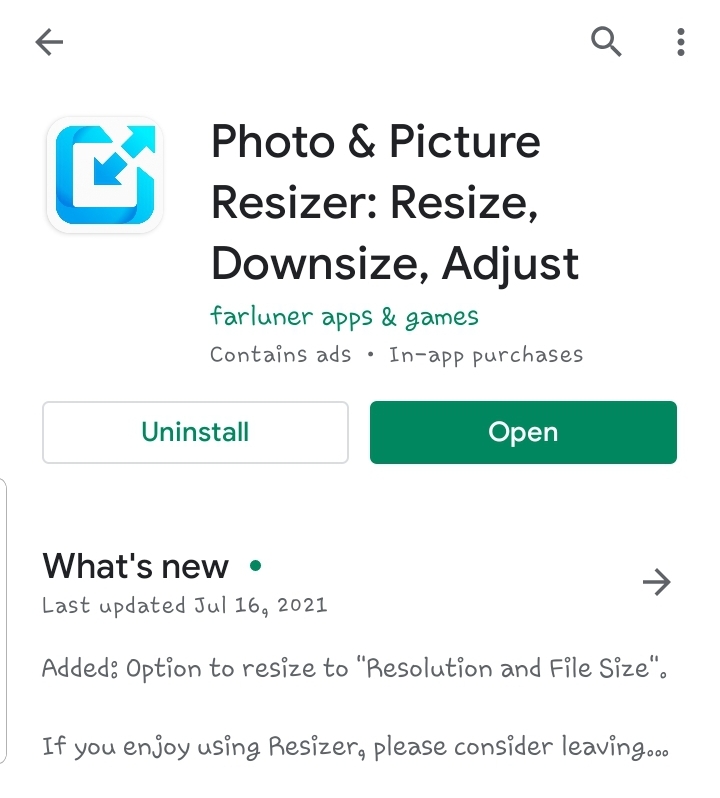
1.First things first, go to Google Play Store and search for “ Photo and Picture resizer” and download.
(Note : to view the size of picture on your android phone, click to select photo, then look to the top right of your screen and click the 3 dots(vertical), then click; Details)
2.Start the Photo and Picture resizer app you just downloaded.
3.Click, Select Photos.
4.Navigate to and click on the photo or photos you want to resize.
5.Click on Resize.
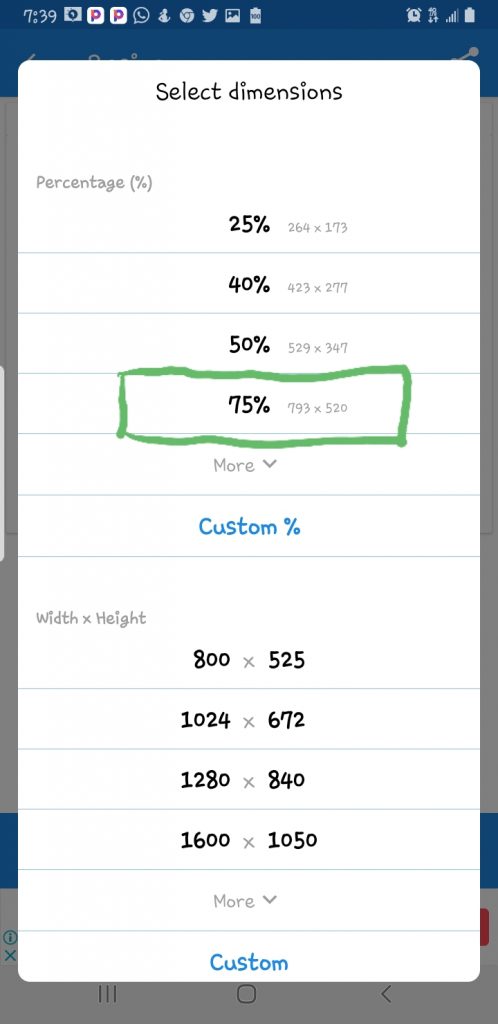
6.You will be presented with several resizing options including percentage, width & height and pixel resolution options.
If the preset picture sizing is not listed, click on Custom to set picture size to the one you want exactly.
7.In this example I will reduce the picture using the percentage option.
8. For instance click 75% to reduce the picture to 75% of its original dimension. Note the new reduced dimensions in pixels is stated.
9.To view the resized picture, click; See in resized photos
Your Modern Android Phone comes equipped with a robust Factory Reset feature. How to do a factory reset varies slightly for different manufacturers and operating systems / version. This write up will show you some examples of how to activate a hard reset on several popular devices. Other devices are likely to have similar options.
The menu structure of Samsung phones and Tablets are not the same. But if your device is running Android 9, below, is the procedure to hard reset it.
How to Hard Reset SAMSUNG GALAXY Phones and Tablets running on ANDROID 9
1. Run the Settings app.
2. From the main Settings menu, click on General Management.
3. Click on Reset.
4. Click on Factory Data Reset.
5. Next Click Reset, Follow the instructions presented with the relevant warnings.
Hard Resetting Android Phones Running on Android 8 and below.
The way to hard reset android phones varies based on phone manufacturer , android operating system and version. You can follow the steps below to reset your phone
1. Run the Settings app.
2. From the main settings menu, click on System.
3. In the System menu, click on Reset.
4. In the Reset menu, click on Factory Data Reset.
5. Confirm by clicking Reset, then Follow the instructions to continue.
Soft reset of an Android device varies between manufacturers. However, one of the 2 methods listed below should work;
Method 1; Press and hold the Power button until you see a power off and restart menu. Click power off then wait a few seconds then power on the phone again.
Method 2: if the first method doesn’t work. Press and hold the Power button and keep pressing until the phone powers off, wait for about 10 seconds then turn the phone back on
How to Soft Reset iPhones
Soft resetting your iPhone varies based on the model. However the following method explained below should work;
Method 1 Press and release the Volume Up button, then press and release the Volume Down button, and then press and hold the Power button until the Apple logo appears on the screen. Wait for the device to restart
Method 2. Press and hold the Power button. While still holding it, press and hold the Volume Down button. A power off prompt comes on, on the screen. Select it to power off the device. Wait ten seconds and press the Power button to turn it back on.
Method 3. Press and hold the Power button, and, while still doing that, press and hold the Volume Down button. Continue to hold both buttons as the iPhone powers off. Release both buttons when the Apple logo appears on the screen. Wait for the device to reboot.
The Samsung Galaxy S21 Ultra was released January 29, 2021. It is the most advanced Samsung Galaxy phone till date and very expensive.
Should you buy the Samsung Galaxy S21 Ultra, these are reasons you should;
It is the most advanced Android Phone Yet.
It can take pictures and shoot videos at 108MP with a selfie camera of 40MP
It’s a 5G phone, so you can browse and download at lighting speed.
The Galaxy S21 Ultra is compatible with the S pen; Great!
With its powerful CPU, GPU and RAM, multitasking and playing high ended games is very easy and smooth.
If you are a YouTube content creator, good news; with Galaxy S21 ultra you can record videos at 4k and 8k resolution.
Note: The S21 ultra does not ship with a charger (you have to buy seperately or keep the ones you already have), no memory tray and no wired earphone slot. Although compatible with Spen, there is not slot to fix the pen within the phone.
Don’t buy the Samsung Galaxy S21 Ultra if;
If you are on a budget; It’s very expensive. The official price starts at $ 1,199. About ₦493,795.88. Think well before you buy.
Your memory needs are High. No memory expansion tray as with the previous S series. You have to make do with the phone’s built in internal memory except You go for the S 21 that comes in 256GB and 512GB memory which is more expensive.
You are not an High end phone user.If all you do with a phone is just make calls and perform other simple tasks, then you don’t have to buy this phone.
Galaxy S21 Ultra Full specifications.
Body: 165.1×75.6×8.9mm, 227g; Glass front (Gorilla Glass Victus), glass back (Gorilla Glass Victus), aluminum frame; IP68 dust/water resistant (up to 1.5m for 30 mins), Stylus support.