Summary of Key Points
- Analyze the processor (CPU) and RAM to ensure smooth daily performance and longevity.
- Look beyond camera megapixels by checking sensor size, aperture, and optical image stabilization.
- Evaluate display technology, focusing on panel type, brightness levels, and refresh rates.
- Inspect physical hardware features such as build materials, IP water-resistance ratings, and port types.
- Use third-party benchmark databases and specification websites to verify manufacturer claims.
Introduction
Buying a new smartphone can feel overwhelming because manufacturers launch dozens of new models every year. Learning how to check phone specs and hardware features before buying helps you avoid overpaying for features you do not need. Furthermore, understanding technical specifications ensures your next device fits your workload, gaming habits, and photography preferences seamlessly.
Marketing teams often emphasize flashy numbers like massive megapixel counts or high clock speeds. However, real-world performance depends on how all internal components work together. In this guide, we will break down key hardware components so you can make a smart, budget-conscious decision.
Evaluating Processor and Memory Performance
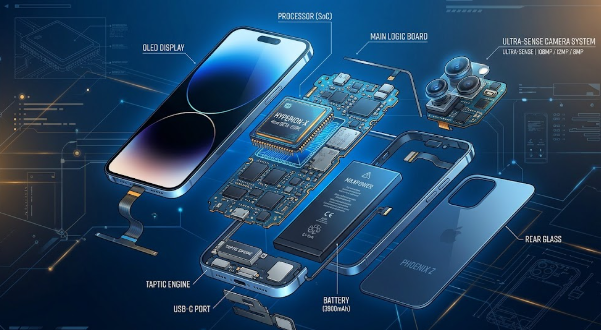
The System on a Chip (SoC) acts as the brain of your smartphone. Therefore, checking the processor model should be your very first step. Leading brands include Qualcomm Snapdragon, Apple A-Series, MediaTek Dimensity, and Samsung Exynos. Higher tier chips offer faster app loading times, better power efficiency, and superior long-term software support.
Equally important is Random Access Memory (RAM). RAM allows your device to keep multiple apps open simultaneously without reloading them. For basic tasks like browsing and messaging, 6GB of RAM is sufficient for Android devices. However, if you plan to play graphics-heavy games or edit video, aim for 8GB or more. iPhone models handle memory management differently, so even 6GB on an iOS device delivers excellent multitasking capability.
Analyzing Display Quality and Screen Features
You interact with your phone display constantly, so quality matters immensely. First, inspect the panel type. AMOLED and OLED screens display deeper blacks and richer colors compared to traditional LCD panels. Additionally, OLED displays consume less battery power when using dark modes.
Next, pay attention to the display refresh rate. Standard screens update at 60Hz, but modern smartphones frequently feature 90Hz or 120Hz refresh rates. A higher refresh rate makes scrolling through web pages and navigating the user interface feel significantly smoother. Finally, verify peak brightness levels, measured in nits. A screen with at least 1,000 nits of peak brightness remains readable even under direct sunlight.
Understanding Camera Specifications and Sensors
Many consumers incorrectly assume that more megapixels automatically guarantee better photos. In reality, sensor size and lens quality matter much more than pixel count alone. Larger camera sensors capture more light, producing clearer images in low-light environments.
Additionally, check for Optical Image Stabilization (OIS). Hardware-based OIS physically stabilizes the camera lens to reduce blur from shaking hands. This feature drastically improves nighttime photos and video recording. Lastly, look at the available lenses. A versatile setup usually includes a primary wide lens, an ultra-wide lens, and a telephoto lens for lossless optical zoom.
Examining Battery Life and Charging Hardware
A fast phone is useless if its battery dies halfway through the day. Look for a battery capacity of at least 4,500 mAh to 5,000 mAh on Android devices. While battery capacity offers a general guideline, processor efficiency and software optimization also dictate how long the phone lasts on a single charge.
Furthermore, review the charging specifications. Check the maximum supported charging wattage, such as 25W, 67W, or 120W. Faster charging power allows you to refill your battery in minutes rather than hours. However, remember to check whether the manufacturer includes a fast charger inside the retail box.
Steps on How to Check Phone Specs and Hardware Features Before Buying
When you prepare to make a purchase, follow a systematic verification process. First, visit official manufacturer product pages to read the full specification sheet. Pay close attention to details like storage types (UFS 3.1 or UFS 4.0 read faster than older standards) and build materials like Gorilla Glass protection.
Second, consult independent technical databases and benchmark platforms. Websites like Geekbench and AnTuTu publish performance scores that let you directly compare different processors. Consequently, you can verify if a phone performs as well as advertisements claim. If possible, visit a physical retail store to hold the device in your hand, check button quality, and test the speaker clarity yourself.
By following these clear evaluation steps, you will make a confident purchase that delivers great value for your money. For detailed device comparisons and complete specs databases, visit GSMArena before placing your order.
References
1. GSMArena Smartphone Specification Database: https://www.gsmarena.com
2. Android Authority Hardware Guides & Processor Benchmarks: https://www.androidauthority.com