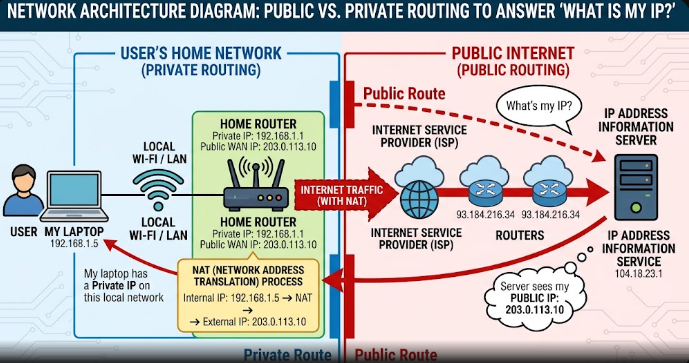
Every computer, tablet, and smartphone connected to the internet relies on a special numeric label to send and receive information. When you type a query like “What is my IP?” into a search engine, you are asking for your device’s exact digital return address. Internet Protocol (IP) addresses allow millions of web pages, videos, and emails to reach the correct destination instantly. Without these unique numbers, global data traffic would stall because routers could not identify where to send incoming web information.
What Is My IP Address and How Does It Work?
An IP address works like a physical street address for your internet-connected devices. When you request a web page on your browser, your computer sends out data packets containing your unique network ID. The web server reads this identifier and sends the requested page back to your specific router. Therefore, every online interaction depends on this mutual exchange of network identifiers to maintain clear communication lines.
+———————————————————————–+
| YOUR DEVICE |
| (Sends request: “Load website content”) |
+———————————————————————–+
|
v
+———————————————————————–+
| YOUR ROUTER |
| (Attaches Public IP Address to request) |
+———————————————————————–+
|
v
+———————————————————————–+
| WEB SERVER |
| (Reads Public IP and returns requested website data) |
+———————————————————————–+
Understanding IPv4 Versus IPv6 Protocols
Engineers created the IPv4 format decades ago using four sets of numbers separated by decimals, such as 192.168.1.1. However, IPv4 only supports about 4.3 billion unique combinations. Because connected smart devices grew rapidly worldwide, the tech industry quickly ran out of available IPv4 numerical combinations for new users.
To solve this shortage, networking experts introduced the newer IPv6 format. IPv6 uses hexadecimal characters separated by colons, creating trillions of new unique network entries. As a result, modern networks use both protocols simultaneously to ensure uninterrupted growth across global internet platforms.
Public Versus Private IP Addresses
Your Internet Service Provider (ISP) assigns a public address directly to your home router. This single public number identifies your entire home network to every outside website on the open internet. Consequently, all connected devices in your household share this single public network identifier when browsing external web pages.
In contrast, your home router generates internal private numbers for each connected device, such as your laptop, smart phone, and TV. These private labels allow your local devices to communicate safely with each other without exposing internal home traffic directly to the outside web.
Dynamic Versus Static Routing Differences
Most residential internet subscribers receive dynamic addresses from their service providers. A dynamic address changes periodically whenever your router restarts or when the internet provider refreshes its connection pools. This automatic rotation helps internet service providers manage their available number pools efficiently across millions of residential customers.
On the other hand, businesses and web servers usually pay for static addresses. A static address remains permanently fixed to one network connection without changing. Companies use static connections so that remote employees, web hosting servers, and online databases maintain reliable, constant connections without unexpected address changes.
What Information Does an IP Address Reveal?
Many users worry about their online privacy when asking, “What is my IP?” Your network identifier reveals general geographical details, such as your current country, state, city, and local area postal code. It also displays the official name of your active Internet Service Provider to every website server you visit.
However, your network identifier does not reveal sensitive personal details like your full name, home street address, or phone number. Only your Internet Service Provider holds the official logs linking your network number directly to your personal customer billing account. Law enforcement agencies usually require legal court warrants to request these personal account details from providers.
How to Find Your IP Address Across Devices
Finding your internal private address requires simple system setting adjustments on your hardware. On Windows computers, open Command Prompt, type ipconfig, and press Enter to view your IPv4 details. On macOS devices, open System Settings, select Network, and click on your active Wi-Fi connection to inspect your local numbers.
+———————————————————————–+
| QUICK DEVICE LOOKUP STEPS |
+———————————————————————–+
– Windows: Open Command Prompt -> Type “ipconfig” -> Press Enter
– macOS: Open System Settings -> Click Network -> Select Active Wi-Fi
– Android: Open Settings -> Select About Phone -> Tap Status Information
– iOS: Open Settings -> Select Wi-Fi -> Tap “i” icon beside network
On mobile platforms, you can locate your private network status easily within your connection submenus. On Android phones, open Settings, select About Phone, and tap Status Information to view your local details. On iPhones, navigate to Settings, tap Wi-Fi, and select the small info icon next to your connected local network name.
Protecting Your Online Privacy: VPNs, Proxies, and Tor
If you want to hide your network location from websites, you can use specialized privacy tools. A Virtual Private Network (VPN) encrypts your data traffic and routes your request through an external server. Thus, external websites see the VPN server location instead of your real residential network address.
+———————————————————————–+
| PRIVACY TOOL COMPARISON |
+———————————————————————–+
| Tool Type | Encryption Level | Primary Function |
|———–|——————|—————————————-|
| VPN | High (Full App) | Encrypts all traffic & masks location |
| Proxy | Low (Browser) | Re-routes simple browser requests only |
| Tor | Maximum (Multi) | Passes traffic through 3 encrypted nodes|
+———————————————————————–+
Alternatively, proxy servers act as simple middlemen for basic browser requests, though they often lack full system encryption. For maximum privacy, the open-source Tor network bounces your encrypted data across three random international server nodes. Using these security tools prevents third-party ad trackers from monitoring your browsing habits across different websites.
For more technical details on how networking protocols handle digital communications, read the official IETF Internet Protocol Specification.
References
- Comer, D. E. (2018). Internetworking with TCP/IP Vol.1: Principles, Protocols, and Architecture (6th ed.). Pearson.
- Kurose, J. F., & Ross, K. W. (2021). Computer Networking: A Top-Down Approach (8th ed.). Pearson.
- Postel, J. (1981). Internet Protocol: DARPA Internet Program Protocol Specification (RFC 791). Information Sciences Institute.