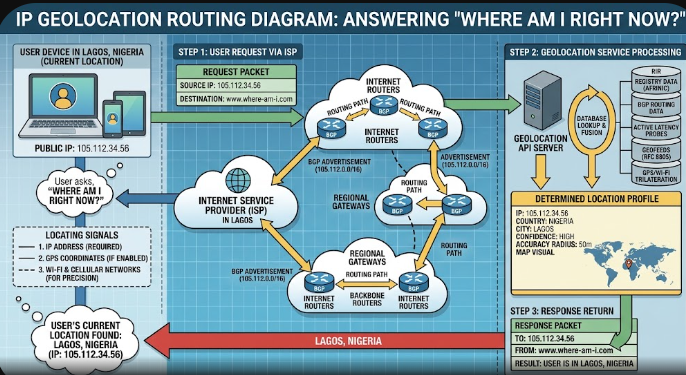
Have you ever opened a navigation application or search engine and asked, “Where am I right now?” Within seconds, your smartphone or computer pinpointed your exact position on a digital map. Everyday users often find this instant accuracy surprising and magical.
However, modern connected hardware relies on complex background networks rather than simple magic. Devices continuously read surrounding signals, network addresses, and satellite data to pinpoint your location. Understanding these positioning methods helps you protect your digital footprint while enjoying modern location services.
+———————————————————————–+
| LOCATION DETECTION METHODS |
+———————————————————————–+
| | | |
v v v v
+————+ +——————–+ +——————+ +———–+
| IP Address | | Cell Tower Triang. | | Wi-Fi BSSID Maps | | GPS |
| (City/State| | (100m – 1km range) | | (Room precision) | | Satellites|
| Precision) | | | | | | (3m-5m) |
+————+ +——————–+ +——————+ +———–+
How IP Geolocation Works to Answer Where Am I Right Now?
Every device on the internet receives a unique string of numbers called an Internet Protocol (IP) address. Your Internet Service Provider (ISP) assigns this address whenever your home router or mobile phone connects to the network. IP geolocation databases match these network addresses against registered physical server locations worldwide.
Consequently, website servers read your incoming request address to estimate your general area instantly. This method usually identifies your country, state, or city correctly. However, IP address lookup rarely reveals your exact street address or home building. Therefore, websites rely on IP data primarily for showing regional content, localized pricing, and initial language settings.
Precise Tracking Methods: GPS, Wi-Fi Mapping, and Cellular Towers
When applications require high accuracy, your smartphone uses Global Positioning System (GPS) chips. GPS receivers process radio signals from orbiting satellites to calculate latitude and longitude coordinates. This satellite tracking system provides high pinpoint accuracy within a few meters outdoors. However, thick concrete walls and dense roofs frequently block these satellite signals indoors.
To maintain positioning accuracy inside buildings, mobile systems use Wi-Fi mapping and cellular tower triangulation. Devices continuously scan nearby Wi-Fi router signatures (BSSIDs) and cell tower signal strengths. Specialized location databases map these surrounding signals against known geographical locations. By combining these three systems simultaneously, your phone maintains smooth location tracking everywhere.
Browser Permissions and Data Anonymization
Web browsers act as strict gatekeepers between websites and your location hardware. When a web application asks, “Where am I right now?”, the browser displays an explicit permission prompt first. Websites cannot read your precise device coordinates without your direct consent.
Furthermore, responsible application developers anonymize collected location data to safeguard user identities. Modern mobile operating systems mask exact coordinates by truncating precise latitude and longitude values. As a result, advertising companies analyze regional traffic trends without logging your individual movements or home address.
Managing and Restricting Location Sharing on Your Devices
Users maintain full administrative control over location tracking across desktop and mobile platforms. You can easily revoke location permissions for individual applications through device privacy settings. Additionally, toggling off high-accuracy location services forces your phone to rely solely on basic network estimates.
+———————————————————————–+
| USER PRIVACY CONTROL STEPS |
+———————————————————————–+
1. Open Device Settings -> Privacy & Security
2. Select Location Services
3. Choose Application (e.g., Maps, Browser, Social)
4. Set Permission Level: “Never” | “Ask Next Time” | “While Using App”
5. Toggle “Precise Location” OFF to share approximate city data only
For maximum privacy protection, many users deploy Virtual Private Networks (VPNs). A VPN reroutes your internet traffic through encrypted remote servers located in different cities or countries. Consequently, third-party websites see the VPN server address instead of your true internet provider location.
To read official technical documentation regarding browser location security standards, check the W3C Geolocation API Specification.
References
- Poeker, L., & Zandbergen, P. A. (2015). Accuracy of IP Geolocation Databases. Cartography and Geographic Information Science, 42(3), 240-252.
- World Wide Web Consortium. (2022). W3C Geolocation API Specification (2nd Edition). W3C Recommendation.
- Zandbergen, P. A. (2009). Accuracy of iPhone Location Provisioning Using Cell Tower Triangulation, Wi-Fi Positioning, and A-GPS. Transactions in GIS, 13(s1), 5-25.