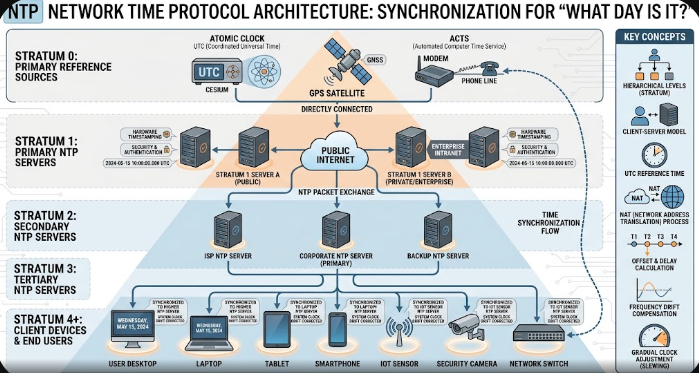
Every morning, millions of users turn on their laptops or smartphones and wonder, “What day is it?” We rely heavily on digital devices to show the correct date, manage calendar appointments, and schedule work tasks. However, maintaining an accurate date across millions of connected servers is a complex task. Digital systems constantly process time calculations behind the scenes to keep our global digital world operating smoothly.
How Digital Systems Track Dates and Calendar Standards
Computers do not store dates using traditional human calendar words like Monday or March. Instead, operating systems count seconds from a fixed reference point called Unix Epoch time, which began on January 1, 1970. The operating system continuously converts these raw seconds into human-readable calendar dates. Consequently, software applications can easily determine the exact day, month, and year for any location worldwide.
Furthermore, applications must automatically adjust for leap years, variations in month lengths, and daylight saving time shifts. For example, programmers write specific rules so that the calendar adds February 29 every four years. In addition, global web platforms accommodate different regional calendar standards, such as the Gregorian, Islamic, or Hebrew calendars, by translating central Unix time values into localized displays.
The Role of NTP Servers in Global Time Synchronization
To ensure every smartphone and server agrees when asking what day is it, networks rely on the Network Time Protocol (NTP). Atomic clocks around the world maintain ultra-precise time and send this signal to primary time servers. Thereafter, secondary NTP servers distribute this accurate time data across the internet to personal devices, preventing system clocks from drifting apart over time.
+———————————————————————–+
| ATOMIC CLOCKS |
| (Reference Time Source – Stratum 0) |
+———————————————————————–+
|
v
+———————————————————————–+
| PRIMARY NTP SERVERS |
| (Stratum 1 Servers) |
+———————————————————————–+
|
v
+———————————————————————–+
| CLIENT DEVICES & WEB APPLICATIONS |
| (Smartphones, Laptops, Web Browsers – Stratum 2+) |
+———————————————————————–+
Fixing Out-of-Sync System Clocks and SSL Certificate Errors
When a device clock strays from the actual network time, users experience confusing software glitches. For instance, an incorrect system date often triggers severe SSL certificate errors in web browsers. Browsers compare the website certificate’s valid date range against the local computer clock. If your computer clock shows a date in the past or future, the browser blocks access for security reasons.
Fortunately, users can quickly troubleshoot out-of-sync system clocks on both Windows and macOS. You can resolve most date errors by navigating to system settings and toggling on the automatic time sync feature. Furthermore, manually clicking the “Sync Now” button forces your device to reconnect with official NTP servers, immediately restoring web access and fixing security warnings.
Setting Up Time-Zone Automation in Daily Workflows
Modern productivity tools offer powerful time-zone automation settings to prevent calendar confusion for remote teams. Applications like Google Calendar, Slack, and Microsoft Outlook can automatically detect your current location and update your schedule accordingly. As a result, team members working in different time zones always see accurate meeting times without manual calculation.
To streamline your daily workflow, enable automatic time zone detection on your operating system and calendar apps. Additionally, set secondary time zones inside your primary calendar view if you regularly collaborate with international colleagues. Proper calendar automation saves valuable time, eliminates scheduling conflicts, and ensures everyone knows exactly what day is it for global deadlines.
For technical guidelines on how web standards handle temporal formats, visit the W3C Date and Time Specification.
References
- Mills, D. L. (2010). Computer Network Time Synchronization: The Network Time Protocol on Earth and in Space. CRC Press.
- Tanenbaum, A. S., & Bos, H. (2014). Modern Operating Systems (4th ed.). Pearson.
- Network Time Foundation. (2024). Network Time Protocol (NTP) Specification and Architecture. NTF Documentation.