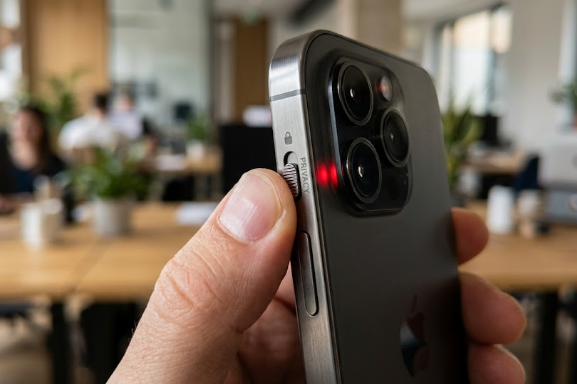
On April 24, 2026, the tech world witnessed a major shift with the official launch of the Hiroh phone. Priced at $1,100, this device enters the market as a “security-first” flagship designed for the modern user. Unlike older privacy-focused phones that looked like bulky military tools, the Hiroh features a sleek, premium design. However, its most talked-about feature is the Hiroh phone physical kill-switch. This hardware toggle allows users to manually control their privacy in an age where AI surveillance is everywhere.
What is the Hiroh Phone Physical Kill-Switch?
Most modern smartphones use software “toggles” to turn off cameras or microphones. When you tap a button on your screen, the software tells the hardware to stop recording. Unfortunately, if a hacker compromises your operating system, they can bypass these software locks. Consequently, your phone could record you without your knowledge.
The Hiroh phone physical kill-switch solves this problem by using a physical slider on the side of the device. When you flip this switch, it physically disconnects the electrical circuit to the camera and microphone sensors. Because the circuit is broken, no software or AI can “listen in” or “watch” you. Even if a genius hacker takes over your phone’s software, they cannot turn the sensors back on remotely. This provides a level of peace of mind that software alone cannot offer.
Flagship Power Meets Modern Privacy
In the past, people often had to sacrifice performance to get better security. Many “privacy phones” had slow processors and poor screens. However, the Hiroh changes this trend by offering 2026 flagship specifications. It features a beautiful 6.7-inch LTPO OLED display with a smooth 1-144Hz refresh rate. Additionally, it uses a secure-enclave version of the latest Snapdragon and MediaTek chips.
The design is a slim “sandwich” of glass and metal that competes directly with the iPhone 17 or Galaxy S26. Furthermore, it runs Hiroh OS, which is a minimalist version of Android. This operating system removes all ad-tracking and telemetry at the deepest level. Most importantly, the Hiroh phone physical kill-switch works alongside “Local-Only AI.” This means your voice data stays on the device’s NPU and never travels to a cloud server for training.
Why the Hiroh Phone Physical Kill-Switch is Trending
Public trust in “Big Tech” reached an all-time low in 2026. Many people feel that companies “scrape” their personal lives to train massive AI models. Consequently, a “Vibe Shift” has occurred in the tech industry. Users now want “Digital Sovereignty,” which means having total control over their own data.
The Hiroh phone physical kill-switch targets this growing movement perfectly. It caters to individuals who want the convenience of a high-end smartphone but refuse to be monitored. Besides the physical switch, the phone includes an “Encrypted Stealth Mode.” This feature masks your GPS coordinates to keep your location private. Additionally, a “Wipe-on-Fail” system deletes all data if someone enters the wrong PIN too many times.
Is a Physical Switch the New Luxury?
As AI becomes more integrated into our daily lives, privacy is becoming a luxury feature. Mainstream companies often prioritize data collection over user secrecy. Therefore, the $1,100 price tag for the Hiroh phone represents an investment in personal freedom. While other brands focus on flashier cameras, Hiroh focuses on the power to turn those cameras off.
Ultimately, the Hiroh phone physical kill-switch sets a new standard for what a “spec” should be in 2026. It proves that you do not have to carry a brick-sized device to stay safe. If you want to learn more about the technical details of hardware-level security, you can read more about physical circuit breaks on Electronic Design.
References
- Hiroh Official Product Launch Press Release (April 2026).
- TechSecurity Journal: “The Rise of Physical Privacy Toggles.”
- Mobile World Congress 2026: Flagship Comparison Reports.