Summary of Key Points
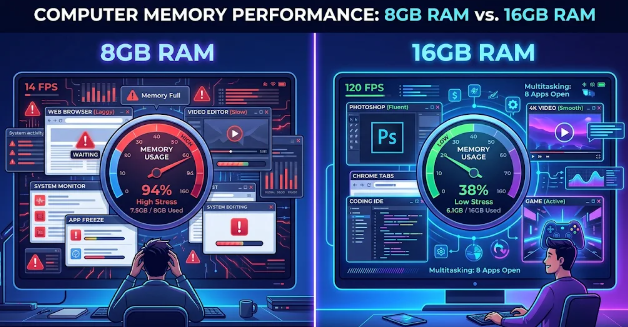
- 8GB of RAM works well for basic browsing, light office work, and video streaming.
- 16GB of RAM is becoming the standard for modern gaming, video editing, and heavy multitasking.
- Upgrading your RAM prevents system slowdowns and extends your computer’s lifespan.
- Checking your task manager helps you decide if your current setup limits performance.
Introduction
Many computer buyers ask themselves a fundamental question when choosing a new PC or laptop: Is 8GB RAM enough or should you upgrade to 16GB? As software evolves and operating systems consume more resources, memory capacity directly impacts your daily computing experience. Therefore, choosing the right amount of memory determines how fast your machine runs.
In this guide, we will analyze your memory needs based on your daily workflow, gaming habits, and future hardware goals. Consequently, you will easily decide whether your current setup suffices or if an upgrade makes financial sense.
Understanding the Role of RAM in Your PC
Random Access Memory, or RAM, acts as your computer’s short-term memory bank. When you open applications, your system stores active data in RAM for quick access. Consequently, having enough memory allows your processor to retrieve information instantly without relying on slower storage drives.
However, when your memory fills up completely, your computer uses virtual memory on your solid-state drive or hard drive. Because storage drives are significantly slower than actual RAM chips, your system experiences lag, stuttering, and dropped frames. Therefore, maintaining adequate memory headroom remains crucial for system responsiveness.
Is 8GB RAM Enough for Basic Work and Web Browsing?
For standard daily activities, 8GB of memory still offers adequate performance. If your typical routine involves web browsing with a few open tabs, streaming high-definition video, and editing word documents, an 8GB system handles these jobs efficiently.
Furthermore, casual users who primarily write emails, perform light photo edits, and attend video calls will rarely encounter bottlenecks. However, modern web browsers like Google Chrome devour significant amounts of memory. If you habitually open dozens of tabs alongside chat apps and music streams, you might notice subtle delays.
Is 8GB RAM Enough or Should You Upgrade to 16GB for Gaming?
If you enjoy modern video games, the debate becomes much clearer. Today’s top titles frequently list 16GB of RAM as a recommended system requirement. While some lighter games run fine on 8GB, newer games suffer from micro-stuttering and longer load times when memory stays maxed out.
Furthermore, background applications like Discord, Spotify, and browser windows continue running while you play games. Consequently, having 16GB gives your computer the extra cushion it needs to run games smoothly alongside background applications without throttling performance.
Content Creation and Power Multitasking
Creative professionals and heavy multitaskers gain immediate benefits from 16GB of memory. Video editing software like Adobe Premiere Pro and DaVinci Resolve requires substantial memory buffer space to preview high-resolution timeline video files without dropping frames.
Similarly, graphic designers working with multi-layered Photoshop projects, vector illustrations, and 3D modeling programs will quickly exhaust an 8GB memory limit. Therefore, upgrading to 16GB drastically speeds up rendering times and smooths out project workflow transitions.
How to Determine If You Need a Memory Upgrade
Before buying new hardware, you can easily check your current memory consumption. On Windows, press Ctrl + Shift + Esc to open the Task Manager and select the Performance tab. On a Mac, open Activity Monitor and click the Memory tab.
If your memory graph constantly stays above 80% usage during your regular workflow, your computer is clearly bottlenecked. Ultimately, asking if Is 8GB RAM enough or should you upgrade to 16GB depends entirely on your workload, but 16GB provides ideal future-proofing for most users today. For detailed system compatibility guidelines, visit Crucial Technology for memory upgrade tools.
References
Crucial Memory Advisory Guides: https://www.crucial.com
Microsoft Windows System Requirements: https://www.microsoft.com