Summary of Key Points
- Budget laptops use smaller Watt-hour (Wh) capacity batteries to cut production costs.
- Dedicated graphics cards and powerful processors draw high power constantly.
- High refresh rate displays consume significantly more energy than standard screens.
- Aggressive cooling fans require additional power to dissipate heat.
- Aggressive power-saving settings and display tweaks can help extend battery runtime.
Understanding Why Do Budget Gaming Laptops Have Short Battery Life
Many gamers wonder: why do budget gaming laptops have short battery life? When you purchase an affordable gaming machine, you expect high frame rates at a reasonable price. However, manufacturers must cut costs somewhere to keep prices low. Consequently, battery performance usually takes the biggest hit in entry-level machines.
Smaller Battery Capacity to Cut Costs
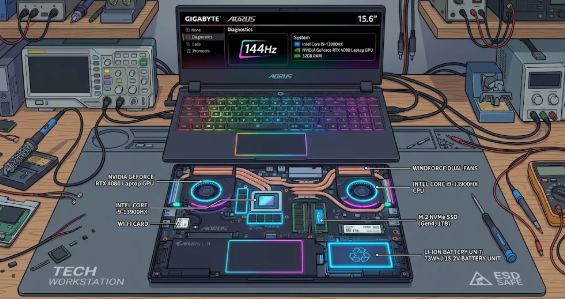
Manufacturers prioritize raw computing performance over battery size in affordable gaming machines. Batteries represent one of the most expensive individual components inside a laptop. Therefore, companies frequently install smaller 45Wh to 50Wh batteries in budget models instead of the 80Wh or 99Wh batteries found in premium units.
Furthermore, smaller batteries save physical space and reduce total manufacturing costs. This trade-off allows manufacturers to include better graphics hardware while keeping the retail price low. As a result, your laptop drains its power reserve much faster during routine use.
High-Power Components Demand Constant Energy
Gaming requires immense processing power compared to web browsing or document editing. Budget gaming laptops pack dedicated Graphics Processing Units (GPUs) alongside high-wattage Central Processing Units (CPUs). These hardware components require continuous, high-voltage electricity to deliver smooth gameplay.
Even during basic desktop tasks, dedicated GPUs often stay active in the background. In addition, budget models sometimes lack advanced display-switching technology like NVIDIA Advanced Optimus. Consequently, the powerful graphics card continuously draws power even when you only need integrated graphics.
High Refresh Rate Displays Drain Power Fast
Modern gaming laptops feature displays with 120Hz or 144Hz refresh rates. These screens render images twice as fast as standard 60Hz office laptop screens. While high refresh rates make gaming feel remarkably smooth, they demand continuous power from the system.
Moreover, entry-level gaming panels usually lack energy-efficient display technologies. The screen backlight operates continuously at high power to maintain brightness and motion clarity. Therefore, the display alone accounts for a major portion of total power draw.
Aggressive Cooling Fans Consume Extra Electricity
Gaming hardware generates substantial thermal energy during operation. To prevent overheating, laptop manufacturers install high-RPM cooling fans and thick copper heat pipes. However, spinning multiple cooling fans at high speeds requires significant electrical energy.
Budget thermal designs often rely on faster fan speeds because they use smaller heat sinks. As these fans work overtime to lower temperatures, they steadily pull energy directly from the battery reserves. Thus, thermal management actively shortens overall battery endurance.
Practical Tips to Improve Your Battery Life
Although budget models feature physical hardware limitations, you can extend your operational time. First, lower your display refresh rate to 60Hz when you work away from an outlet. Second, enable Windows Power Saver mode to restrict background CPU power consumption.
Additionally, force your system to use integrated graphics for non-gaming applications through your GPU control panel. Lowering display brightness by just twenty percent also saves noticeable power over time. Finally, close unnecessary software running in the background to reduce CPU workload.
If you want to dive deeper into hardware optimization, explore detailed performance guides on Tom’s Hardware for advanced tweaks.
References
Tom’s Hardware. (2023). Laptop Battery Life Testing and Optimization Guidelines.
PC Gamer. (2023). How Gaming Laptop Power Delivery Works.